
The Best Whiteboard Software in 2026: 8 Tools Compared

Key facts8 tools compared: Miro, FigJam, Excalidraw, Mural, Lucidspark, Microsoft Whiteboard, Eraser…
- 8 tools compared: Miro, FigJam, Excalidraw, Mural, Lucidspark, Microsoft Whiteboard, Eraser, tldraw
- Miro (best for: Cross-functional teams at scale): Free; paid from $8/member/mo
- FigJam (best for: Design teams already in Figma): Free; paid from $3/mo (Collab seat)
- Excalidraw (best for: Quick technical sketches): Free (open source); Plus $6/mo
- Mural (best for: Facilitated workshops): Free; paid from $9.99/member/mo
Most whiteboard tools look identical in a screenshot: an infinite canvas, some sticky notes, a few cursors floating around. Then you run a real workshop with 15 people, half of them on flaky hotel wifi, and the differences show up fast. One tool lags. One has a template that saves you 20 minutes. One charges you per guest and blows the budget.
I compared documentation, pricing, and public reviews for brainstorms, retros, and messy architecture sessions across the eight tools below. Some have been widely used for years. A few are newer, picked up specifically to see if the hype holds. The category has changed since the last time most people shopped for it: AI now clusters sticky notes, summarizes a board into action items, and turns a rough sketch into a diagram. That's real, not marketing, and it shifts which tool is worth paying for.
If you want the short version: Miro is still the one I recommend to most teams, because it does the most things well and scales from a two-person sketch to a 200-person workshop. If you live in Figma, FigJam is the obvious and cheaper pick. If you just want to draw a diagram and share a link without an account, Excalidraw wins and it's free. Here's the full breakdown.
Quick comparison
| Tool | Best for | Price | Standout |
|---|---|---|---|
| Miro | Cross-functional teams at scale | Free; paid from $8/member/mo | Biggest template + integration library |
| FigJam | Design teams already in Figma | Free; paid from $3/mo (Collab seat) | Native Figma handoff |
| Excalidraw | Quick technical sketches | Free (open source); Plus $6/mo | No account needed, hand-drawn style |
| Mural | Facilitated workshops | Free; paid from $9.99/member/mo | Facilitation superpowers |
| Lucidspark | Diagram-heavy planning | Free; paid from $7.95/mo | Pairs with Lucidchart |
| Microsoft Whiteboard | Microsoft 365 shops | Free with M365 | Built into Teams |
| Eraser | Engineering teams | Free; paid from $15/member/mo | Diagram-as-code + AI |
| tldraw | Developers building canvas apps | Free web app; SDK licensed | Open-source canvas SDK |

Miro: the default for a reason

Miro is the tool I open without thinking. It's the closest thing the category has to a standard, and after using it across three companies I understand why. The canvas is fast even with hundreds of objects, the template gallery is enormous, and it connects to almost everything: Jira, Asana, Slack, Google Workspace, Azure DevOps.
The default for cross-functional teams and workshops bigger than a single squad, with a fast canvas and deep integrations. The AI credit system gets annoying quickly, and the jump to Business at $20 is steep for small teams.
The free plan gives you three editable boards and 10 AI credits per month for the whole team, which is enough to test it but not to live in. Paid Starter is $8 per member per month billed annually ($10 monthly) for unlimited boards and 25 AI credits each. Business jumps to $20 per member per month annually and adds SSO, the Jira and Asana integrations, and AI Workflows. Enterprise is custom with a 30-member minimum.
The standout: Miro AI. It clusters sticky notes into themes, summarizes a chaotic board into a clean list, and generates diagrams from a prompt. In a retro with 40 stickies, the auto-clustering saved me a real chunk of facilitation time, and the result was about 80% right out of the box.
The catch: the AI credit system gets annoying fast. Twenty-five credits a month on Starter sounds fine until you're using AI in every session, and then you're rationing. The jump to Business at $20 is steep if all you wanted was diagramming integrations. For a two-person team, that's overkill.
FigJam: the easy call if you're already in Figma
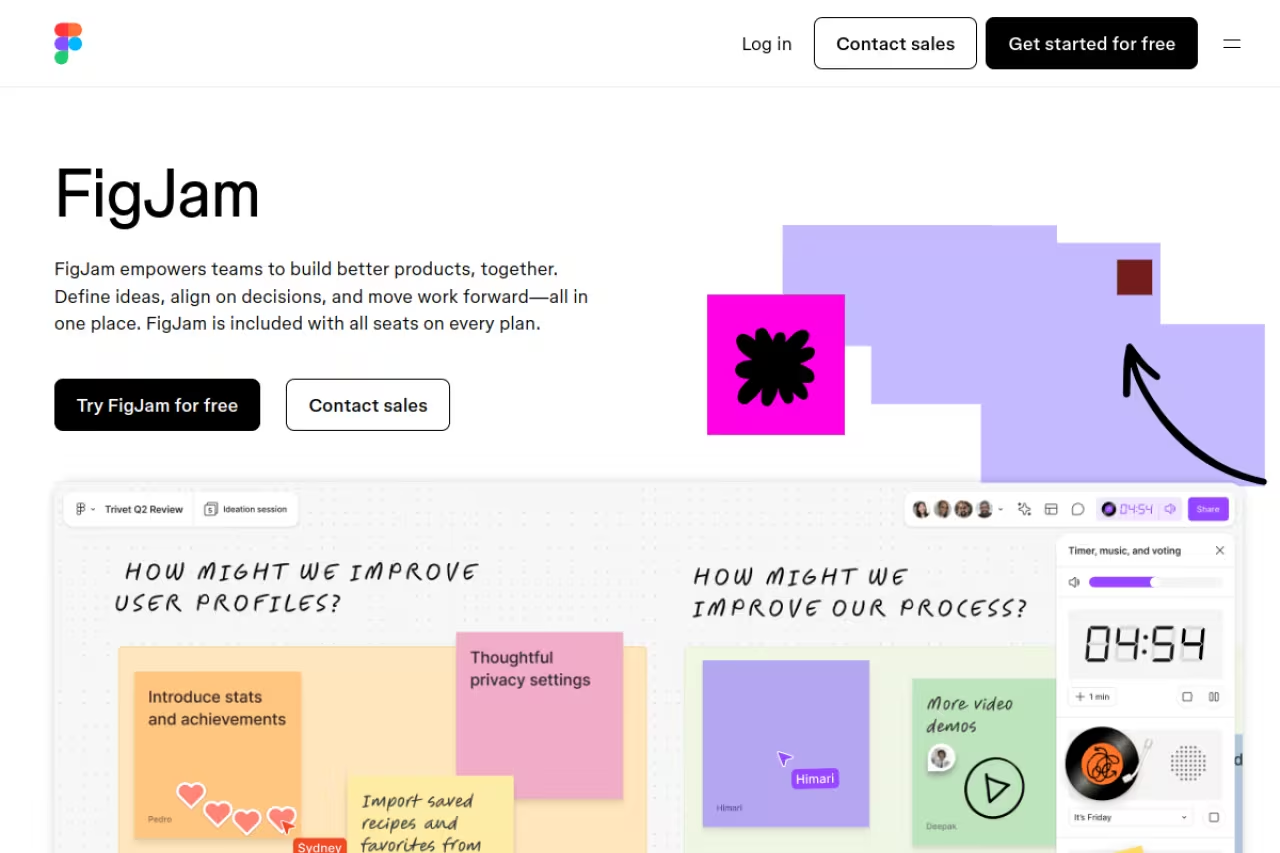
FigJam is Figma's whiteboard, and its whole pitch is that you don't leave the design tool you already pay for. Sticky notes, stamps, cursor chat, and a playful feel that makes meetings less stiff. If your design files and your brainstorm live in the same place, the handoff is genuinely smooth.
The easy call for product and design teams already in Figma, keeping ideation next to design work. Outside that ecosystem the value drops, seat-type pricing is confusing, and large facilitated workshops are not its strength.
This is where it gets confusing. FigJam is bundled into Figma's plans rather than sold standalone. The free tier covers basic use. On the Professional plan, a Collab seat is $3 per month and a full seat is $16. On Organization it's $5 for a Collab seat and $55 for a full seat, billed annually. For people who only whiteboard, the cheap Collab seat is a nice deal.
The standout: the AI features feel built for meetings rather than bolted on. It sorts stickies into themes, summarizes output into action items, and can generate a meeting template from a prompt. It also generates diagrams that map what an AI agent is building from your plans and codebase, which is a sign of where Figma is steering this.
Where it falls short: outside the Figma ecosystem, the value drops. The seat-type pricing is hard to reason about if you're not already an admin juggling Figma billing, and large facilitated workshops aren't really its strength. It's a brainstorming tool, not a workshop platform.

Excalidraw: free, fast, and refreshingly simple
Excalidraw is the one I reach for when I just need to draw a thing and send a link. It's open source, the hand-drawn aesthetic makes diagrams feel approachable instead of corporate, and you can start drawing in two seconds with no account and no signup wall.
Open, free and fast for developers who just need a quick technical sketch to share, with no account needed. It is deliberately minimal, with no voting or governance, so it is wrong for structured 20-person workshops.
the core tool is free forever and open source, which is the whole point. Excalidraw Plus adds cloud storage, folders, access management, and extended AI for $6 per user per month annually ($7 monthly). For most solo use, you never need to pay.
The standout: speed and zero friction. There's no onboarding, no template gallery to wade through, no AI nagging you. You open it, you draw, you export or share. The end-to-end encryption on shared rooms is a nice touch for anyone sketching something they'd rather not have stored on a vendor's server.
The catch: it's deliberately minimal. No deep facilitation tools, no voting, no enterprise governance, a thin template library. If you're running a structured 20-person workshop, this is the wrong tool. For a quick architecture sketch, nothing beats it.
If you're building out a wider stack of AI-assisted tools, our roundup of the best AI productivity tools pairs well with a lightweight whiteboard like this one.

Mural: built for people who run workshops
Mural is Miro's closest competitor, and the gap between them is mostly about philosophy. Mural is facilitation-first. If your job involves running structured sessions, design sprints, or regulated-industry workshops, Mural's facilitation tools are noticeably ahead.
The facilitator's pick for design sprints and structured sessions, with private mode, timers and voting that feel built by people who run workshops. It is less of a general canvas than Miro, so non-facilitators pay for unused strengths.
the free plan caps you at three editable murals at a time. Team+ is $9.99 per member per month billed annually ($12 monthly) for unlimited murals and Mural AI. Business is $17.99 annually and adds SSO plus unlimited guests, which matters a lot if you run client workshops.
The standout: facilitation features. Private mode so people add ideas without groupthink, a summon button to pull everyone to your part of the canvas, timers, and voting that feel designed by someone who has actually run a workshop and been frustrated by the alternatives.
Where it falls short: it's less of a general-purpose canvas than Miro. The integration library is smaller, and the interface can feel busier. If you're not running facilitated sessions, you're paying for strengths you won't use.

Lucidspark: the planning whiteboard with a diagramming sibling
Lucidspark is the brainstorming half of the Lucid suite, and its pitch is the link to Lucidchart. You ideate freely on Lucidspark, then convert the mess into a structured Lucidchart diagram. For teams that already do formal diagramming, that pipeline is the selling point.
Worth it for teams that brainstorm loosely but must end with polished flowcharts or process maps, thanks to the Lucidchart handoff. On its own it is fine but not special, and the pairing means another subscription.
there's a free plan, an Individual plan at $7.95 per month, and a Team plan at $9 per user per month. Enterprise is custom with SSO and admin controls. The numbers sit right in the middle of the pack.
The standout: assisted grouping (their AI clustering) and the Lucidchart handoff. If you live in both tools, moving from a sticky-note dump to a clean diagram is the smoothest in this list.
The catch: on its own, Lucidspark is fine but not special. Its real value shows up only when paired with Lucidchart, which means another subscription. As a standalone whiteboard, Miro and Mural simply do more.
Microsoft Whiteboard: free if you're already paying Microsoft
Microsoft Whiteboard is the one nobody chooses and everybody ends up using, because it's sitting right there inside Teams. If your company runs on Microsoft 365, it's free, it saves boards to OneDrive, and it shows up automatically in your meetings.
A convenience whiteboard for Microsoft 365 shops that want no-cost boards inside Teams calls with zero procurement friction. It is the most basic option here, so it is no reason to switch ecosystems.
included with Microsoft 365. No extra cost if you already have the licenses, which most enterprises do.
The standout: the Teams integration and the price. Boards from a meeting are saved and accessible afterward, and a 2026 refresh cleaned up the controls and added AI-powered features. Zero procurement friction is a real advantage in a big org.
Where it falls short: it's the most basic option here. Thin template library, limited integrations outside Microsoft, and it has historically lagged on collaboration polish. It's a convenience tool, not a reason to switch ecosystems.

Eraser: the whiteboard engineers actually like
Eraser is built for technical teams. It blends a whiteboard with diagram-as-code, markdown docs, and AI that turns prompts or code into live architecture diagrams. If your "brainstorm" is really a system design session, this is the tool that speaks your language.
The whiteboard engineers actually like, mixing diagram-as-code and AI that turns prompts into architecture diagrams. It is narrow on purpose, so marketing brainstorms look elsewhere, and AI credit limits on lower tiers bite.
the free plan covers 5 files and 20 AI diagrams to start. Starter is $15 per member per month billed annually ($20 monthly) with unlimited files and AI. Business is $45 annually with 250 monthly AI credits and team controls.
The standout: diagram-as-code plus the AI generator. You describe a system in text and Eraser renders the diagram, and because diagrams are code, they version like code. For engineers who hate dragging boxes around, that's a genuinely different workflow.
The catch: it's narrow on purpose. This is not where marketing runs a brainstorm. The AI credit limits on lower tiers bite if you generate diagrams constantly, and the price climbs quickly to Business. Outside engineering, you won't use most of it.

tldraw: for builders, not just users
tldraw is a bit different from everything above. It's a free web whiteboard, yes, but its real identity is an open-source, MIT-licensed canvas SDK that developers embed in their own apps. If you want to build a canvas product rather than just use one, this is the foundation a lot of teams start from.
Developers building canvas features into their own software should start here, with an open-source SDK that handles multiplayer sync and shape management. As a plain whiteboard it is bare, and the license restricts some commercial use.
the web app at tldraw.com is free with no account. The SDK is open source, though the current license is source-available and restricts some commercial use without a paid agreement, so read the terms before you ship.
The standout: the SDK. It handles the hard parts of real-time drawing, multiplayer sync, and shape management, with around 44,000 GitHub stars behind it. There's also an AI module that turns sketches into working websites, which is a fun demo of where this is heading.
Where it falls short: as a plain whiteboard for a non-technical team, it's bare. The value is for builders. If you just need a board for next Tuesday's retro, look elsewhere.
How to choose
Forget the feature checklists for a second and answer three questions.
Where does your team already live? If you're a Figma shop, FigJam is the cheap, obvious answer. If you run on Microsoft 365, Microsoft Whiteboard is free and already installed. Picking the tool that's adjacent to your existing stack removes the biggest source of friction: getting people to actually open it.
What are you really doing on the board? If it's loose ideation across many teams, Miro is the safe default. If it's facilitated workshops, pay for Mural. If it's system design, Eraser. If it's a quick sketch to drop in a doc, Excalidraw and you're done in a minute.
How much will guests and AI cost you? This is where budgets blow up. Per-guest charges matter if you run client workshops (Mural's Business tier and Miro both handle this, but check the seat math). AI credit caps matter if AI is central to how you work, because the cheap tiers ration hard. Map your actual monthly AI usage before you commit, not the marketing number.
My honest take: most teams overthink this. Start with Miro's free plan or whatever's already bundled with your stack, run two real sessions, and only upgrade when you hit a wall you can name. The best whiteboard is the one your team opens without being asked.
If you want a steady feed of tools like these, Dupple X tracks what's actually worth your time so you don't have to test eight tools yourself. You can also browse our top tools directory for more.
FAQ
What is the best whiteboard software in 2026?
For most teams, Miro is the best all-around choice because it balances a fast canvas, the biggest template and integration library, and solid AI. If you're already in Figma, FigJam is a cheaper fit, and for quick technical sketches, free and open-source Excalidraw is hard to beat.
Is there a free whiteboard tool that's actually good?
Yes. Excalidraw is fully free and open source with no account required, which makes it the best free option for quick diagrams. Miro, Mural, FigJam, and Lucidspark all have free tiers too, though they cap how many active boards you can have, usually around three.
What's the difference between Miro and Mural?
Both are infinite-canvas whiteboards, but Miro is the more general-purpose tool with a larger integration ecosystem, while Mural is facilitation-first. If you run structured workshops, design sprints, or sessions in regulated industries, Mural's facilitation features (private mode, summon, timers) are stronger. For everyday cross-team work, Miro does more.
Do whiteboard tools have AI features now?
Most do. Miro AI clusters sticky notes and summarizes boards, FigJam sorts stickies into themes and writes action items, and Eraser turns text prompts into architecture diagrams. The catch is that lower-priced plans usually cap AI usage with monthly credits, so heavy AI users should check the limits before subscribing.
Which whiteboard is best for engineering teams?
Eraser is purpose-built for engineers, with diagram-as-code, markdown docs, and AI that generates architecture diagrams from prompts or code. Excalidraw is a great lightweight alternative for quick system sketches, and tldraw is the pick if you want to build canvas features into your own product rather than just use a board.
How much does whiteboard software cost?
Paid plans generally run $8 to $20 per member per month. Miro and Excalidraw Plus start around $6 to $8, Mural and Lucidspark sit near $8 to $10, and engineering-focused Eraser starts at $15. Microsoft Whiteboard is free if you already have Microsoft 365, and Excalidraw's core tool is free forever.
Related guides
Some offers on this page may be paid placements or contain affiliate links.
