
The 8 Best Task Management Apps in 2026 (Compared and Ranked)

Key facts8 tools compared: Todoist, TickTick, Things 3, Asana, Notion, Trello, ClickUp, Sunsama
- 8 tools compared: Todoist, TickTick, Things 3, Asana, Notion, Trello, ClickUp, Sunsama
- Todoist (best for: Solo pros who want simple that scales): Free / $5 mo (Pro)
- TickTick (best for: Feature density on a budget): Free / $35.99 yr
- Things 3 (best for: Apple minimalists): $9.99-$49.99 once
- Asana (best for: Cross-functional teams): Free / $10.99 user/mo
Most task apps fail in the same boring way. You sign up during a productivity binge, dump 40 tasks into an inbox, and three weeks later it's a graveyard you avoid opening. The app wasn't broken. It just didn't fit how your brain actually plans work.
We compared eight of these tools against the actual daily grind they're built for: capturing a thought on the go, triaging a Monday backlog, sharing a project with two other people who half-pay-attention. Based on their documentation and public user reviews, the gap between "looks great in a screenshot" and "still gets used on day 12" is enormous.
If you want the short answer: Todoist is the safest pick for most people, and it's where I'd point a friend who just wants something that works. But the right app depends heavily on whether you're flying solo or running a team, whether you live in Apple's world, and how much you care about price. Here's the full breakdown for anyone who follows AI and wants their tools to keep up.
Quick comparison
| Tool | Best for | Price | Standout |
|---|---|---|---|
| Todoist | Solo pros who want simple that scales | Free / $5 mo (Pro) | Natural-language capture + AI assist |
| TickTick | Feature density on a budget | Free / $35.99 yr | Pomodoro, habits, calendar in one |
| Things 3 | Apple minimalists | $9.99-$49.99 once | Best-designed task app, period |
| Asana | Cross-functional teams | Free / $10.99 user/mo | Workflows and reporting at scale |
| Notion | System builders | Free / $10 user/mo | Tasks live next to your docs |
| Trello | Visual, board-first thinkers | Free / $5 user/mo | Kanban that anyone gets in 30 sec |
| ClickUp | Teams that want everything | Free / $7 user/mo | Deepest feature set per dollar |
| Sunsama | Calendar-driven daily planners | $20/mo | Time-boxing across all your tools |

Todoist: the default everyone should try first
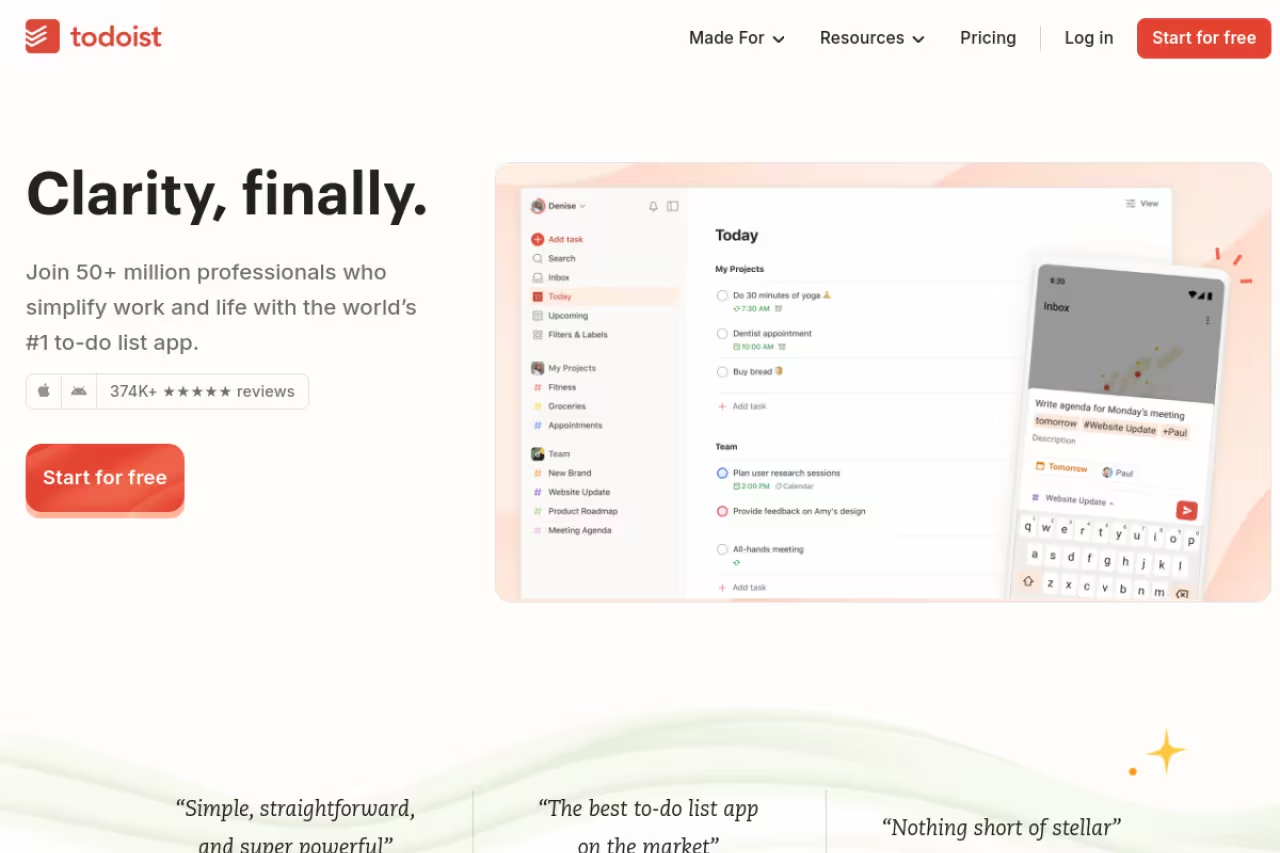
Todoist is what I recommend when someone has no idea where to start, because it gets out of your way. Type "Email Sarah the deck tomorrow at 9am p1" and it parses the date, time, and priority automatically. That natural-language input sounds like a gimmick until you've used it for a month and realize you've stopped thinking about the app at all.
Who it's best for: solo professionals and small teams who want a clean list app that won't collapse under 300 projects.
The free plan covers 5 personal projects and up to 5 collaborators per project, which is genuinely enough for a lot of people. Pro runs $5/month billed annually ($60/year) after the December 2025 price hike, and unlocks calendar layout, reminders, 150 filter views, and the newer AI features: Task Assist for breaking down big tasks and Ramble for voice-to-task capture.
The standout is restraint. Where competitors bolt on habit trackers and timers, Todoist stays a to-do list and does it cleanly across every platform that exists.
The catch: that December 2025 price increase stung. Pro jumped 25% on the annual plan, and the AI features, while useful, aren't as deep as the marketing implies. If you want a built-in calendar or Pomodoro timer, you'll be paying more for less than TickTick gives you.
The easiest recommendation for solo professionals and small teams who want a clean list app, with natural-language input that parses dates and priorities. The 25% Pro price hike stung, and the AI features are less deep than the marketing implies.

TickTick: the most app for the least money
TickTick is the value king, and it's not close. For $35.99/year it bundles a Pomodoro timer, a habit tracker, an Eisenhower Matrix view, and a full calendar, all of which Todoist either charges more for or doesn't offer. I kept finding features I didn't know were there.
Who it's best for: people who want one app to handle tasks, focus sessions, and habits without juggling three subscriptions.
The free tier is unusually capable. You get list and calendar views, basic reminders, and habit tracking before you pay anything. Premium at $35.99/year (or $2.99/month) lifts the limits on lists, adds the calendar view, custom filters, and the Eisenhower Matrix for prioritizing.
The standout is the all-in-one design. If you follow GTD or run Pomodoro sessions, having the timer attached to the actual task you're working on removes a whole layer of friction.
Where it falls short: with so much packed in, the interface feels busier than Todoist or Things. It also has fewer integrations (around 30 versus Todoist's 80+), so if your workflow depends on connecting a dozen other apps, you may hit walls.
The value pick for people who want tasks, focus sessions and habits in one app, with a Pomodoro timer, habit tracker and calendar for $35.99/year. The interface is busier than Todoist and it has fewer integrations, around 30 versus Todoist's 80+.

Things 3: the one Apple users keep coming back to
Things 3 is the most beautifully built task app I've ever used, and I say that as someone who finds "beautiful software" a tired phrase. Every interaction has weight and polish. Its Today, Upcoming, and Areas structure maps to how I naturally think about commitments, and the keyboard shortcuts on Mac are fast enough that I stopped reaching for the mouse.
Who it's best for: Apple-only users who value design and a calm interface, and who plan their own work rather than coordinate a team.
Pick Things 3 if you are Apple-only, value a calm and polished interface, and plan your own work rather than coordinate a team. It is a one-time purchase with no subscription, but there is no web, Windows, Android or collaboration.
Pricing is refreshingly old-school: a one-time purchase per platform at $9.99 for iPhone, $19.99 for iPad, and $49.99 for Mac. Buy it once, own it forever, no subscription. If you go all-in across devices you're looking at roughly $80 total, which pays for itself against a $60/year subscription in about 15 months.
The standout is that there's nothing to manage. No upsells, no AI panel begging for attention, no team-sharing nags. Just your tasks, arranged elegantly.
The catch is real and a dealbreaker for some: Apple only. No web app, no Windows, no Android, and no collaboration features whatsoever. If you switch to a Windows laptop for work or need to share a list with anyone, Things is off the table.

Asana: when the work involves other people
Asana is where I'd take a team that has outgrown shared spreadsheets. It's built around projects that pass between people, with timelines, dependencies, and reporting that scale to genuinely large groups. For coordinating who does what by when across a marketing or product team, it's hard to beat.
Who it's best for: cross-functional teams of 5 to 500 that need visibility into work across departments.
The free Personal plan handles small teams. Paid plans start at $10.99/user/month billed annually (Starter) with a 2-user minimum, and Advanced at $24.99/user/month adds workload management, goals, and advanced reporting.
The standout is its rules and workflow automation, which quietly handle the busywork of moving tasks through stages and notifying the right people.
Where it falls short: it's overkill for solo use, and the pricing climbs fast once you scale past a handful of seats. The interface can also feel heavy if all you want is a personal to-do list, which is exactly why it sits below the solo tools here.
The right move for cross-functional teams of 5 to 500 that need visibility into work across departments, with strong timelines, dependencies and automation. It is overkill for solo use, and pricing climbs fast past a handful of seats.
Notion: tasks inside your second brain
Notion isn't a task manager by default, it's a workspace you shape into one. The payoff is that your tasks live right next to your notes, docs, and wikis, so there's no context-switching between "where I plan" and "where I think." You can build a personal dashboard where your reading list, project notes, and task board share one page.
Who it's best for: system builders who want tasks, docs, and databases under one roof and enjoy customizing.
The free plan is generous for individuals with unlimited pages. Plus is $10/member/month annually, and Business at $18 now bundles Notion AI, which used to be a separate $8/member add-on.
The standout is flexibility. With databases, filtered views, and templates, you can build a task system that matches your exact process instead of bending to someone else's.
The catch: that flexibility is also the tax. Notion makes you build your own system, which means setup time and a tendency to fiddle endlessly. For pure task management, a dedicated app like Todoist is faster out of the box.
A good home for system builders who want tasks, docs and databases under one roof and enjoy customizing. The flexibility is also the tax: setup takes time, and a dedicated app like Todoist is faster for pure task management.

Trello: the board everyone understands instantly
Trello is the easiest tool here to onboard a non-technical teammate onto. It's Kanban in its purest form: columns, cards, drag and drop. I've handed Trello to people who hate project software and watched them get it in under a minute.
Who it's best for: visual thinkers and small teams who manage work as it moves through stages.
The free plan is permanent with unlimited users and 10 boards per workspace. Standard is $5/user/month annually and Premium at $10 adds calendar, timeline, and dashboard views.
The standout is its low ceiling-to-entry ratio. Almost no learning curve, and Power-Ups let you bolt on extra capability when you need it.
Where it falls short: boards get unwieldy once a project has more than a few dozen cards, and Trello lacks the reporting and dependency tracking that Asana or ClickUp offer. It's a great front door, not a full house.
The easiest board to roll out to visual thinkers and small teams, with almost no learning curve and a permanent free plan. Boards get unwieldy past a few dozen cards, and it lacks the reporting and dependency tracking of Asana or ClickUp.

ClickUp: the everything app for teams
ClickUp wants to replace your whole stack: tasks, docs, goals, whiteboards, time tracking. For teams that want depth and are willing to spend time configuring, it delivers more raw feature surface per dollar than anything else here.
Who it's best for: teams that want a single tool for project management and are comfortable with a steeper setup.
The Free Forever plan supports unlimited users and tasks, which is unusually generous. Unlimited is $7/user/month annually and Business is $12. Note that ClickUp Brain, the AI layer, is a separate $9/user/month add-on, so the all-in cost is higher than the headline.
The standout is customization. Custom statuses, multiple views per project, and automations let a team mold ClickUp to almost any workflow.
The catch: it can feel overwhelming. The sheer number of features means new users often get lost, and performance has historically lagged when workspaces grow large. It's powerful, but it asks for patience.
Go with ClickUp if your team wants one tool for projects, docs and goals and is comfortable with a steeper setup. It offers a lot of features per dollar, but it can overwhelm new users, and the AI layer is a separate $9/user/month add-on.

Sunsama: planning your day, not just listing it
Sunsama is different in kind. Instead of an endless backlog, it walks you through a daily ritual: pull in tasks from Todoist, Asana, your calendar, and email, then time-box each one into your actual day. It forces a realistic plan instead of an aspirational list.
Who it's best for: knowledge workers who feel busy but scattered and want a calmer, intentional daily planning habit.
There's a single plan at $20/month billed annually (or $25 monthly), with a 14-day trial that doesn't ask for a card up front. No free tier, no team plans, just one product for individuals.
The standout is the planning workflow itself. The guided daily and weekly reviews changed how I decide what to actually work on, not just what exists on a list.
Where it falls short: the price. At $20/month it's the most expensive option here for a single user, and it assumes you already have a task app feeding it. It's a layer on top of your stack, not a replacement for it.
A strong daily planning ritual for knowledge workers who feel busy but scattered, time-boxing tasks pulled in from other apps. At $20/month it is the priciest single-user option here, and it assumes a task app already feeds it.
How to choose the one that sticks
Skip the feature checklists. Pick based on two questions.
First, solo or team? If you mostly manage your own work, look at Todoist, TickTick, or Things 3. If you coordinate other people, jump to Asana, ClickUp, or Trello. Trying to force a personal app onto a team (or vice versa) is the most common reason these tools get abandoned.
Second, what's your constraint? If it's budget, TickTick gives you the most per dollar and Trello's free tier is hard to beat for teams. If it's the Apple ecosystem and you hate subscriptions, Things 3. If you want tasks living beside your notes, Notion. If your real problem is deciding what to do today rather than tracking what exists, Sunsama.
One honest warning: the best app is the one you'll open tomorrow. A perfect system you dread is worse than a simple list you actually check. Start with the free tier of your top pick, use it for two real weeks, and only then decide if it's worth paying for.
If you want to go deeper on the AI tools reshaping how professionals work, Dupple X breaks down the highest-use ones every week, and our running top tools list tracks what's actually worth your time. You might also like our guides to the best AI agents and the best AI productivity tools if you're rebuilding your workflow this year.
Want a weekly filter on which of these tools are actually worth switching to? Try Dupple X free for a year and skip the trial-and-error.
FAQ
What is the best task management app overall in 2026?
For most people, Todoist is the best all-around pick. It balances a clean interface, fast natural-language task entry, and AI features like Task Assist, and it works on every platform. TickTick is the better value if you want a Pomodoro timer and habit tracking bundled in, and Things 3 wins on design for Apple-only users.
What is the best free task management app?
TickTick and Todoist both have strong free tiers for individuals, while Trello and ClickUp offer the most generous free plans for teams (both support unlimited users). Notion's free plan is excellent if you want tasks alongside notes and docs. Start free with any of these before paying.
Is Todoist or TickTick better?
It depends on what you value. Todoist has a cleaner interface, better natural-language input, and far more integrations (80+ versus about 30). TickTick costs less at $35.99/year versus Todoist's $60/year and includes a Pomodoro timer, habit tracker, and calendar that Todoist either charges extra for or doesn't have. Choose Todoist for simplicity, TickTick for features per dollar.
What is the best task management app for teams?
Asana is the strongest pick for cross-functional teams that need timelines, dependencies, and reporting. ClickUp offers more features per dollar if you're willing to configure it, and Trello is the easiest for small teams that think in boards. All three have free tiers, so you can test them before committing budget.
Are one-time purchase task apps worth it over subscriptions?
If you're an Apple-only user, Things 3's one-time purchase (roughly $80 across all devices) pays for itself against a $60/year subscription in about 15 months and you own it forever. The tradeoff is no cross-platform support and no collaboration. For most people who switch devices or work in teams, a subscription with web access and sync is the safer bet.
Related guides
Some offers on this page may be paid placements or contain affiliate links.
Across our whole catalogue the median is $24 a month and 33% of tools advertise a free tier. Figures are the lowest recurring monthly price quoted in our own review of each tool, read on 2026-08-19. Full method and every category.
