What Appy AI Actually Is
Appy AI is a team of specialist AI agents that live inside Slack and Microsoft Teams and take on real business work. Instead of opening yet another chat window, you message a virtual Director of AI named Violet, tell her what you need in plain English, and she coordinates a roster of task specific coworkers to get it done. The framing is less "assistant" and more "workforce": persistent agents with names, roles, and their own areas of responsibility.
The core interaction is deliberately low friction. You tag the app in a channel or a direct message, describe the outcome you want, and Violet replies with a plan that names which specialists will handle each part. Those agents do the work, hand results back to Violet, and she delivers them along with a suggestion for what to do next. There are no prompt templates to memorize and no separate console to babysit, which is the entire point of building the product where teams already talk.
Try Appy AI Get started →Violet and the Delegation Model
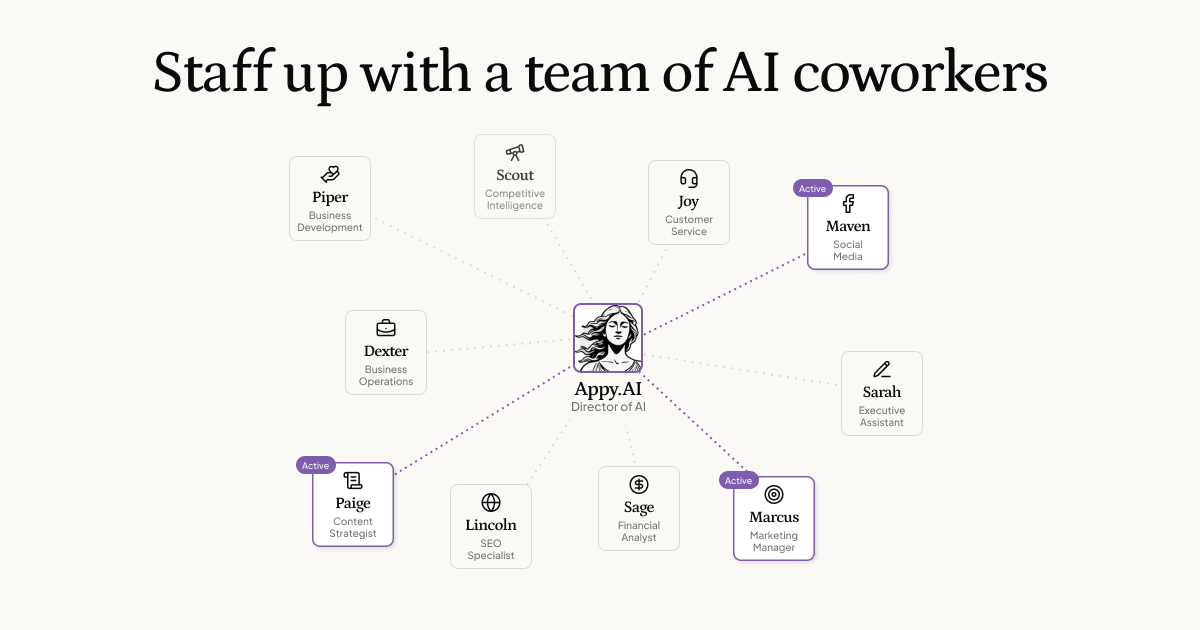
The feature that sets Appy AI apart is its orchestration layer. Rather than dumping every request onto one generalist model, Violet acts as a router. She reads a request, decides which specialist (or combination of specialists) is the right fit, drafts a visible plan before any work starts, and then coordinates the hand offs between agents. That transparency matters in practice. You can see that a competitive research task went to Scout and a cash flow question went to Sage, instead of trusting an anonymous black box to have picked the right approach on its own.
This division of labor is what makes the "team" language more than a slogan. Each agent is scoped to a single domain, so its output tends to be tighter than a single all purpose bot trying to be a bookkeeper one minute and a copywriter the next. Violet also closes the loop by returning finished assets and proposing the next step, which turns a one off answer into something closer to an ongoing working relationship. For a small company that has no operations lead to triage incoming requests, that routing and planning layer is the piece that does the most work, and it is the reason the product reads as a coordinated staff rather than a pile of disconnected tools.
What Else It Does
A Named Roster of Specialist Agents
Appy AI ships with agents grouped across four functions. Finance includes Sage (financial analyst), Audrey (bookkeeper), and Sloane (payroll operations). Marketing has Marcus (market strategist), Maven (social media), and Paige (content strategist). Operations covers Sarah (executive assistant), Joy (customer support), and Dexter (business ops). Sales brings Piper (business development), Alexander (account executive), and Scout (competitive research). The concrete deliverables span cold email and outreach sequences, blog posts and lead magnets, cash flow forecasting and margin analysis, account reconciliation and month end close, ticket triage and sentiment analysis, plus battle cards and positioning briefs. One example task shown on the product is researching and scoring 40 conference leads, then returning an executive summary and an ideal customer profile analysis.
Custom Coworkers and Scheduled Work
If the stock roster does not cover a niche in your business, you can create a custom agent just by describing what it should do in plain language, with no configuration screens to fill out. Tasks can also be recurring rather than one off. Scheduled jobs wake the relevant agent automatically and route the work to whoever is best suited, so routine items like a weekly pipeline summary or a month end reconciliation run without anyone re triggering them by hand. That scheduling is what backs the platform's claim of continuous, around the clock operation, and it moves Appy AI closer to a set it and forget it back office than a tool you have to prompt every time.
Over 900 Integrations
Agents connect to more than 900 third party applications, which is what lets them act rather than only advise. Finance work can reach Google Sheets, QuickBooks, Stripe, Ramp, Brex, and Gusto. Marketing touches Google Ads, Mailchimp, HubSpot, Meta Ads, and Webflow. Operations plugs into Gmail, Outlook, Zendesk, Asana, and Zoom. Sales connects to Salesforce, Pipedrive, Apollo, Gong, and DocuSign. The breadth is what makes a request such as "research and score these leads, then send me a summary" resolve into work performed inside real systems instead of stopping at a block of text you then have to copy somewhere useful.
Audit Logs and Task Tracking
Every task has a clear owner, a status, and a history, all surfaced in an activity stream so you can see what each agent did and when. Generated assets are bound to the agent that produced them, and the platform keeps full tracing across every action with no edits and no deletions. For a business that is handing financial or customer facing work to automated coworkers, that audit trail is the difference between trusting the system and guessing what happened after the fact. It also gives a manager something to review, which most single chatbot tools simply do not offer.
Pricing
Appy AI runs on a credit model, where credits are consumed as agents complete tasks such as drafting content or triaging emails. There are two plans, and the entry point is a genuine free tier rather than a short, time limited trial.
- Starter (Free): $100 in free credits, unlimited users, and no credit card required. It comes with no support and no renewal, so it functions as a substantial trial you can run at your own pace.
- AI Workforce ($50 per month): 20,000 credits per month, native Slack and Microsoft Teams agents, persistent workspace context, unlimited users, priority support, and advanced analytics.
Unused credits roll over, additional credits can be purchased as needed beyond the monthly allocation, and there is no long term contract. If you cancel, your coworkers stay active through the end of the current billing period. The unlimited users detail is worth flagging, because pricing scales with how much work the agents do rather than with how many people sit in the workspace. That is unusual for team software, and it removes the awkward per seat math that usually discourages inviting the whole company in.
Who It Is For
Appy AI fits small and mid sized teams that want more output without more headcount, especially founders and operators who already run their day inside Slack or Teams. The flat, usage based pricing and unlimited seats make it approachable for a lean startup, and the four function roster maps neatly onto the jobs a small company cannot yet afford to hire for, from bookkeeping to outbound sales to customer support. It is less obviously aimed at large enterprises with strict procurement rules or multi step approval chains, although the audit logging and permanent task history clearly point in that direction. The practical test is simple. If your work already flows through a chat platform and you are comfortable letting agents act inside connected tools like your CRM and accounting software, the $100 in free credits make it low risk to find out whether the delegation model earns a permanent spot in your stack. Teams that prefer a single open ended chatbot, or that are not ready to grant tool access, will get less out of it.
Is Appy AI free to use?
Yes. There is a free Starter plan that includes $100 in credits and requires no credit card. It has no support and no renewal, so it works as a self paced trial. Beyond that, the AI Workforce plan costs $50 per month.
Where do the AI agents actually work?
Inside Slack and Microsoft Teams. You tag the app and describe your task in plain English, and Violet, the Director of AI, coordinates specialist agents from within your existing chat workspace rather than a separate dashboard you have to check.
How does the credit system work?
Credits are spent as agents complete tasks such as drafting content or triaging emails. The paid plan includes 20,000 credits per month, unused credits roll over to the next period, and you can buy additional credits whenever you need more.
Can I build my own agent?
Yes. If the built in roster does not cover a need specific to your business, you can create a custom AI coworker just by describing what it should do in plain language. Tasks can also be scheduled to run automatically on a recurring basis.
What tools does Appy AI integrate with?
More than 900 applications, including Google Sheets, QuickBooks, Stripe, HubSpot, Mailchimp, Gmail, Outlook, Zendesk, Asana, Salesforce, Pipedrive, and DocuSign, which lets agents take action inside your systems rather than only offering advice.