
Synup Review (2026): The AI Agent for Local Marketing, Listings, and AI-Search Visibility

Key factsFrom $49/month · for agencies and multi-location brands
- Local marketing platform: business listings, review monitoring, social publishing, local rank tracking and AEO
- Sydekick, an AI agent, turns conversational requests into marketing tasks such as location-specific social drafts
- Playbooks organise recurring work; an Approvals Inbox lets teams review content before it goes live
- Agency features: separate client contexts, permissions, branded reporting and white-labeling
Keeping local marketing up to date is manageable for one business until the work starts to multiply. Each location has its own opening hours, reviews, social posts and search performance to track. For an agency, those tasks also come with different client expectations and brand guidelines. Synup brings that work into one platform and adds Sydekick, an agent that can act on conversational requests. The useful question is how much of the day-to-day workflow it can take off a team’s hands, and where people still need to be involved.
We went hands-on with Synup and tested Sydekick across the workflows shown in this review. We looked at how conversational requests turn into marketing tasks, how recurring work is organised and how teams review content before it goes live. The screenshots show the agent and the tools it works with, from social content and approvals to business listings.
What is Synup?
Synup combines business listings management, review monitoring, social media publishing and local SEO in one workspace. Business information can be distributed across its network of 100+ publishers, voice assistants and data aggregators. The company also reports working with 5,000+ partners. For a team managing multiple locations, the practical benefit is having business details and marketing activity together instead of maintaining separate records for each channel.
Sydekick gives users a way to request work directly within that platform. Connected accounts, business information and approval settings provide the context for those requests.
Sydekick: Synup's AI marketing agent
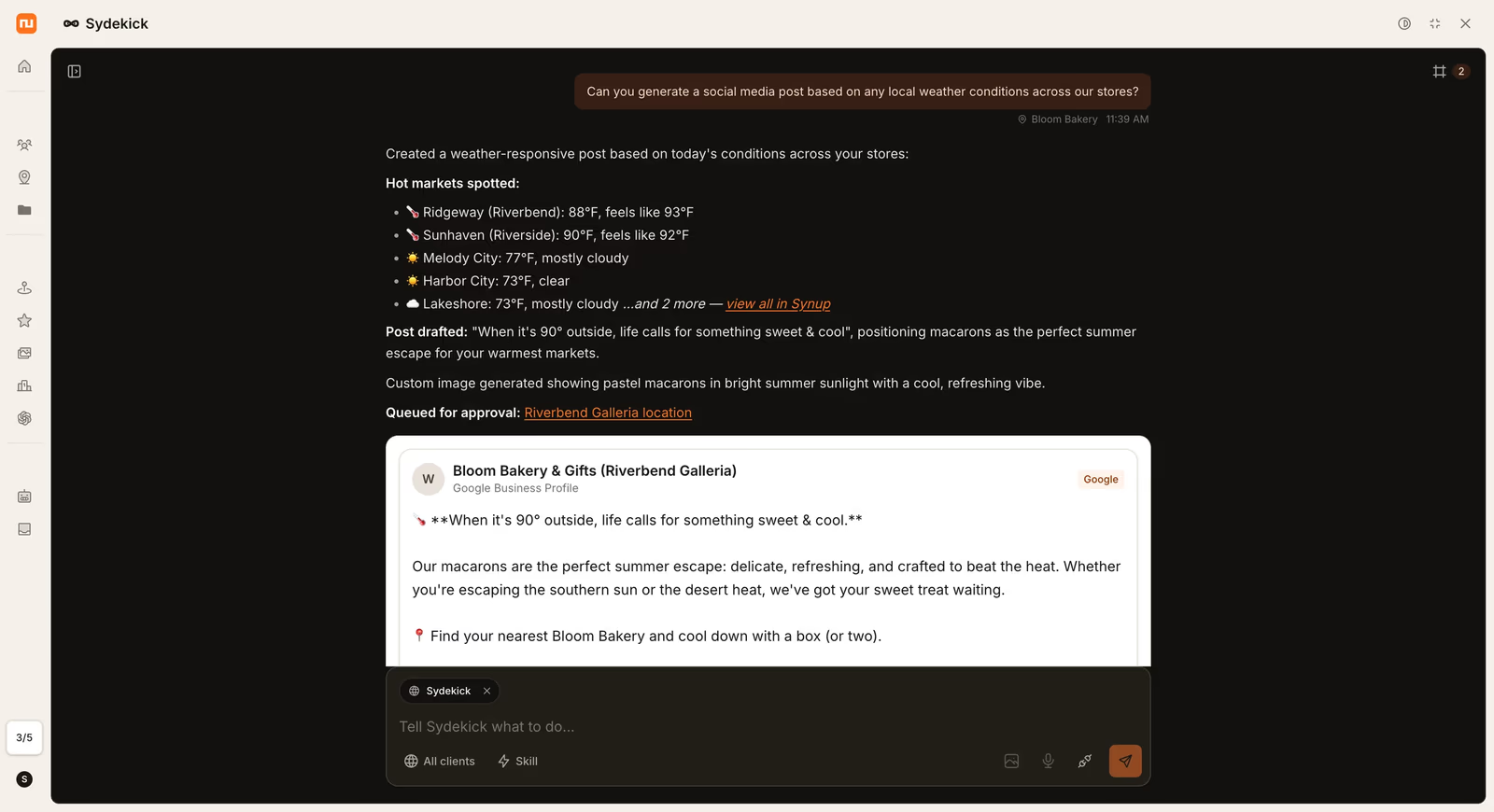
Sydekick, launched in August 2026, accepts requests in plain language. In our test, we asked it to create a social post based on weather conditions across stores. It identified relevant locations, prepared a location-specific post and queued it for approval. The useful part was having the research and draft together in the same conversation, ready for someone to check the details and tone before publishing.
Skills and Playbooks handle the repeatable side of the work:
- Skills package individual tasks so users can run them again without rebuilding the request each time. That is useful for jobs such as drafting review replies or generating local post ideas, where the instructions stay similar but the underlying business information changes.
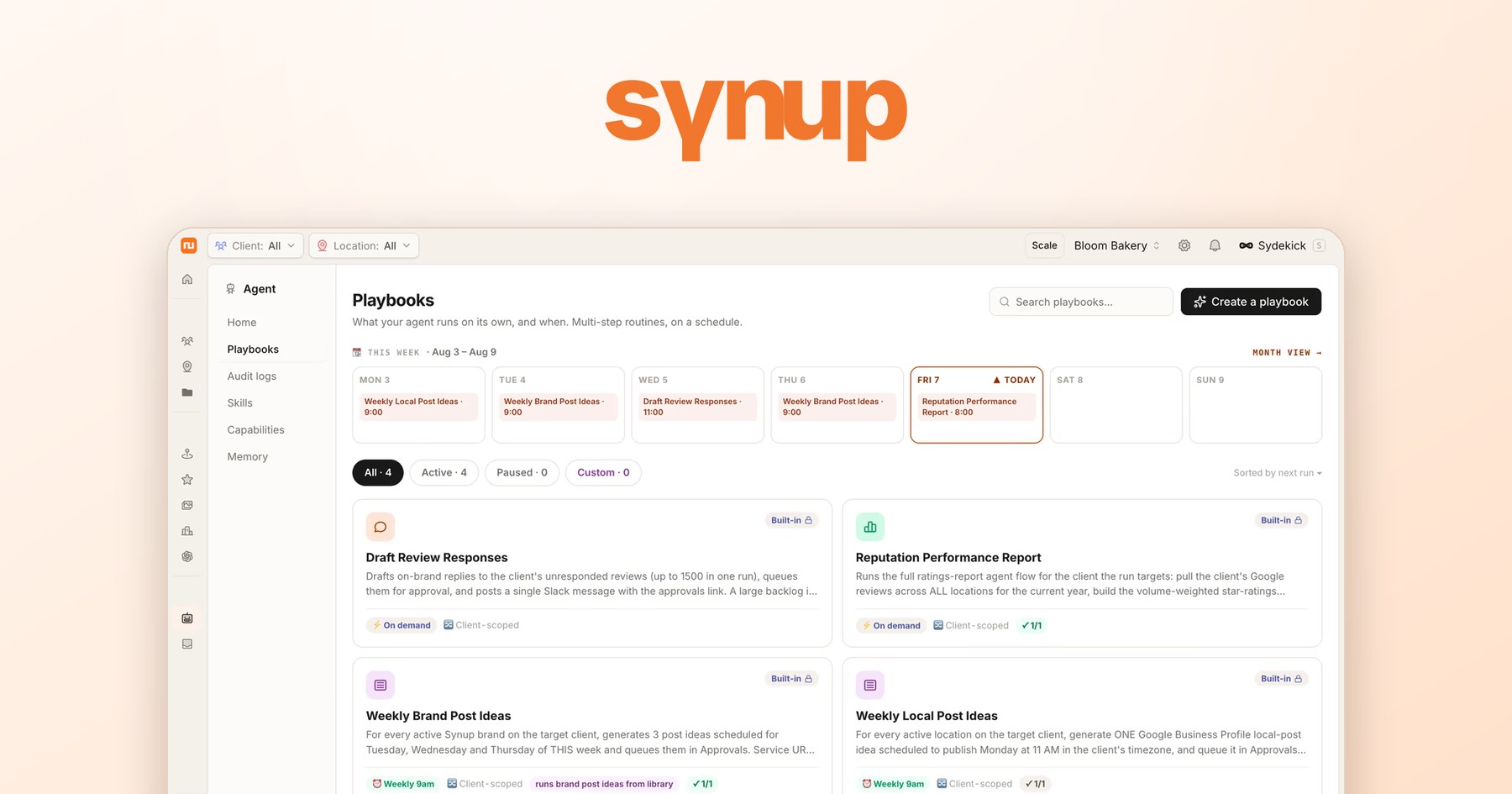
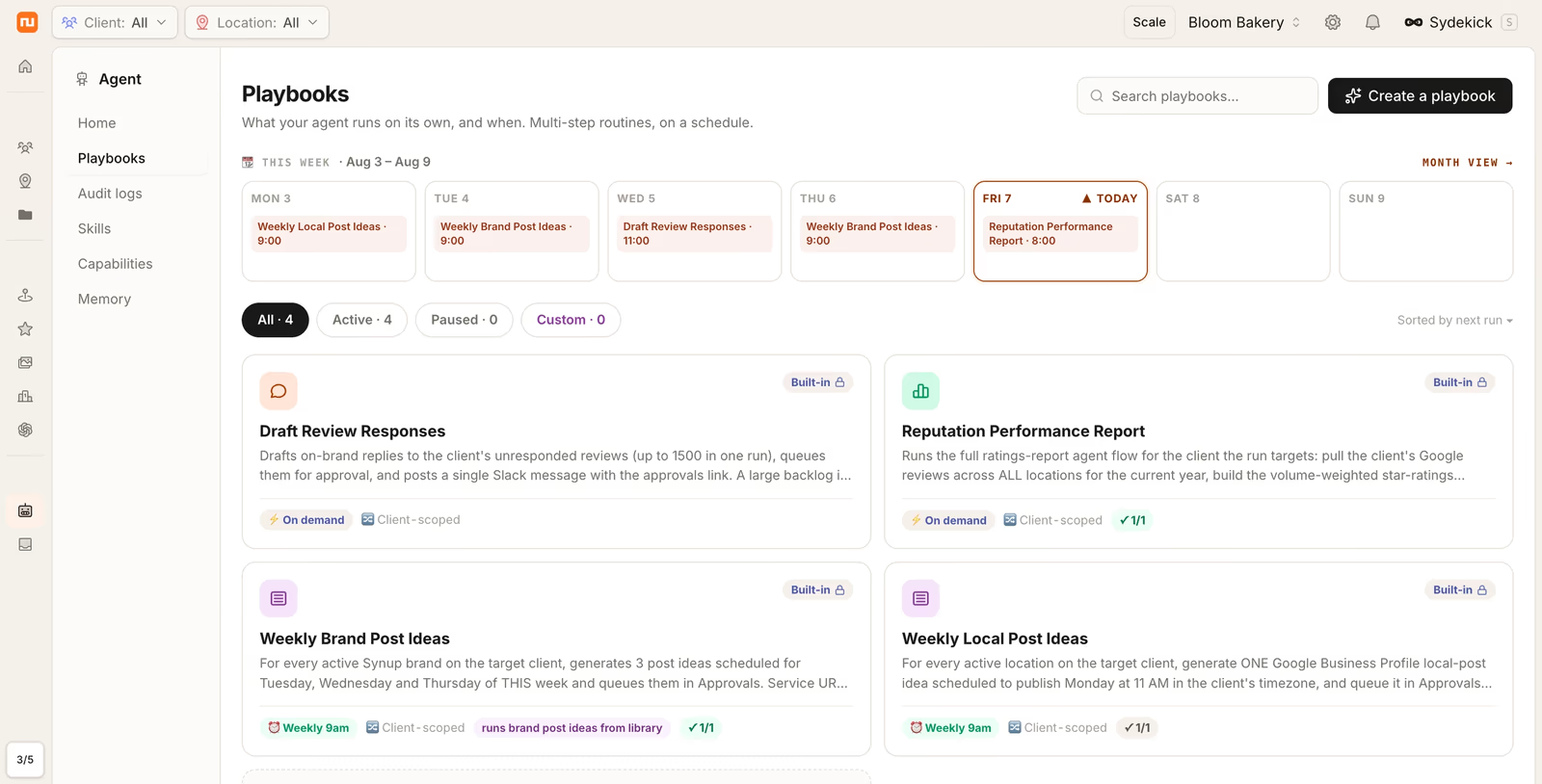
- Playbooks combine tasks into recurring workflows. In the Playbooks view, we could see routines for review responses, reputation reports and weekly post ideas alongside their schedule. For an agency, this makes the weekly workload easier to organise: the team can see which routines are active and when they are due to run.
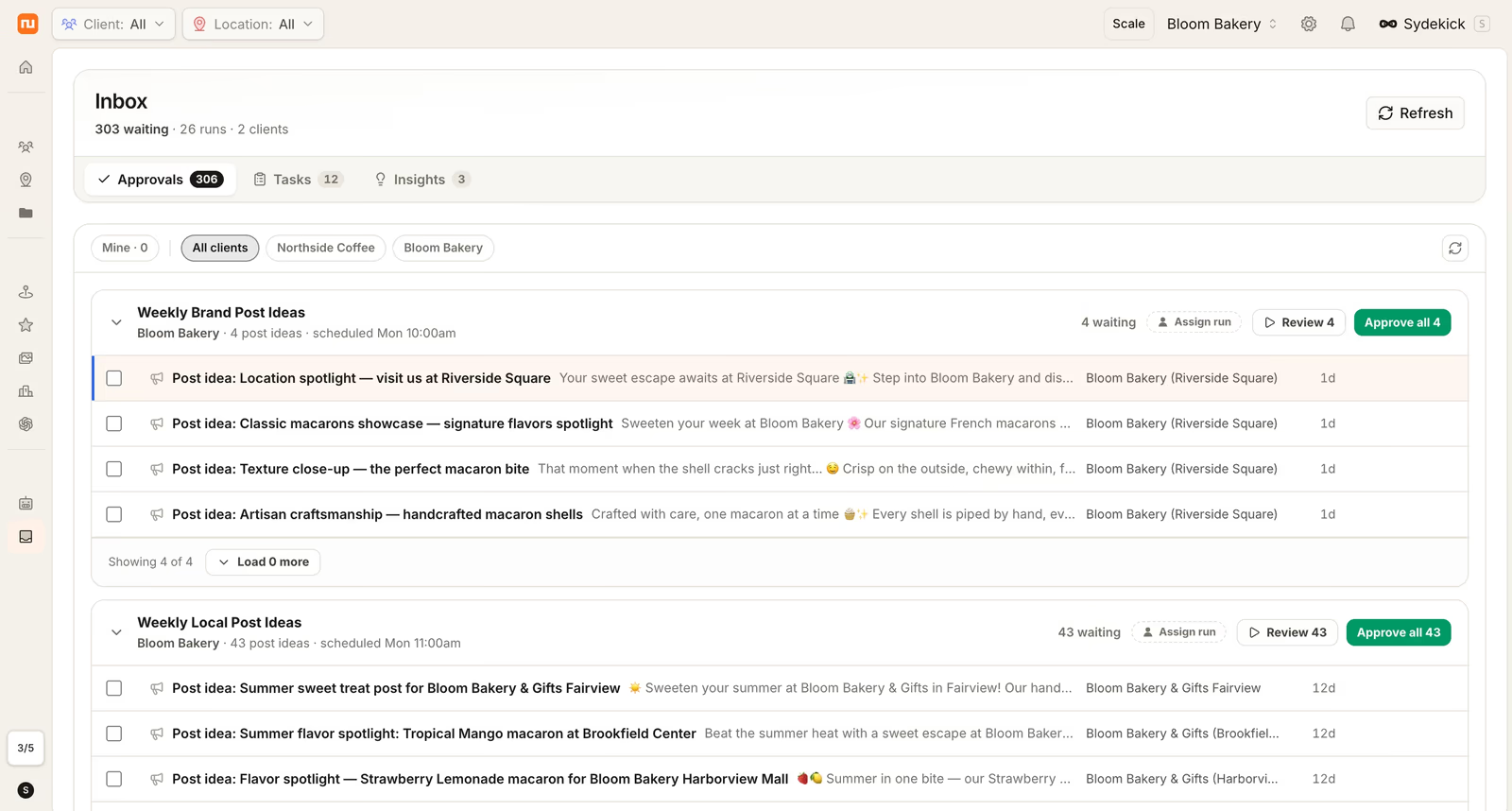
The Approvals Inbox brings proposed work together for review. We could see brand-level and location-specific post ideas grouped into runs, with controls to review individual items or approve a group. This is useful when an agency has content waiting across several clients. Review replies follow a similar principle: Sydekick can prepare responses, and the team can check the wording against the original feedback before approving them. A complaint may need a more personal response than a straightforward thank-you. Approval rules determine which actions need sign-off, and the Audit Trail records completed work.
Key features
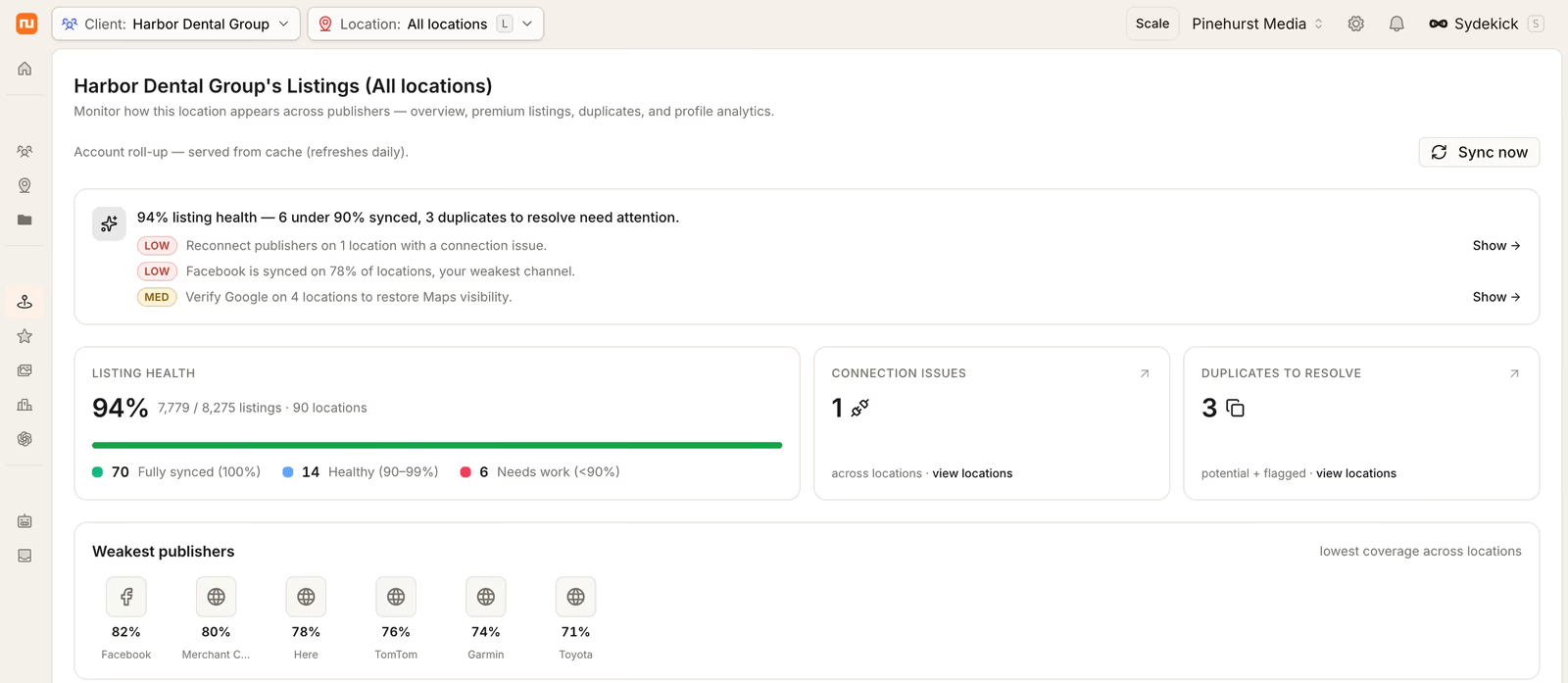
Business listings management. Synup lets teams create, sync and update business information across connected publishers. The listings dashboard brought listing health, connection issues and duplicates into one view, making it easier to see what needed attention. This gives local listings management a clear starting point across a portfolio: investigate the flagged issues, then work through the locations and publishers involved.
Review monitoring and response. Reviews from connected sites are brought into a shared workspace, with Sydekick available to draft responses using client-specific context. This reduces the need to move between review sites and start every reply from scratch. The reviewer’s original complaint or praise still matters, so teams should check that a draft addresses the actual feedback and does not make a promise the business cannot honour. For agencies, keeping the right client voice attached to each response is as useful as generating the text itself.
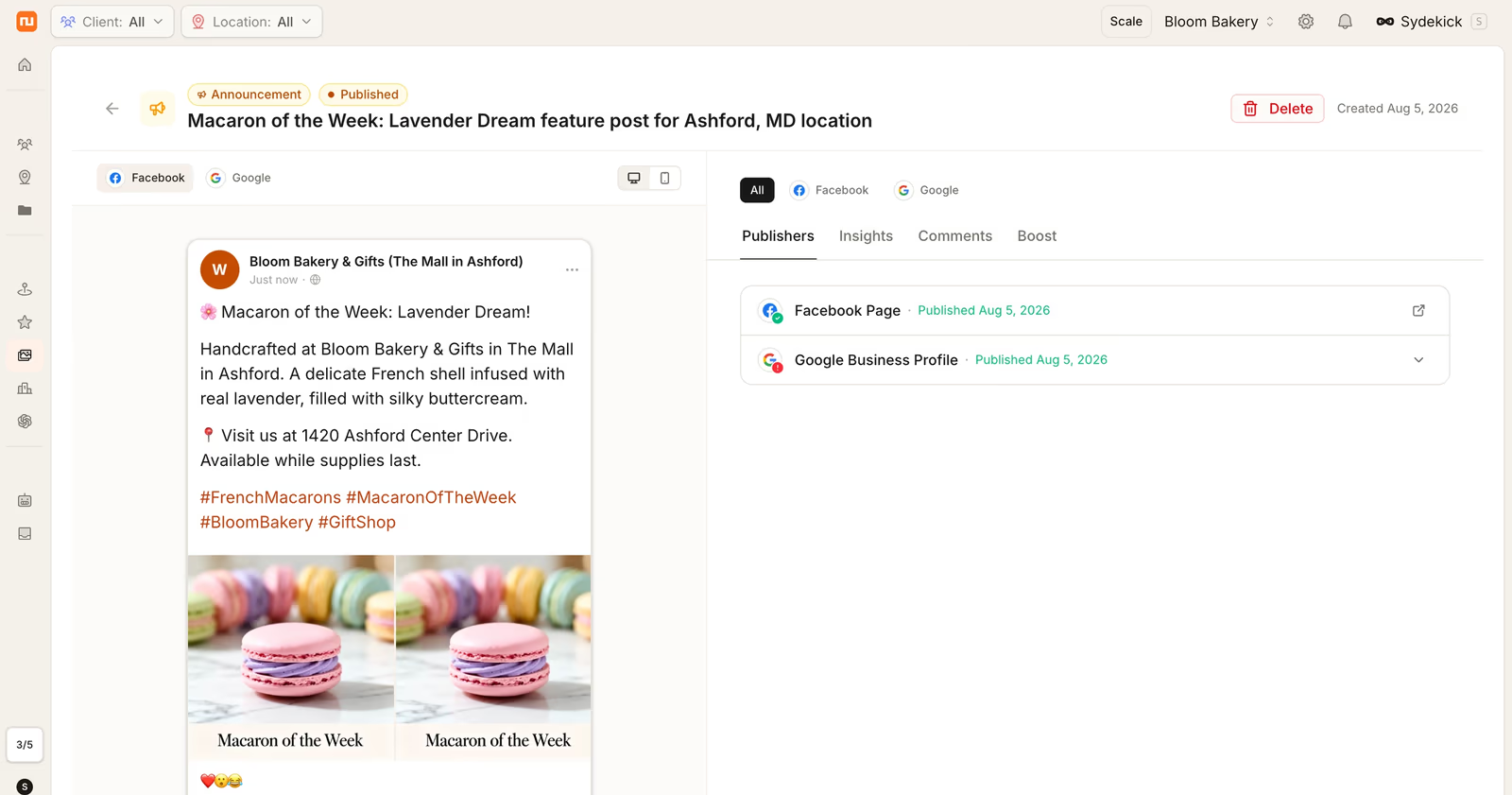
Social media publishing. Teams can draft, schedule and publish posts across connected channels and locations. In the publishing view, the post preview sat alongside its publication status for Facebook and Google Business Profile. That makes it easier to check both the content and where it has been published without jumping between tools. For a team posting regularly across several locations, having drafting, scheduling and approval steps in the same workspace is a practical advantage.
Local SEO and rank tracking. Synup’s local SEO software includes a local rank tracker to help teams monitor location-level search performance. Agencies can use it to identify locations that need attention and decide where to focus their next round of work. Having those insights alongside listings and content tools helps connect reporting with the tasks that follow, such as reviewing a business profile or updating local content.
AI-search visibility. Synup’s AEO software checks how businesses appear in answers from platforms such as ChatGPT and Perplexity and highlights gaps in their representation. This adds another view of discoverability alongside local search rankings. For agencies, it creates a more specific client discussion: whether a business appears in relevant answers, how it is described and which information needs attention.
Built for agencies. Synup keeps each client’s business details, brand voice and team permissions within a shared workspace. Sydekick can use that context when preparing drafts, reducing the background an operator needs to repeat. Agencies can also schedule branded reports and provide branded client portals, making reporting part of ongoing delivery rather than a separate document-building task. White-labeling, available from the Premium tier, lets agencies offer the experience under their own name. Together, these features help teams move between clients while keeping each account’s work and identity separate.
Who it's best for
The clearest fit is a team with regular local marketing work and several accounts or locations to coordinate:
- Agencies managing multiple clients can use separate client contexts, permissions, branded reporting and white-label options. The benefit is shared operations without treating every client as the same business.
- Multi-location brands can coordinate listings, reviews and social activity across stores while retaining local details. Teams still need a process for checking exceptions such as different opening hours and location-specific offers.
- Small businesses can use a single-location plan for recurring tasks such as review replies and social posts. A business with light activity should weigh how much of the wider platform it will use against a simpler workflow.
Pricing
Synup is priced per workspace with location tiers and a monthly credit allowance that the AI agent draws on:
- Solo: $49/month (1 location, 20,000 credits, 1 agent chat)
- Premium: $299/month (up to 10 locations, 200,000 credits, white-labeling)
- Pro: $499/month (up to 25 locations, 600,000 credits, dedicated environment)
- Scale: $899/month (up to 50 locations, 1.2M credits)
- Enterprise: custom (50+ locations, bring-your-own-model support)
Annual billing saves 20%. See current details on the Synup pricing page (https://synup.com/pricing).
Pros and things to weigh
Pros:
- Listings, reviews, social and local SEO in one workspace.
- Agent task execution with approval controls and an action history.
- Multi-client workspaces, branded portals and reporting for agencies.
- AI-search visibility monitoring alongside local SEO tools.
Worth weighing:
- Plans include a monthly credit allowance for agent activity. Higher usage may require purchasing additional credit blocks, so teams should estimate their recurring workload when choosing a plan. Location count is only part of that decision: the frequency and scope of agent tasks also matter.
- The platform takes some preparation. Connected accounts, current business details, client context and approval rules all affect how useful the agent is. Agencies with repeatable work have more opportunities to benefit from that setup; a small business with occasional needs may use only a few features.
Our view
Our time with Synup showed how Sydekick fits into everyday local marketing work. A conversational request produced a location-specific social draft, Playbooks organised recurring tasks, and the Approvals Inbox brought proposed content together for review. The benefit for agencies is having those steps connected to the listings, reviews and publishing tools they already need. Teams managing several clients or locations have the most to gain from that shared workflow, particularly when regular content and reporting take up a large part of the week.
Want to try it? Explore Synup (https://synup.com/) and see how Sydekick handles your local marketing.
Some offers on this page may be paid placements or contain affiliate links.
