Tresorit Review: The Cloud Storage Platform That Puts Security Above Everything Else
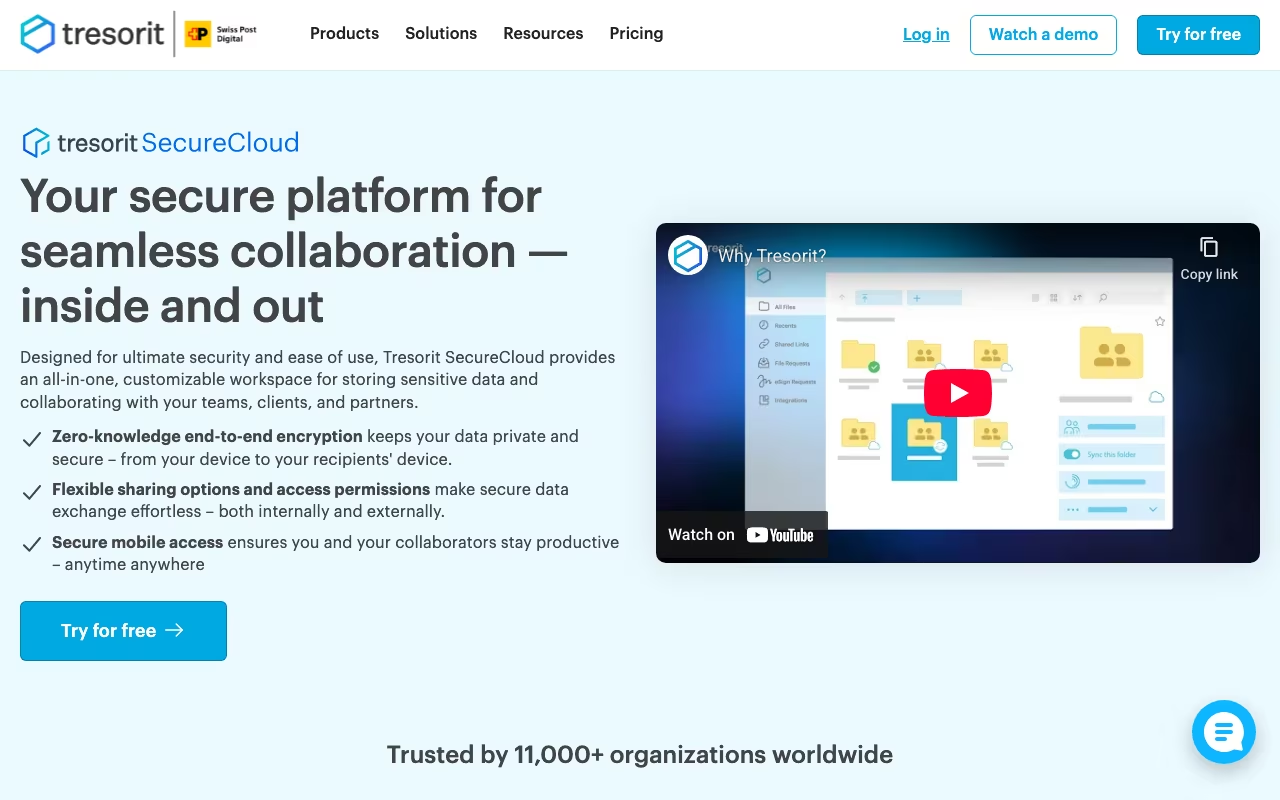
Most cloud storage services encrypt your files in transit and at rest. That sounds secure until you realize the provider still holds the encryption keys and can access your data whenever they want (or whenever a government asks them to). Tresorit takes a fundamentally different approach: end-to-end encryption with zero-knowledge architecture. This means files are encrypted on your device before they ever leave it, and Tresorit never has access to your encryption keys or your data.
Founded in 2011 and headquartered in Switzerland (a country with some of the strongest privacy laws in the world), Tresorit stores data exclusively in EU data centers certified under ISO 27001, ISO 27017, and ISO 27018. It is compliant with GDPR, HIPAA, and CCPA. For businesses in healthcare, legal, finance, or any industry handling sensitive data, this level of security is not a nice-to-have. It is a requirement.
But security comes with trade-offs. Tresorit is more expensive than Google Drive, Dropbox, or OneDrive. It is slower at syncing. And it lacks many of the collaboration features that mainstream cloud platforms offer. The question is whether the security premium is worth it for your specific needs.
Try Tresorit Free Get started →Key Features
End-to-End Encryption and Zero-Knowledge Architecture
Every file is encrypted with AES-256 on your device before upload. Tresorit does not store your password and has zero access to your unencrypted data. Even if Tresorit's servers were breached, attackers would get encrypted files they cannot decrypt. This is the same standard used by government agencies and military organizations.
The zero-knowledge principle means that if you forget your password and are not logged in on any device, your files are gone permanently. There is no password recovery, no "forgot my password" email, no backdoor. This is the trade-off for true zero-knowledge security.
Secure File Sharing
Tresorit lets you share files and folders via encrypted links with granular controls. You can set expiration dates, password protection, download limits, and access permissions. Shared links can be revoked at any time. You can also watermark shared documents to track distribution and discourage unauthorized sharing.
For businesses that share contracts, financial documents, or client data externally, these controls are essential. The recipient does not need a Tresorit account to access shared files, which removes friction from the sharing process.
Cross-Platform Sync
Tresorit works on Windows, macOS, Linux, iOS, and Android, plus a web interface. Files sync across all connected devices automatically. However, because of the end-to-end encryption, Tresorit cannot use block-level sync. If you change one sentence in a 1 GB document, the entire file is re-encrypted and re-uploaded. For large files that are frequently edited, this results in noticeably slower sync compared to Dropbox or Google Drive.
eSignatures
Tresorit includes built-in eSignature functionality on business plans (16 free eSignatures on the Business plan). You can send documents for signature directly from Tresorit without needing a separate tool like DocuSign or HelloSign. The signatures are encrypted end-to-end, maintaining the same security standard as file storage.
Data Rooms
For due diligence, M&A, legal proceedings, or any situation requiring secure document exchange between parties, Tresorit offers virtual data rooms with unlimited trial access on business plans. Data rooms include audit logs, granular permissions, and the same zero-knowledge encryption applied to all files.
Admin Controls and Compliance
Business plans include admin dashboards with user management, activity logs, device policies, and remote wipe capabilities. You can enforce two-factor authentication across your organization and set data residency policies. For compliance-heavy industries, Tresorit provides the audit trail and controls that regulators require.
Tresorit Pricing in 2026
Tresorit offers separate personal and business plans:
Personal Plans
- Personal Lite: $4.75/month. 50 GB storage, 2 GB max file size, 5 version history, 2 devices, basic link security. An affordable entry point, but very limited.
- Personal Essential: $11.99/month. 1 TB storage, 10 devices, larger file size limits, document scanning, extended version history. The most popular personal plan.
- Personal Professional: Higher storage and expanded features for power users. Pricing varies.
Business Plans (per user, per month, billed annually)
- Business Standard: $14.50/user/month. Minimum 3 users. 2 TB per user (from 6 TB total). 15 GB max file size, 16 free eSignatures, unlimited trial data rooms, SSO, custom branding, audit logs, and integrations.
- Business Plus: $19.17/user/month. Everything in Standard plus advanced admin controls, enhanced compliance features, and additional integrations.
- Enterprise: $24/user/month (or custom quote for 50+ users). Full feature set with dedicated support, advanced security configurations, and custom deployment options.
All plans include a 14-day free trial with no limitations. Annual billing saves up to 20% compared to monthly pricing.
Try Tresorit Free Get started →Pros and Cons
Pros
- Strongest encryption available in cloud storage: AES-256 end-to-end encryption with zero-knowledge architecture. Tresorit literally cannot access your files, and neither can anyone who breaches their servers.
- Swiss jurisdiction and EU data centers: Switzerland's privacy laws protect against foreign government data requests. EU-only data centers with ISO 27001/27017/27018 certifications meet the strictest compliance requirements.
- HIPAA, GDPR, and CCPA compliant: Out-of-the-box compliance for healthcare, legal, and financial organizations. No additional configuration or third-party tools needed.
- Granular sharing controls: Expiring links, password protection, download limits, watermarking, and revocable access give you precise control over shared documents.
- Built-in eSignatures and data rooms: Eliminates the need for separate DocuSign or virtual data room subscriptions for many use cases.
- Reliable cross-platform sync: Users report syncing across 9+ machines with gigabytes of data without versioning issues or sync failures.
Cons
- Expensive compared to mainstream alternatives: Google Drive offers 2 TB for $9.99/month. Dropbox Plus offers 2 TB for $11.99/month. Tresorit's 1 TB personal plan is $11.99/month, and business plans start at $14.50/user/month. You pay a significant premium for the security.
- No block-level sync: Because of end-to-end encryption, even a tiny change to a large file requires re-uploading the entire file. This makes Tresorit noticeably slower than Dropbox or Google Drive for frequently edited large documents.
- No password recovery: If you forget your password and are not logged in anywhere, your data is permanently lost. True zero-knowledge means there is no backdoor, period.
- Limited collaboration tools: No real-time document co-editing, no built-in document viewer for most file types, no Google Docs-style collaboration. If your team collaborates heavily on documents, you will still need Google Workspace or Microsoft 365 alongside Tresorit.
- 500 MB file size limit on free/lite plans: The Personal Lite plan caps file uploads at 2 GB and the lower tier at 500 MB, which is restrictive for video files or large datasets.
- App stability reports: Some users report occasional app freezes, sync failures with files containing special characters, and context menu issues. These are not universal but appear frequently enough in reviews to note.
Who Should Use Tresorit
Great for: Healthcare organizations that need HIPAA-compliant file sharing. Law firms handling confidential client documents. Financial services companies under strict regulatory requirements. Any business where a data breach would be catastrophic. Teams that need secure external file sharing with clients or partners. Organizations operating in the EU that need GDPR-compliant storage.
Skip it if: You need heavy real-time collaboration (use Google Workspace or Microsoft 365). You are a personal user looking for cheap cloud storage (Google Drive and Dropbox are better values). Your team frequently edits large files and needs fast sync speeds. You work with very large files (video, CAD, etc.) and need block-level sync to save bandwidth.
Frequently Asked Questions
Is Tresorit more secure than Dropbox or Google Drive?
Yes, significantly. Dropbox and Google Drive encrypt files in transit and at rest, but the providers hold the encryption keys and can technically access your data. Tresorit uses end-to-end encryption with a zero-knowledge model, meaning only you hold the keys. Even Tresorit's own employees cannot access your files. For sensitive data, this difference is substantial.
What happens if I forget my Tresorit password?
If you forget your password and are not logged in on any device, your data is permanently inaccessible. There is no password recovery mechanism because Tresorit never stores your password (that is the zero-knowledge guarantee). To mitigate this risk, stay logged in on at least one device and use a password manager.
Can I use Tresorit for HIPAA compliance?
Yes. Tresorit is HIPAA compliant and provides the encryption, access controls, and audit logging required for handling protected health information (PHI). Business plans include BAA (Business Associate Agreement) support. Many healthcare organizations and medical practices use Tresorit for secure patient document storage and sharing.
How does Tresorit compare to Proton Drive?
Both offer end-to-end encrypted cloud storage with zero-knowledge architecture and Swiss jurisdiction. Proton Drive is cheaper (and included free with Proton Mail) but has fewer features, limited integrations, and is still maturing as a platform. Tresorit is more feature-rich, with eSignatures, data rooms, better admin controls, and broader platform support. For personal use, Proton Drive is a good budget option. For business use, Tresorit is the more complete solution.
Final Verdict
Tresorit is the most secure cloud storage platform available for businesses and individuals who genuinely need strong data protection. The end-to-end encryption, zero-knowledge architecture, Swiss jurisdiction, and compliance certifications make it the default choice for healthcare, legal, and financial organizations. The trade-offs are real: higher cost, slower sync for large files, no real-time collaboration, and no password recovery. But if a data breach would cost your organization more than a few hundred dollars a month in cloud storage, Tresorit's security premium is money well spent. Start with the 14-day free trial and test the sync speed and sharing features with your actual workflow before committing.
Try Tresorit Free Get started →