
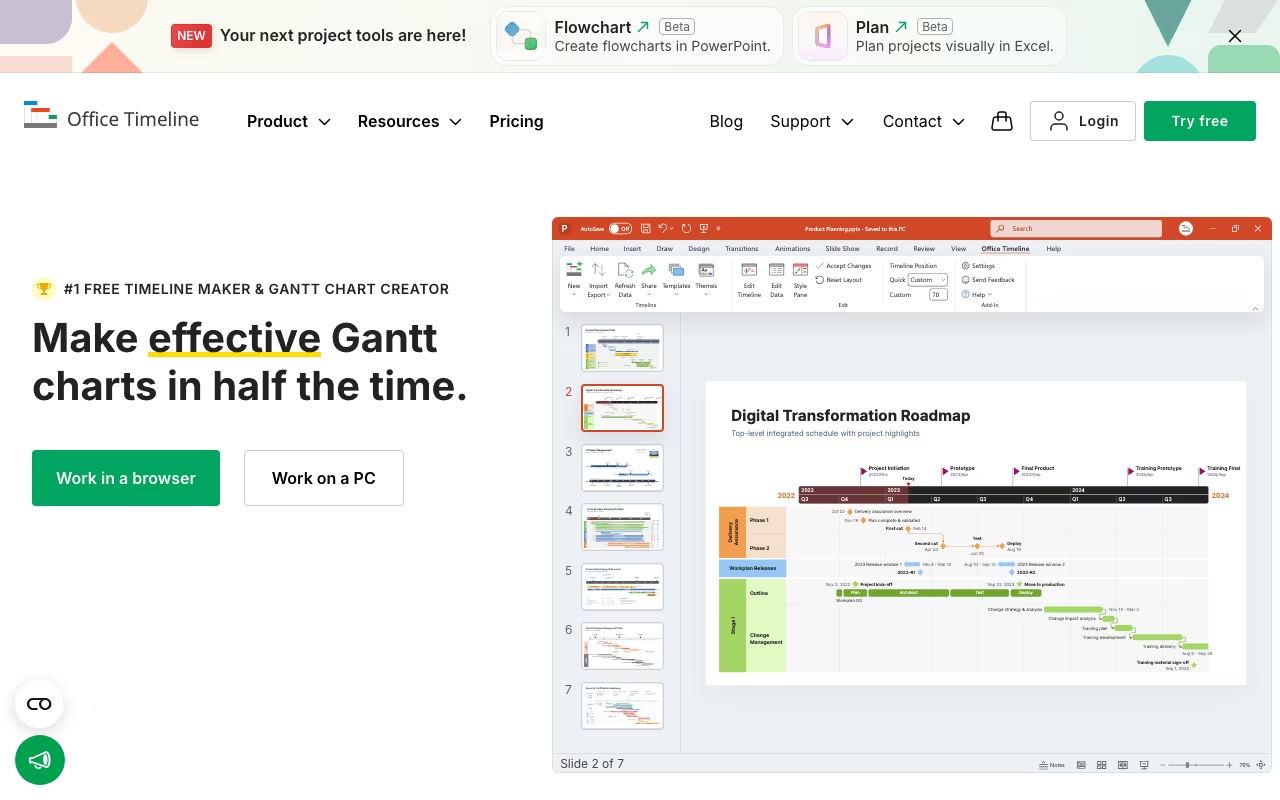
Office Timeline fills a very specific gap: it creates professional-looking timelines and Gantt charts inside PowerPoint. Not project management. Not task tracking. Just beautiful visual timelines that are ready for executive presentations. If you have ever spent an hour manually drawing timeline arrows and milestone diamonds in PowerPoint, you will immediately understand why this tool exists.
PowerPoint-Native Timeline Building
Office Timeline installs as a native PowerPoint add-in on Windows. Once installed, it adds a new tab to your PowerPoint ribbon with timeline-specific tools. You add milestones, tasks, and durations through a simple interface, and it generates a polished timeline slide. The whole process takes 5-10 minutes for what would normally take 45-60 minutes of manual PowerPoint work.
The output quality is genuinely impressive. Templates are designed for boardroom presentations, not internal tracking. You get clean swimlane diagrams, Gantt charts with dependencies, project roadmaps, and milestone timelines. Drag-and-drop editing lets you adjust colors, shapes, fonts, and date formats. Everything stays as a native PowerPoint object, so recipients can open and edit slides without needing Office Timeline installed.
Download Office Timeline Free Get started →Data Import Changes Everything
The real value unlock comes with data import. On the Lite plan and above, you can copy-paste data from Excel spreadsheets directly into a timeline. The Plus plan adds direct Excel file import. And the Expert plan syncs bidirectionally with Microsoft Project, Smartsheet, Jira, and Wrike. When your source data updates, your timeline updates automatically.
This is where Office Timeline saves the most time. Project managers who maintain schedules in MS Project or Jira can generate stakeholder-ready presentations without manually recreating data. You pull in your project plan, Office Timeline visualizes it, and you present. No screenshots, no manual data entry, no risk of the presentation being out of sync with the actual schedule.
The "Planned vs. Actual" tracking on the Expert plan deserves a callout. It overlays your original timeline against actual progress, making status meetings much more informative. You can show exactly where tasks slipped and by how much, right inside a PowerPoint slide.
Plans and Pricing
Office Timeline offers a free version and three paid tiers for the desktop add-in, plus a separate online version:
- Free: Basic timelines and Gantt charts, up to 10 items without watermark, manual data entry only
- Lite (~$108/year): Excel copy-paste import, up to 2 swimlanes
- Plus (~$204/year): Unlimited swimlanes, sub-swimlanes, task dependencies, critical path visualization
- Expert (~$252/year): MS Project/Smartsheet/Jira/Wrike sync, Planned vs. Actual tracking, reusable custom themes
- Online Premium (~$149/year per user): Browser-based version with collaboration, full export capabilities
All paid plans include a 30-day money-back guarantee. The free tier is genuinely usable for simple presentations, though the 10-item limit and watermark push you toward paid plans quickly for real projects.
Compare Office Timeline Plans See plans →Prices checked on the Lucen Timeline (Office Timeline) pricing page in September 2026. Plans and limits change, so confirm before you buy.
Limitations You Should Know
The biggest limitation is platform support: the desktop add-in is Windows-only. No Mac support. If your team runs on Macs, your only option is the online version, which lacks some of the desktop add-in's features and polish. There is no real-time co-editing either. You can share timelines, but two people cannot work on the same timeline simultaneously.
Office Timeline also deliberately avoids being a project management tool. There are no task assignments, workload views, resource management, or Kanban boards. If you need those, use Asana, Monday.com, or Wrike for day-to-day management and Office Timeline for the presentation layer. This is a visualization tool, not a work management tool.
No AI features exist in the current version. While competitors are adding AI-assisted scheduling and auto-layout, Office Timeline remains a manual (if efficient) design tool. Keyboard shortcut support is also limited, which slows down power users who prefer staying on the keyboard.
User Ratings and Competitive Position
On G2, Office Timeline holds 4.5/5 from about 82 reviews. Capterra rates it 4.6/5 with high marks for ease of use (4.5), features (4.5), and customer service (4.6). Users consistently praise the visual quality and time savings. The most common complaint is the lack of Mac support.
Compared to alternatives: thinkcell is the enterprise standard at consulting firms and offers a broader chart library (waterfall, Mekko, etc.) but costs significantly more. GanttPRO and TeamGantt are better for project management but produce less polished presentation outputs. Lucidchart and Miro offer more flexibility for general diagramming but are not PowerPoint-native.
Office Timeline has been around since 2012 and claims over 1 million professionals have used it, including teams at Ericsson, Hitachi Solutions, and FUJIFILM Medical Systems. It is a mature, stable tool that does its specific job well.
Who Should Use Office Timeline
If you regularly present project timelines, roadmaps, or schedules to stakeholders and you work in PowerPoint on Windows, Office Timeline is an obvious productivity gain. Project managers, consultants, and marketing teams who spend significant time making timelines look presentable will recoup the $204-252/year investment quickly. If you work on a Mac, need real-time collaboration, or want full project management capabilities, look elsewhere.
Try Office Timeline Free Get started →How Office Timeline works
First, a naming note: Office Timeline is now Lucen Timeline. The company rebranded to Lucen Software and officetimeline.com 301-redirects to lucensoftware.com. The product itself is unchanged in substance. It turns project data into presentation-ready Gantt charts, roadmaps and swimlane timelines, either as a PowerPoint add-in or as a browser app (Timeline Online). It exists to solve the slide problem, not the planning problem: you take a schedule that already lives in MS Project or Jira and produce a one-slide visual an executive can read, then refresh it instead of redrawing it. Lucen now sells it alongside Lucen Track (time tracking and project profitability, formerly Timeneye), plus Lucen Plan for Excel and Lucen Flowchart for PowerPoint, both in beta.
In use, you either install the PowerPoint add-in or open Timeline Online in a browser. You build a timeline from a template or import a schedule, then arrange tasks, milestones, swimlanes and sub-swimlanes, set multiple timescales on a single view, and apply custom themes for brand colors and fonts. Imports come from Microsoft Project, Excel, Smartsheet, Jira and Wrike, and higher plans let you re-sync so the slide updates when the source schedule moves rather than being a one-time paste. The tool also embeds into Google Docs, Google Slides and Google Sheets, and Timeline Online can export as a native PowerPoint slide. Planned-versus-actual comparison and dependency or critical-path display are configured per timeline. Timeline Online adds real-time collaboration with role-based permissions.
Where Office Timeline wins
- Real import-and-refresh, not just import. On the Plus and Expert plans an Excel-sourced timeline can be refreshed against its source rather than rebuilt, which is the entire point for anyone updating the same board slide every month.
- The output is a native PowerPoint slide, not an embedded image or an iframe, so the deliverable stays editable inside the file your executive team already circulates.
- A genuinely usable free tier at $0, capped at 10 items per timeline with limited swimlanes and copy/paste-only data entry. That is enough to judge the visual quality before paying anything.
- A cross-platform escape hatch. Timeline Online runs in any browser on Windows, Mac or anything else, so Mac users are not locked out even though the add-in is Windows PowerPoint.
- Broad Google Workspace reach for a PowerPoint-first tool, with embeds into Docs, Slides and Sheets.
Where it falls short
- Jira, Microsoft Project and Smartsheet import are gated to the top Expert tier at $21/month. If your schedule lives in Jira, the cheaper plans are effectively useless to you, since only Excel import is available below Expert.
- The PowerPoint add-in is Windows-only, and Mac users are pushed to the browser version. The vendor also does not publish PowerPoint version or system requirements on the product pages at all, with the download page simply linking out to a support article.
- Every advertised price is an annual-billing rate ($9 / $17 / $21 per month billed yearly). Monthly pricing is not shown, so the real entry cost is a year up front, backed by a 30-day money-back guarantee rather than a monthly exit.
- The useful features start at Plus. Dependencies and critical path, sub-swimlanes and project tracking all require Plus or above, and the $9 Lite tier is capped at 2 swimlanes with no dependencies.
- It is explicitly not a project management tool. The vendor states that Timeline Online does not replace project management or work management tools. It is a visualization layer, so you still pay for whatever actually holds the schedule.
- The rebrand itself creates friction. Docs and support still sit on officetimeline.com domains while the product sits on lucensoftware.com and app.lucensoftware.com, so looking for help means crossing brands.
Who should use Office Timeline
Project managers, consultants and PMO staff working on Windows who live in PowerPoint and have to present a schedule to executives every month. It is worth paying Expert pricing specifically if your source of truth is Jira, MS Project or Smartsheet and you want refresh rather than redraw, because that is the one capability that pays for itself over repeated reporting cycles.
Skip it if you need actual scheduling and resource management, since this only visualizes what another system holds. Skip it too if you are Mac-first and want the full add-in experience rather than the browser app, or if you just need a one-off timeline, in which case the free tier probably covers you.