
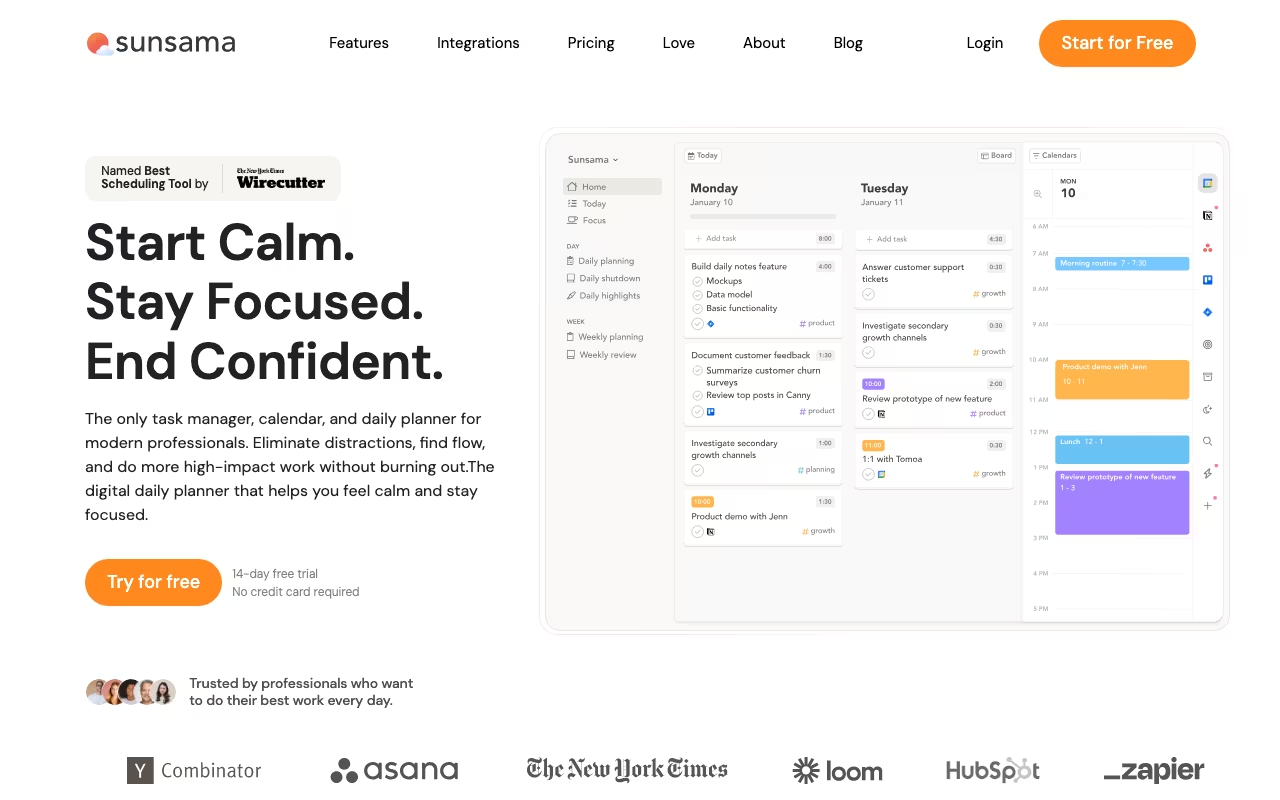
Most productivity apps try to help you do more. Sunsama tries to help you do the right things, and then stop working. It's a daily planner built around a simple idea: every morning, you sit down, look at everything on your plate, decide what's realistic for today, time-block it on your calendar, and then work through that plan. At the end of the day, you do a quick shutdown ritual and close your laptop.
That sounds obvious, but in practice most knowledge workers start their day reacting: checking email, jumping into Slack, handling whatever feels urgent. Sunsama's daily planning ritual forces you to be intentional before the chaos starts. It pulls tasks from the tools you already use (Asana, Trello, Jira, Todoist, Linear, GitHub, Gmail, Slack, Notion) and brings them into a single daily view where you decide what actually gets your attention today.
The pitch is calm productivity over hustle culture. If you've ever ended a day exhausted but unable to point to what you actually accomplished, that's the problem Sunsama is trying to solve.
Try Sunsama Free for 14 Days Get started →The Morning Ritual That Makes It Work
Every morning, Sunsama walks you through a guided planning flow. You review tasks that carried over from yesterday, pull in new items from your connected tools, estimate how long each task will take, and drag them onto your calendar. The whole process takes about 5-10 minutes. By the time you're done, you have a realistic plan for the day with time blocked for each task, not an infinite to-do list that you'll never finish.
The time estimation step is what makes this different from just making a list. When you see that your 8 tasks add up to 11 hours and you only have 6 hours of working time, you're forced to cut or postpone things before the day even starts. That's a better time to make those decisions than 4pm when you're already fried.
Pulling Tasks from Everywhere
Sunsama connects to Asana, ClickUp, GitHub, Jira, Linear, Monday.com, Trello, Todoist, Notion, Microsoft To Do, Google Tasks, Gmail, Outlook, Slack, and Microsoft Teams. Tasks and messages from these tools show up in Sunsama's sidebar, and you can drag them into your daily plan with one click. The sync is two-way for most integrations, so marking a task done in Sunsama updates the original tool too.
This is genuinely useful if your work is spread across multiple tools. Instead of checking Jira for dev tickets, Asana for marketing tasks, and Gmail for follow-ups, you see everything in one place each morning and decide what makes the cut for today.
Time Blocking, Tracking, and Guardrails
Once you assign time estimates to tasks, they appear as blocks on your calendar alongside your meetings. You can see at a glance whether you've overbooked yourself. When you start working on a task, Sunsama tracks the actual time spent, so over weeks you get better at estimating. If you consistently think a type of task takes 30 minutes but it actually takes an hour, the data shows you.
You set a maximum number of working hours per day, and Sunsama warns you when your planned tasks exceed that limit. It's a nudge toward realistic planning instead of the optimistic fantasy most people default to. Over time, this trains you to say no to things or push them to days where you actually have capacity.
The Evening Shutdown
At the end of your workday, Sunsama prompts you to review what you finished, what you didn't, and to move unfinished tasks to tomorrow or later. It sounds small, but this ritual creates a clean mental break between work and personal time. You're not lying in bed at 11pm wondering if you forgot something. You already processed it during shutdown.
Weekly summaries show where your time went: which projects got the most hours, how accurate your estimates were, and whether you're consistently overloading certain days. The Power Pro plan adds deeper analytics and an AI assistant that can help with planning.
What It Costs (and Why It's Expensive)
Basic Pro: $20/month billed yearly, or $25/month billed monthly. This covers the full daily planning experience: all integrations, time blocking, shutdown ritual, and basic analytics. One price per person, no feature gating between individual and team use.
Power Pro: $50/month billed yearly, or $65/month billed monthly. Adds deeper analytics, an AI text assistant, MCP and API access, and Zapier triggers for automation workflows.
Enterprise: Custom pricing. Adds SSO/SAML, SCIM, audit logs, and custom data requirements.
There's a 14-day free trial with no credit card required. The pricing is steep for a personal productivity tool. $20/month is 4x what Todoist Pro costs and more than most task managers charge. Sunsama's argument is that it's not a task manager but a daily planning system, and the value comes from the habits it builds rather than the features it lists. Whether that justifies the price depends on how much you value the structured ritual.
Start Your 14-Day Free Trial Get started →What Works Well
- The daily ritual actually works: The guided planning flow builds a habit that most people can't build on their own with a blank calendar
- Two-way sync with 15+ tools: No duplicating work or maintaining a separate system
- Time blocking reveals overcommitment: Seeing your tasks on a calendar forces honest conversations about what's actually possible today
- Shutdown ritual creates work-life boundaries: Especially valuable for remote workers who struggle to stop working
- Clean, calm design: No gamification, no engagement tricks, no notification spam. Sunsama deliberately avoids making you use it more
What Frustrates Users
- Expensive for what it does: $20-25/month is a lot when Todoist is $5/month and Google Calendar is free. You're paying for the planning framework, not the feature list
- Only works if you commit daily: Skip the morning planning for a few days and Sunsama becomes just another app collecting dust
- Can't plan more than two weeks ahead: By design, Sunsama focuses on daily and weekly planning. If you need a 3-month project timeline, you'll need another tool alongside it
- Mobile app is limited: You can add and rearrange tasks on mobile, but the full planning and shutdown rituals only work well on desktop
- No AI auto-scheduling on Basic Pro: Unlike Motion, Sunsama doesn't automatically schedule your tasks. You do the planning yourself (which is the point, but some people want automation)
Who Gets the Most Value
Overwhelmed knowledge workers: If you end most days feeling like you were busy but didn't accomplish what mattered, Sunsama's structure helps you focus on fewer, more important things.
Remote workers who need boundaries: The shutdown ritual and workload limits create the kind of structure that offices provide naturally but remote work doesn't.
People whose work lives in multiple tools: If you have tasks in Jira, action items in Slack, follow-ups in Gmail, and projects in Asana, the unified pull is worth the price just for the time saved switching between apps.
Not for project managers or teams needing collaboration. Sunsama is a personal daily planner. It has basic team visibility (you can see what colleagues planned for their day), but it's not a project management tool. If you need Gantt charts, dependencies, or team workflows, look at ClickUp, Asana, or Monday.com instead.
Sunsama vs Todoist vs Motion
Named alternatives, published pricing
| Tool | Pricing | Model |
|---|---|---|
| Sunsama | $20/mo (billed annually), 14-day free trial | Subscription |
| Todoist | Free, $5/mo (Pro), $8/user/mo (Business) | Freemium |
| Motion | $19/mo (lowest published recurring price) | Subscription |
Todoist is a task manager: it helps you capture and organize tasks. Sunsama is a daily planner: it helps you decide which tasks to do today and when. Many people actually use both, with Todoist as the inbox and backlog and Sunsama as the daily execution layer. At $5/month vs $20/month, Todoist is the obvious choice if you just need task management.
Motion takes the opposite approach to scheduling. Where Sunsama wants you to manually plan your day (the process itself is the value), Motion uses AI to automatically schedule tasks around your meetings. Motion is better if you want hands-off scheduling. Sunsama is better if you want the mindfulness of intentional planning.
Reclaim.ai auto-blocks calendar time for tasks and habits, similar to Motion but with a free tier. Less opinionated about daily rituals than Sunsama, more focused on calendar optimization.
Doing it manually in Google Calendar is free and works for some people. What you lose is the task integration, time tracking, shutdown ritual, and workload warnings that make Sunsama's system stick.
Frequently Asked Questions
Does Sunsama replace my project management tool?
No. Sunsama sits on top of your existing tools, not in place of them. You still use Asana, Jira, or Trello for project-level planning and team collaboration. Sunsama just pulls today's tasks from those tools into your personal daily plan.
What if I skip the daily planning for a few days?
Unfinished tasks carry over automatically, so nothing gets lost. But the value of Sunsama comes from the daily habit, and using it sporadically turns it into just another task list. Most people who quit say they stopped doing the morning ritual, not that the tool didn't work.
Sunsama is not for everyone, and it knows it. If you're looking for a task manager with lots of features, Todoist gives you more for less money. If you want AI to handle your scheduling, Motion does that. Sunsama is specifically for people who want to build a daily planning habit, the kind of person who's tried productivity systems before and found that the tool wasn't the problem, the consistency was.
The $20/month price filters out casual users, which is probably intentional. Skip the ritual and it's just an expensive task list. Follow the ritual and it genuinely changes how you approach your workday. Start the 14-day trial, connect your tools, and do the daily planning every morning for a full week. By day five, you'll know whether it clicks for you or not.
Start Your Free Sunsama Trial Get started →