

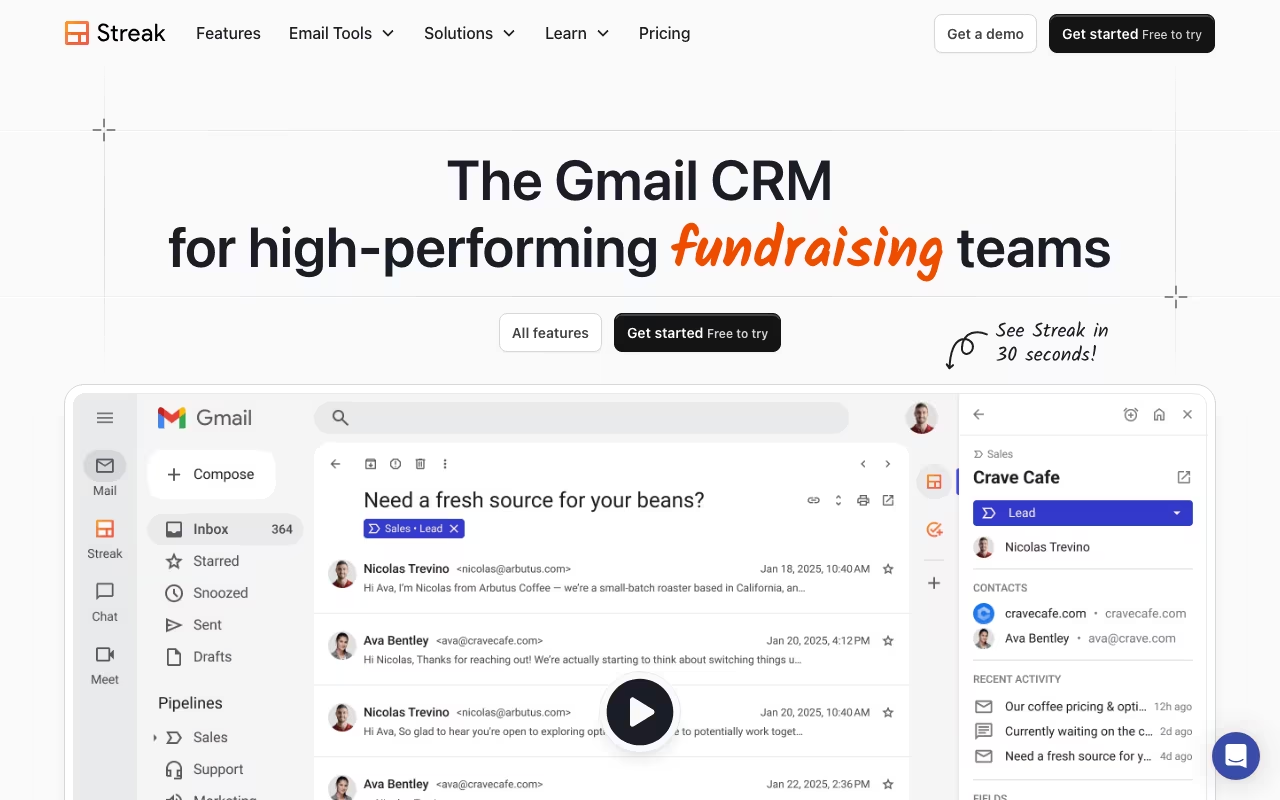
A CRM That Never Leaves Your Inbox
Streak is the only CRM that lives entirely inside Gmail. No separate tab, no new login, no syncing headaches. You open Gmail, and your pipeline is right there alongside your emails. Founded in 2011 by a former Google PM and backed by Y Combinator, Streak turns your inbox into a deal tracker, mail merge engine, and contact database without ever making you leave the Google ecosystem.
The pitch is simple and compelling: if you already spend your whole day in Gmail, why would you go somewhere else to manage your pipeline? Every email automatically links to the relevant deal. Every contact gets enriched with social data. Every stage change happens in the same window where you read and reply to messages. For solopreneurs and small teams who run their entire business through Gmail, that zero-friction approach is genuinely hard to beat.
Try Streak CRM Free Inside Gmail Get started →How Pipelines Work in Practice
Streak's pipeline view looks like a spreadsheet crossed with a kanban board. You create stages (Lead, Contacted, Proposal Sent, Closed Won, etc.), drag deals between them, and add custom fields for whatever data matters to your workflow. Each deal links to the email threads, contacts, tasks, and files associated with it. Click a deal and you see the full communication history without searching through your inbox.
The mail merge feature sends personalized bulk emails through your actual Gmail account, not a third-party server. On the free plan you get 50 sends per day. Paid plans bump that to 1,500 per day with tracking, scheduling, and follow-up sequences. Email tracking shows you exactly when someone opens your message, clicks a link, and what device they read it on. Real-time notifications pop up when a prospect opens your proposal for the third time at 10 PM, which tells you something useful about their interest level.
Streak added an AI Co-Pilot in 2025 that generates deal summaries, answers questions about your pipeline data, and auto-fills contact details from email signatures and web enrichment. The Pro plan includes 20 AI credits per user per month, Pro+ gives you 150, and Enterprise provides 500. Early days, but the deal summary feature already saves time when you need to catch up on a prospect you haven't spoken to in weeks.
Pricing Breakdown
The free plan gives you email tracking, snippets (templates), mail merge (50/day), and thread splitting. No pipeline CRM on the free tier anymore, which frustrated long-time users who relied on it. Streak removed the free CRM pipeline in recent years, pushing anyone who needs actual deal management to a paid plan.
The Pro plan costs $59 per user per month (or $49/user billed annually). You get unlimited pipelines, shared team email, mobile apps, Zapier integration, and standard reports. Pro+ runs $89/user/month ($69 annual) and adds automations, webhooks, API access, and advanced dashboards. Enterprise is $159/user/month ($129 annual) with custom roles and data validation.
For a five-person sales team on Pro, that's $245/month or $2,940/year on the annual plan. Comparable to Pipedrive ($14-99/user) and cheaper than Copper ($29-134/user), though both of those are standalone CRMs with deeper feature sets.
Start Your 14-Day Streak Pro Trial Get started →Prices checked on the Streak pricing page in September 2026. Plans and limits change, so confirm before you buy.
Where Streak Works and Where It Breaks
Streak holds a 4.5 out of 5 on both G2 (257 reviews) and Capterra (477 reviews). Users consistently praise the Gmail integration and pipeline visualization. The criticism clusters around three areas that show up across every review platform.
First, Streak slows Gmail down as your data grows. Multiple reviewers report noticeable lag once you pass a few hundred deals in a pipeline. For teams processing high volumes, that performance hit adds up throughout the day. Second, customer support consistently gets the lowest scores across all review platforms. Email responses take days. Some users report being ignored entirely. Third, the tool was designed for small teams and it shows at scale. Past 10-15 users, collaboration gets unwieldy, there's no global activity feed, and the permission system feels limited.
The hard constraint is Gmail-only. If anyone on your team uses Outlook, Yahoo, or anything other than Google Workspace, Streak simply won't work for them. There's no Outlook version and never will be. The entire product is a Chrome extension built on top of Gmail's interface.
How It Compares to Alternatives
NetHunt CRM also lives inside Gmail but offers stronger automation and better scalability at $24/user/month. Copper integrates deeply with Google Workspace but runs as its own web app rather than living inside Gmail. HubSpot's free CRM has more features than Streak's free tier but requires tab-switching. Pipedrive is better for pure sales pipeline management but has no Gmail-native experience.
Streak's niche is clear: if you're a solopreneur or a team of 2-5 people who live in Gmail and want lightweight deal tracking without learning a new platform, Streak does exactly that. The moment you need advanced automation, deep reporting, or a team larger than 10, you'll outgrow it. And that's fine. Not every tool needs to be enterprise-grade. Sometimes the best CRM is the one you actually use, and the one that sits inside the app you already have open is the one most likely to get used.
Add Streak to Your Gmail Today Get started →



