

What Makes Pipedrive Different
Most CRMs try to be everything: marketing hub, customer service desk, project manager, and sales tool. Pipedrive doesn't. It's a sales CRM, built by salespeople, designed to do one thing well: help you close deals.
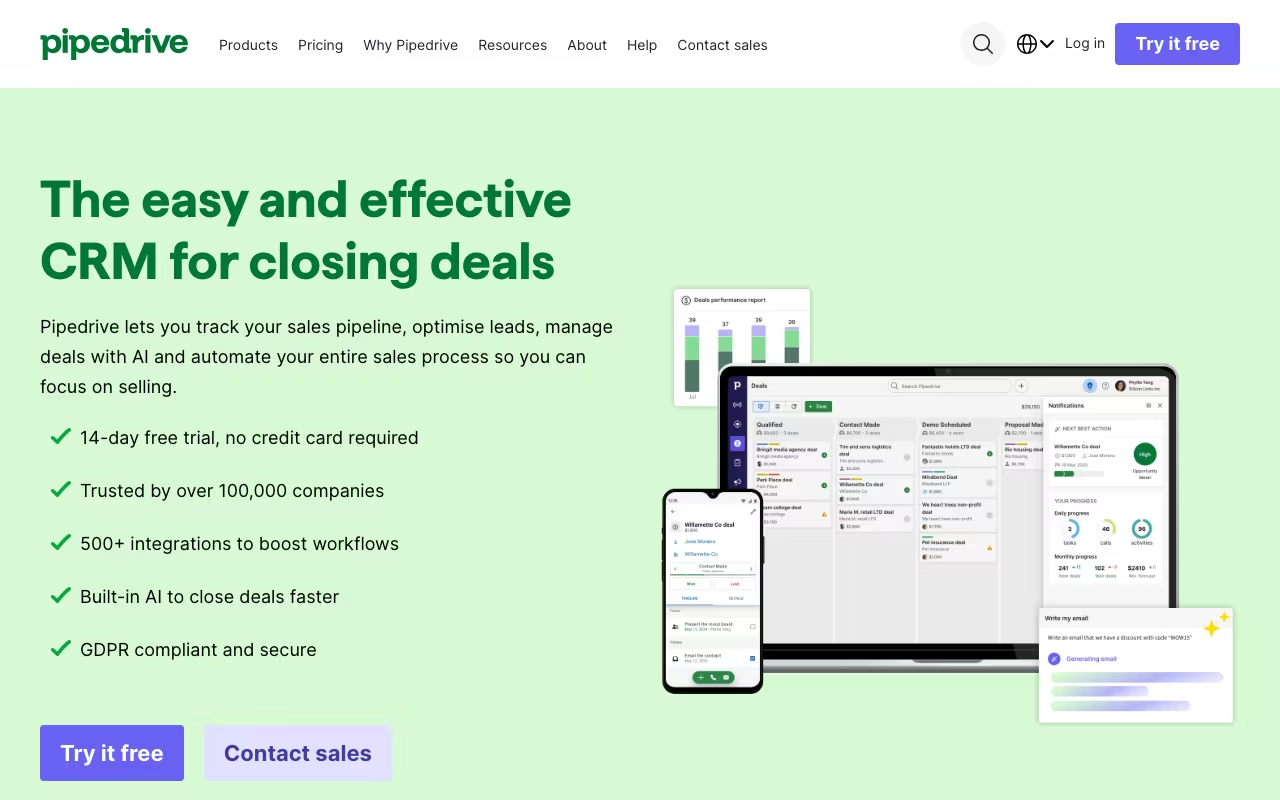
The entire product is organized around a visual sales pipeline. You see your deals as cards moving through stages, and everything in Pipedrive exists to help those cards reach the "Won" column. Activities, emails, calls, meetings, and notes all tie back to deals and contacts. If your team's primary job is selling, and your main frustration is that deals slip through the cracks, Pipedrive was built to solve exactly that problem.
Founded in 2010, Pipedrive now serves over 100,000 companies in 179 countries. It consistently earns high marks for ease of use on review sites, with a 4.3/5 on G2 and 4.5/5 on Capterra. It's particularly popular with small to mid-sized sales teams that want a CRM they can actually start using on day one.
Try Pipedrive Free for 14 Days Get started →The Pipeline View That Started It All
Pipedrive's visual pipeline is still its biggest draw. When you log in, you see a board with columns representing your sales stages (Lead In, Contact Made, Proposal Sent, Negotiation, Won, Lost, or whatever stages you define). Each deal is a card you can drag from stage to stage.
This sounds simple, and it is. That's the point. Salespeople can glance at their pipeline and immediately know how many deals are in play, where each one stands, and what needs attention. Deals that haven't been touched in a while get flagged. Activities overdue for follow-up pop up as reminders. The system is designed to prevent the most common sales failure: forgetting to follow up.
You can create multiple pipelines for different products, regions, or processes. Custom fields let you track whatever matters to your business, from deal source to contract length to competitor mentions. Filters let you slice and dice your pipeline any way you need.
Pipedrive Pricing in 2026
Pipedrive restructured its plans in 2025, consolidating from five tiers to four:
Lite: $14/user/month (billed annually) or $24/user/month (billed monthly)
Includes pipeline management, basic reporting, contact and deal management, and 3,000 open deals. Good for solo sellers and very small teams getting started.
Growth: $39/user/month (annual) or $49/user/month (monthly)
Adds two-way email sync, email templates, automation builder (with limited runs), group emailing, and meeting scheduler. This is where Pipedrive becomes practical for most sales teams.
Premium: $59/user/month (annual) or $79/user/month (monthly)
Adds AI-powered features, revenue forecasting, advanced reporting, and more customization options. Built for larger teams that need deeper insights.
Ultimate: $79/user/month (annual) or $99/user/month (monthly)
Adds unlimited custom fields, 24/7 phone support, more automation runs, and advanced security. For teams that need maximum flexibility and dedicated support.
There's no free plan, only a 14-day free trial. Annual billing saves up to 42% compared to monthly. Implementation is free for plans over $400/year.
Watch Out for Add-On Costs
Pipedrive's base plan pricing looks reasonable, but the add-ons can add up fast:
- LeadBooster ($32.50/company/month): Chatbot, live chat, web forms, and prospector for lead generation.
- Smart Docs ($32.50/company/month): Proposals, contracts, and e-signatures with CRM data auto-fill.
- Projects ($6.67/user/month): Basic project management for post-sale delivery tracking.
- Campaigns ($13.33/company/month): Email marketing with templates and tracking.
- Web Visitors ($41/company/month): Identifies companies visiting your website.
For a 5-person team on the Premium plan with LeadBooster and Smart Docs, the real cost is closer to $390/month, not the $295 the base plan suggests. Factor this into your budgeting.
See Pipedrive Pricing See plans →Day-to-Day Sales Features
Activity Management
Pipedrive tracks calls, emails, meetings, tasks, and any custom activity types you create. The activity-based selling approach means instead of just looking at deal amounts, you focus on the actions that move deals forward. The system prompts you to schedule the next activity for every deal, so nothing goes cold without a deliberate decision.
Email Integration
On the Growth plan and above, Pipedrive syncs with Gmail and Outlook. Emails sent to contacts are automatically linked to the right deal and contact record. Email templates let you standardize outreach, and tracking shows you when recipients open emails and click links. It's not as advanced as a dedicated sales engagement platform like Salesloft or Outreach, but it covers the basics well.
Automations
The automation builder lets you trigger actions based on deal stage changes, new activities, field updates, and more. For example: when a deal moves to "Proposal Sent," automatically create a follow-up task for three days later and send a Slack notification. Automations are useful but limited. You get a cap of 5,000 runs every 10 minutes, and the logic options are fairly basic compared to tools like HubSpot or Salesforce.
Reporting and Forecasting
Standard dashboards show you pipeline value, conversion rates, deal velocity, and sales rep performance. The Premium and Ultimate plans add revenue forecasting and more advanced custom reports. Reports are decent for small teams but may feel shallow if you're used to Salesforce-level analytics.
Strengths of Pipedrive
- Speed to value: Most teams can set up Pipedrive and be productive within 48 hours. The interface is intuitive enough that training is minimal.
- Visual pipeline clarity: The drag-and-drop pipeline view makes it genuinely hard to lose track of deals. It's the best visual pipeline in the CRM category.
- Activity-based selling: The focus on scheduling and completing activities (calls, emails, meetings) keeps sales reps proactive instead of reactive.
- Mobile app quality: The mobile app is well-designed for field sales teams. Log calls, update deals, and check your pipeline from anywhere.
- 400+ integrations: Connects with Slack, Zoom, Google Workspace, Microsoft 365, Zapier, and hundreds of other tools.
- Honest simplicity: Pipedrive doesn't pretend to be something it's not. It's a sales tool, and it does sales things well.
Limitations to Know About
- No free plan: Only a 14-day trial. HubSpot offers a free CRM with basic features that Pipedrive charges for.
- Weak marketing features: Email campaigns are a paid add-on. There's no built-in landing page builder, no social media management, no content tools. If you need marketing and sales in one platform, HubSpot is better.
- Add-ons inflate the real cost: Features that competitors include in their base plans (lead generation, document management, email campaigns) are separate charges in Pipedrive.
- Automation limitations: The automation builder works for basic workflows but lacks the depth and flexibility of HubSpot, ActiveCampaign, or Salesforce automation.
- Email sync restricted to higher plans: Two-way email sync requires the Growth plan ($39/user/month). The Lite plan only supports manual email logging.
- Reporting depth: Reports are adequate for small teams but lack the customization and drill-down capabilities of more advanced CRMs.
Pipedrive vs. HubSpot
Sales tools, published pricing
| Tool | Pricing | Model |
|---|---|---|
| Pipedrive | $14/mo (Essential), $34/mo (Advanced), $49/mo (Professional) | Subscription |
| Demodesk | $50/mo (lowest published recurring price) | Subscription |
| Capsule CRM | $18/mo (lowest published recurring price) | Subscription |
| Lusha | $36/mo (lowest published recurring price) | Subscription |
| Salesflare | $35/mo (lowest published recurring price) | Subscription |
| Seamless | $147/mo (lowest published recurring price) | Subscription |
This is the comparison everyone asks about. Here's the honest breakdown:
HubSpot is a full business platform (marketing, sales, service, operations). It has a free CRM tier, more advanced automation, better reporting, and a much larger feature set. But HubSpot gets expensive at scale. The Sales Hub Professional plan is $90/user/month, and adding marketing features pushes costs higher.
Pipedrive is a focused sales tool. It's faster to set up, easier to learn, and cheaper at the entry level. But it lacks HubSpot's marketing capabilities, automation depth, and ecosystem.
Choose Pipedrive if your team's job is selling and you want a tool that does pipeline management really well without a complicated setup. Choose HubSpot if you need marketing and sales to work together in one system and you're willing to invest in a larger platform.
Who Pipedrive Is Built For
Small sales teams (2-20 reps) that need a CRM they can start using immediately without weeks of configuration. Pipedrive respects your time by keeping things simple.
Deal-focused businesses where the sales process follows a clear pipeline (stages from lead to close). Real estate, SaaS, consulting, and B2B services are natural fits.
Teams switching from spreadsheets. If you're currently tracking deals in Excel or Google Sheets, Pipedrive is the easiest upgrade.
Not ideal for: Enterprises needing advanced customization (Salesforce is better). Marketing-heavy teams (HubSpot is better). Support or service-focused businesses (Zendesk or Freshdesk are better).
The Verdict on Pipedrive
Pipedrive doesn't try to be a platform. It's a tool. A focused, well-designed tool that helps sales teams track deals, follow up on time, and close more business. If that's what you need, Pipedrive delivers it with less friction than almost any competitor.
The risk is outgrowing it. As your team scales and your needs expand into marketing automation, customer service, and complex reporting, Pipedrive's boundaries become more visible. The add-on costs stack up, and you might eventually find yourself migrating to a broader platform.
But for right now? For a sales team that needs to get organized and start closing more deals? Pipedrive is one of the best places to start.
Start Your Free Pipedrive Trial Get started →



