What Knock Actually Is
Knock is notification infrastructure. It sits between your application and every channel where you reach users (email, SMS, push, in-app feeds, and chat) and turns a single API call or data event into the right message, delivered to the right person, on the channels they have not muted. Instead of wiring up separate provider integrations, retry logic, batching rules, and preference checks inside your own codebase, you offload all of it to a hosted service and trigger workflows by name.
The company has since broadened its positioning to "customer engagement infrastructure," covering product, transactional, and marketing messaging from one system. It was founded in New York in 2021 by Sam Seely and Chris Bell, who ran into notification problems firsthand while at Frame.io, and it raised a Series A in 2024. Teams at Vercel, Webflow, Medium, Clay, Gorgias, Outreach, and Amplitude use it to run notifications they would otherwise have to build and maintain themselves.
Try Knock Get started →The Notification Workflow Engine
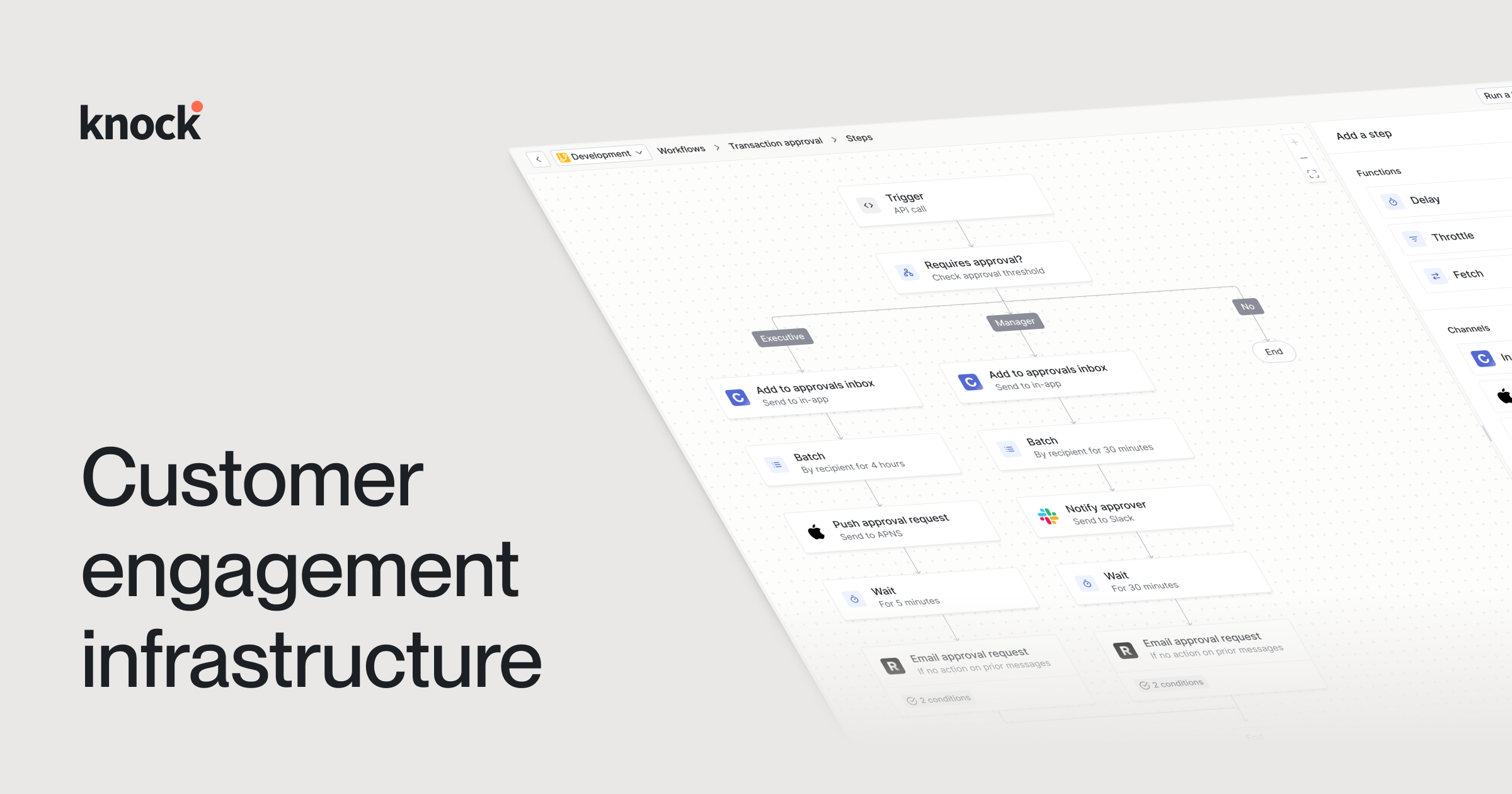
The workflow engine is the core of Knock and the reason most teams adopt it. You define a workflow once as an ordered set of steps: send an email, wait an hour, check whether the user has already seen an in-app message, batch several events into one digest, throttle repeat sends, or branch based on user attributes. Your application does not fan messages out itself. It fires one event to Knock, and Knock runs the workflow, resolves each recipient's channel preferences, and delivers across every channel you configured.
What makes this practical in production is that workflows are versioned. Knock separates development and production environments, tracks every change as a commit, and lets you roll back instantly if a change misbehaves. Changes can be validated through CI/CD before they reach production, so a template edit or a new step does not go live untested. The visual builder is approachable enough that product managers can read and adjust a workflow, while the underlying commit model keeps engineers in control of what actually ships. That combination (a shared visual canvas plus real version control) is unusual in this category and is where Knock earns its keep.
Batching and digesting deserve a specific mention. Aggregating twelve "someone commented" events into a single "you have 12 new comments" notification is deceptively hard to build correctly, and it is one of the features teams most often cite as the thing they no longer want to maintain in-house. Knock handles the accumulation window, deduplication, and rendering as first-class steps.
What Else It Does
Cross-channel delivery and integrations
Knock delivers across email, SMS, push, chat, and in-app, and connects to collaboration tools including Slack and Microsoft Teams. It does not replace your existing email or SMS providers; it orchestrates on top of them, routing each channel through the delivery services you already use and normalizing status, retries, and logs across all of them. That means you can switch a provider without rewriting your application logic, because the workflow definition stays the same.
In-app feeds, guides, and preferences
Beyond outbound channels, Knock ships in-app messaging components: a notification feed you can drop into your product, plus "guides" for in-context nudges, banners, and paywalls rendered with your own brand components. It also provides preference centers and send windows, so recipients control which categories they receive and when, and quiet hours are respected automatically. Preference logic is enforced inside the workflow rather than bolted on afterward, which keeps compliance and user choice consistent across every channel.
Data activation and segmentation
Knock can ingest data from warehouses, customer data platforms, reverse ETL pipelines, and webhooks, then build dynamic audiences using attributes, events, and relationships. Broadcasts let you send one-off or recurring campaigns to those segments through the same workflow system used for transactional messages. More recent additions lean on AI: a workflow builder that can assemble a messaging journey from a single prompt, and AI-assisted generation of branded email content.
Developer tooling and observability
This is a developer-first product, and the tooling reflects that. Official SDKs cover Node, Python, Ruby, Go, Java, .NET, Elixir, and PHP. Built-in observability lets you inspect message logs, debug why a given notification did or did not send, and stream logs out to external tools. Multi-tenancy, SSO, and per-environment controls are available so that agencies and platforms can isolate their own customers. On the trust side, Knock is SOC 2, HIPAA, GDPR, and CCPA aligned and publishes a 99.99% uptime SLA, and it reports processing hundreds of millions of messages per month.
Pricing
Knock is freemium, with a genuinely usable free tier and a per-message model above it. There are three published plans, and the two paid-adjacent ones bill on monthly message volume plus separate allowances for in-app "guide" active users and AI agent credits.
- Developer (free): $0 per month, including 10K messages, 500 guide active users, and 500 AI agent credits. Workflows, broadcasts, delivery channels, and team members are unlimited, and it includes batch and delay steps, multi-tenancy, and Google SSO.
- Starter: $250 per month, including 50K messages (then $0.005 per additional message), 2.5K guide active users ($0.05 each beyond that), and 2,000 AI agent credits ($0.01 each beyond that). It adds the ability to remove Knock branding and to preview emails across clients.
- Enterprise: custom pricing through sales, with volume-based discounting, an optional monthly notified-user model, and annual commit discounts. It layers on custom roles and permissions, per-customer branding, translation support, analytics and Datadog integrations, SCIM directory sync, SAML 2.0 SSO, HIPAA with a signed BAA, a shared Slack channel, and priority support.
The free plan is more than a demo, so small products can run real notifications at no cost, and the jump to $250 per month is the point at which you remove branding and grow past 10K messages. Because overages are metered per message and per guide user, high-volume or in-app-heavy products should model their real send patterns before assuming a plan will hold.
Who It Is For
Knock fits engineering and product teams that have outgrown ad hoc notification code and want cross-channel messaging without owning the infrastructure. It is a strong match if you send transactional and product notifications across several channels, need batching and digests, want a preference center your users actually control, or need a workflow that non-engineers can read while engineers keep version control and rollback. SaaS platforms, marketplaces, and B2B products with active in-app feeds get the most out of it.
It is less compelling if your needs are genuinely simple, for example a single channel with a handful of transactional emails, where a plain email API is cheaper and sufficient. Knock is also a build-time commitment: it expects you to integrate SDKs and model your data, so it rewards teams with developer resources more than those looking for a no-code marketing blast tool. For the messy middle (multiple channels, real preference logic, and a need to iterate safely), it removes a category of work most teams underestimate.
Is there a free version of Knock?
Yes. The Developer plan is free at $0 per month and includes 10K messages, 500 guide active users, and 500 AI agent credits, with unlimited workflows, delivery channels, and team members. It is intended for real production use at low volume, not just evaluation.
Which channels does Knock support?
Knock delivers across email, SMS, push, chat, and in-app feeds, and integrates with Slack and Microsoft Teams. Each channel runs through the delivery providers you already use, so Knock orchestrates rather than replaces your email or SMS vendors.
Does Knock replace my email or SMS provider?
No. Knock sits on top of your existing providers and handles workflow logic, routing, batching, preferences, retries, and logging. You keep your provider accounts, which means you can switch providers later without rewriting your notification logic.
Can non-developers use Knock?
Partly. The visual workflow builder is readable and editable by product managers, and changes are tracked as commits with rollback. Initial setup is developer-first, though, since it requires integrating the SDKs and modeling recipient data.
Is Knock secure and compliant enough for regulated use?
Knock is aligned with SOC 2, HIPAA, GDPR, and CCPA, and publishes a 99.99% uptime SLA. HIPAA coverage with a signed BAA, along with SCIM and SAML 2.0 SSO, is available on the Enterprise plan.