Last updated: March 2026
QuillBot Review: The Paraphrasing Tool That Does More Than You Think
QuillBot started as a simple paraphrasing tool back in 2017. Nine years later, it serves over 50 million users and has evolved into a full writing assistant platform. The core product, a paraphraser that rewrites text while preserving meaning, remains the main draw. But QuillBot now bundles grammar checking, plagiarism detection, AI content detection, summarization, translation, and citation generation into a single subscription.
The value proposition is clear: get most of the writing tools you need at a price significantly lower than Grammarly. QuillBot Premium costs $99.95/year compared to Grammarly's $144/year, and QuillBot includes paraphrasing capabilities that Grammarly simply does not offer. For students, content writers, and non-native English speakers, this combination makes QuillBot a compelling choice.
Try QuillBot Free Get started →Key Features
Paraphraser (The Core Product)
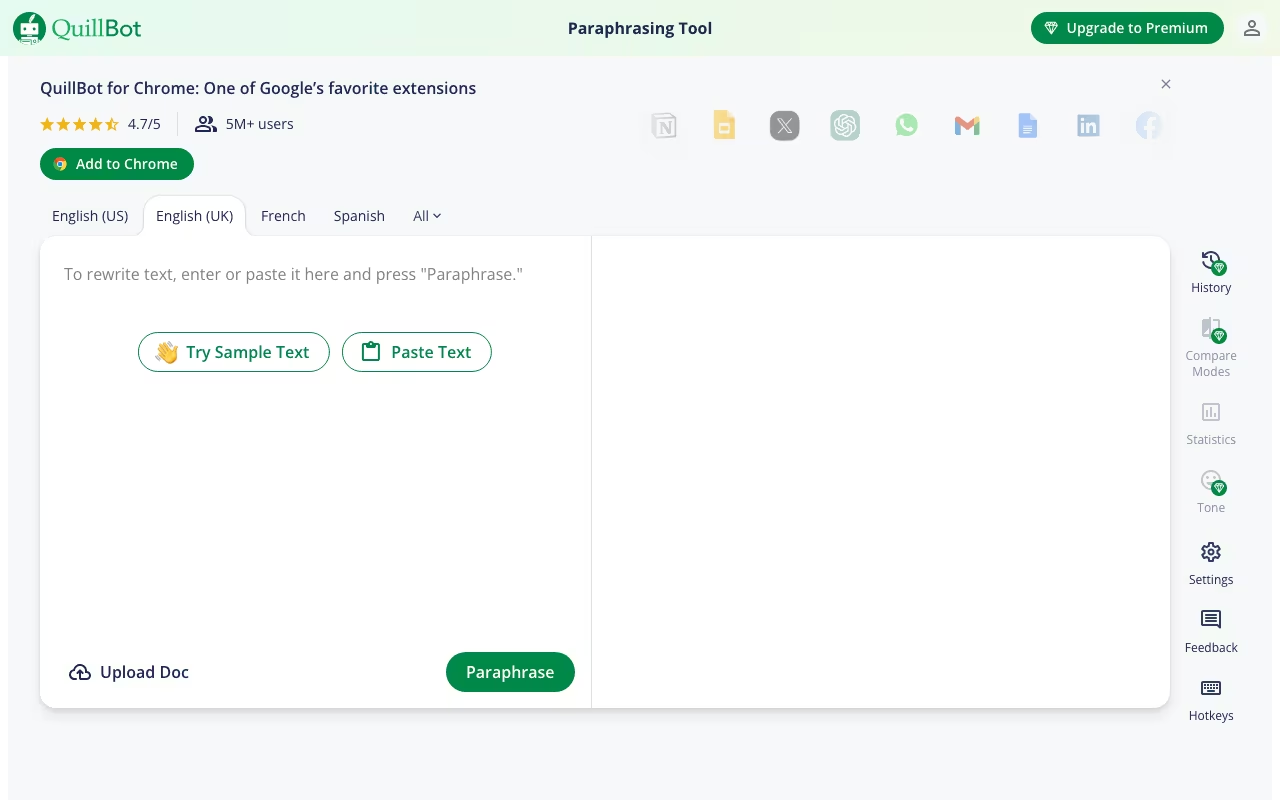
QuillBot's paraphraser rewrites text using nine predefined modes plus unlimited custom modes. The standard modes include:
- Standard: Balanced rewriting that preserves meaning while changing sentence structure and word choice.
- Fluency: Light touch that fixes awkward phrasing while keeping the text close to the original.
- Formal: Elevates casual writing to professional or academic tone.
- Creative: Aggressively rewrites with more variation, sometimes changing meaning in the process.
- Shorten: Condenses text while preserving key points.
- Expand: Adds detail and elaboration to brief text.
- Simple: Simplifies complex language for easier reading.
The free version limits paraphrasing to 125 words at a time (with Standard and Fluency modes only). Premium removes the word limit and unlocks all modes. The paraphrasing quality varies by mode: Standard and Fluency produce consistently good results, Creative mode occasionally generates awkward or meaning-altering output that requires review.
Grammar Checker
QuillBot's grammar checker catches spelling, grammar, and punctuation errors in real time. It supports multiple English dialects (US, UK, Australian) plus German, French, Spanish, and Brazilian Portuguese. The checker handles common errors well: subject-verb agreement, comma usage, tense consistency, and article placement. For basic grammar correction, it is competent and fast.
Where it falls short is on nuanced suggestions. Grammarly's writing assistant offers tone, clarity, engagement, and delivery feedback that QuillBot does not match. If grammar checking is your primary need, Grammarly remains the superior tool. QuillBot's grammar checker is best understood as a solid bonus feature alongside the paraphraser, not a standalone grammar solution.
Plagiarism Checker
The plagiarism checker scans your text against web sources and provides a similarity score with highlighted matches and source links. Premium users get 20 pages per month (approximately 5,000 words per scan). It works well for basic plagiarism detection, catching direct copying and close paraphrases. For academic papers and professional content, it provides reasonable assurance. However, it is not as thorough as Turnitin (the academic standard) and may miss some sources that dedicated plagiarism tools catch.
AI Content Detector
In response to the surge in AI-generated content, QuillBot added an AI detector that analyzes text and estimates the probability of AI authorship. It supports bulk uploads for checking multiple documents at once. The detector is useful as a quick sanity check, but AI detection technology in general remains imperfect. QuillBot's detector catches obvious AI-generated text but can produce inconsistent results on edited or mixed-source content.
Summarizer
The summarizer condenses long text into key points or short paragraphs. You can adjust the summary length with a slider and choose between "Key Sentences" (extractive) and "Paragraph" (abstractive) modes. The free version handles up to 1,200 words; Premium increases this to 6,000 words. For quickly digesting long articles, research papers, or reports, it is genuinely useful and saves significant reading time.
Citation Generator
QuillBot generates citations in APA, MLA, Chicago, and other major formats. You enter a URL, DOI, book title, or other source information, and QuillBot produces a properly formatted citation. For students writing papers with dozens of sources, this feature alone saves hours of manual formatting. The accuracy is generally good, though you should always double-check generated citations against your institution's style guide.
Translator
QuillBot includes a translation tool supporting over 45 languages. It handles basic translation needs competently, though it does not match the accuracy of DeepL or Google Translate for complex or nuanced text. Best used for quick translations of short passages rather than full document translation.
QuillBot Pricing in 2026
QuillBot has four plans plus pay-as-you-go top-ups. Annual billing is the cheapest option. Pricing increased significantly in 2025 (the annual plan doubled from $49.95 to $99.95), so long-time users got a sticker shock, but QuillBot remains ~30% cheaper than Grammarly Premium with paraphrasing tools Grammarly lacks.
| Plan | Price (USD) | Key limits / features | Best for |
|---|---|---|---|
| Free | $0 forever | 125-word paraphrase cap; Standard + Fluency modes only; basic grammar; 1,200-word summarizer; no plagiarism / AI detector | Testing the engine; very light use |
| Premium Annual | $99.95/yr ($8.33/mo) | Unlimited paraphrasing all 9 modes; advanced grammar; plagiarism (20 pages/mo); AI detector; full summarizer; faster processing | Most users committing to year-round writing |
| Premium Semi-Annual | $79.95 / 6mo ($13.33/mo) | Same as Premium Annual, 6-month commitment | Semester users, freelancers on shorter projects |
| Premium Monthly | $19.95/mo | Same features, no commitment | Short-burst projects, testing Premium for a month |
| Student | $74.95/yr ($6.25/mo) | All Premium features at 25% off; verified-student only | College / grad students with .edu email |
| Team | From $7.50/user/mo | Centralized billing, shared style guides, admin controls, priority support | Editorial teams, agencies, education institutions |
There is no free trial of Premium, but QuillBot offers a 3-day money-back guarantee for new subscribers. At $99.95/year, QuillBot Premium is still roughly 30% cheaper than Grammarly Premium ($144/year) while including paraphrasing tools and an AI detector that Grammarly does not have. If you only need grammar checking, Grammarly is still stronger; if you need paraphrasing + grammar + plagiarism + AI detection in one tool, QuillBot is the better deal.
Pros
- Best paraphrasing tool available: Nine modes with nuanced control over how aggressively text is rewritten. No competitor matches the breadth and quality of QuillBot's paraphrasing engine.
- Strong value for the price: At $99.95/year, you get paraphrasing, grammar checking, plagiarism detection, AI detection, summarization, citations, and translation. That is a lot of capability for under $10/month.
- Excellent for students: The combination of paraphrasing, citation generation, plagiarism checking, and the 25% student discount makes QuillBot the best writing tool for academics on a budget.
- Smooth integrations: Browser extensions for Chrome, Firefox, and Edge, plus direct integration with Google Docs and Microsoft Word. You can use QuillBot without leaving your writing environment.
- No account required for basic use: The free paraphraser and grammar checker work without creating an account, making it easy to test the core product.
- Multilingual grammar support: Grammar checking in five languages is useful for non-native speakers and multilingual teams.
Cons
- Free version is severely limited: 125-word paraphrasing limit makes the free tier essentially a demo. You will hit the wall within minutes of normal use.
- Grammar checker is basic compared to Grammarly: QuillBot catches spelling and grammar errors well but lacks Grammarly's clarity, tone, and engagement suggestions. If grammar is your primary concern, Grammarly is the better standalone choice.
- Paraphrasing output requires review: Creative and Expand modes sometimes produce awkward phrasing, altered meaning, or repetitive text. You should never accept QuillBot's output blindly.
- Price doubled in 2025: The annual plan jumping from $49.95 to $99.95 was a significant increase that reduced the platform's value advantage. Still cheaper than Grammarly, but the gap narrowed.
- AI detection is inconsistent: The AI detector produces variable results, sometimes flagging human-written text and missing obvious AI content. Do not rely on it as your sole AI detection tool.
- Plagiarism checker has low limits: 20 pages per month (roughly 5,000 words per scan) is restrictive for heavy users. Academic professionals may need Turnitin or Copyscape alongside QuillBot.
- Requires internet connection: All processing happens server-side, so QuillBot does not work offline. This can be a problem in low-connectivity situations.
Who Should Use QuillBot
Best for: Students who need an affordable writing toolkit with paraphrasing, citations, and plagiarism checking. Content writers and bloggers who regularly rephrase or repurpose existing content. Non-native English speakers who want to improve fluency and clarity. Researchers and academics who need to synthesize information from multiple sources. Budget-conscious writers who want Grammarly-level functionality at a lower price.
Skip it if: You need a premium grammar and style checker (Grammarly is still the gold standard for that specific use case). You work offline frequently (QuillBot requires an internet connection for all features). You need thorough plagiarism detection for professional or institutional use (Turnitin or Copyscape are more thorough). You are looking for an AI writing assistant that generates original content from scratch (ChatGPT, Jasper, or Claude are better suited for that).
Is QuillBot considered plagiarism?
Paraphrasing with QuillBot is not inherently plagiarism, but it can be if you paraphrase someone else's work without proper attribution. The tool rewrites text; the responsibility for ethical use lies with you. Always cite your sources regardless of how much the text has been rewritten. Many academic institutions have policies on AI writing tools, so check your school's guidelines before using QuillBot for assignments.
Can QuillBot bypass AI detectors?
Sometimes, but not reliably. QuillBot's paraphrased output passes AI detectors roughly half the time, depending on the detection tool, the paraphrasing mode used, and the length of text. Using QuillBot specifically to disguise AI-generated content is risky and potentially violates academic integrity policies. The tool is best used for legitimate paraphrasing and writing improvement, not as an AI detection bypass.
How does QuillBot compare to Grammarly?
QuillBot is the better choice for paraphrasing and offers more writing tools per dollar ($99.95/year vs. $144/year for Grammarly). Grammarly is the better choice for pure grammar and style checking, with more nuanced suggestions around tone, clarity, and engagement. Many users subscribe to both: QuillBot for paraphrasing and Grammarly for editing. If you can only pick one, choose based on your primary need: paraphrasing (QuillBot) or grammar/style (Grammarly).
Does QuillBot work with Google Docs?
Yes. QuillBot offers a Google Docs add-on that integrates directly into the editing interface. You can paraphrase selected text, check grammar, and access other QuillBot features without leaving your document. The Chrome extension also works on Google Docs for additional functionality.
Final Verdict
QuillBot is the best writing toolkit for users who need paraphrasing as a core capability. The nine paraphrasing modes, combined with grammar checking, plagiarism detection, summarization, citations, and translation, create a full writing suite at a price well below Grammarly. Students, in particular, get exceptional value with the $74.95/year student plan. The trade-offs are a grammar checker that cannot match Grammarly's depth, a severely limited free tier, and paraphrasing output that sometimes requires manual cleanup. But for the $8.33/month annual price, you are getting a remarkable amount of writing capability. If paraphrasing and affordability are your priorities, QuillBot is the clear winner in its category.
Try QuillBot Free Get started →