Last updated: March 2026
What Is UX Magic?
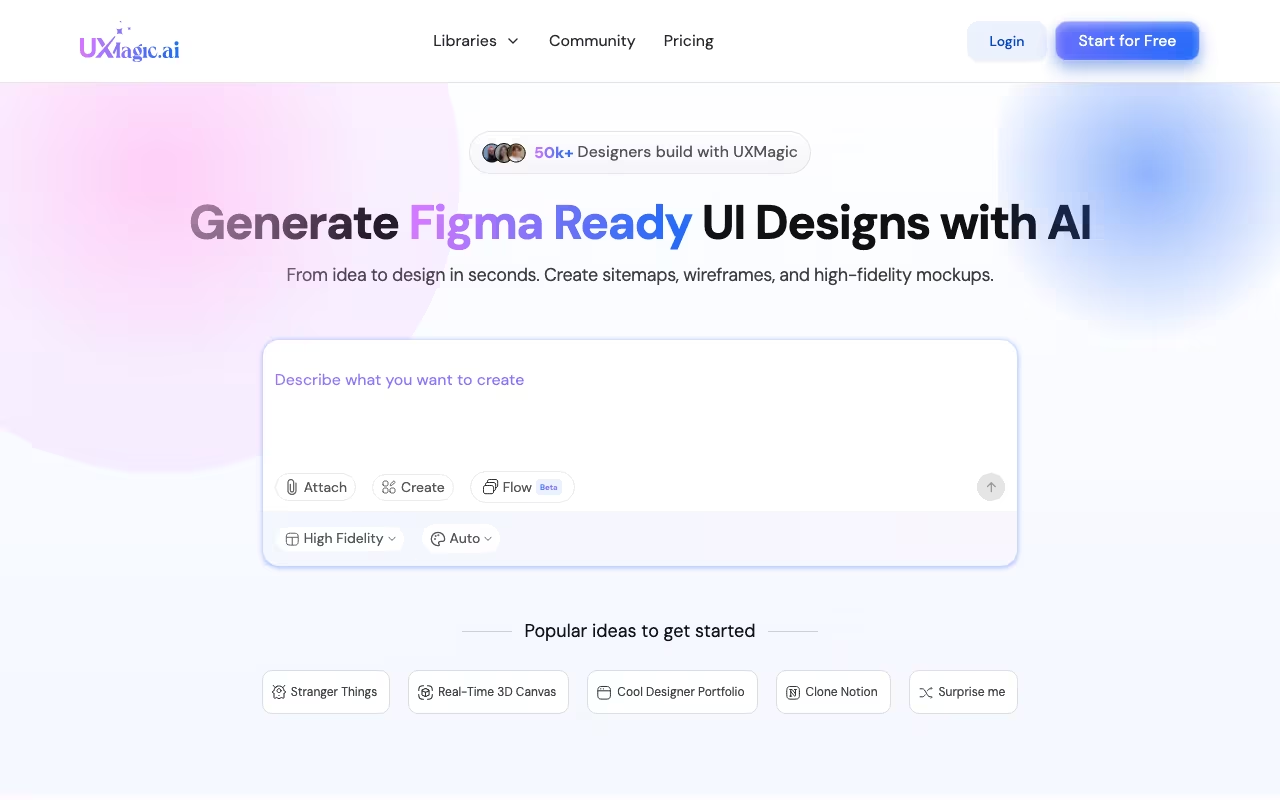
UX Magic is an AI-powered UX/UI design tool that turns text prompts, screenshots, sketches, images, and URLs into complete wireframes, high-fidelity mockups, and production-ready code. Think of it as an AI design partner that handles the initial 80% of design work so you can focus on refining the remaining 20%. You describe what you want in plain language ("a SaaS dashboard with a sidebar nav, analytics cards, and a user table"), and UX Magic generates a multi-page Figma file in seconds with editable components, responsive layouts, and exportable code.
The platform positions itself as the first "vibe UI/UX" design tool, meaning it is built around the idea that you should be able to describe the feel and function of what you want rather than manually constructing every pixel. It integrates deeply with Figma through a plugin and can export finished designs to WordPress, Webflow, Shopify, React, HTML, and Framer. UX Magic launched in 2024 and has been iterating rapidly, adding features like URL cloning, sketch-to-design conversion, and a component library of 1,000+ pre-built elements.
Key Features
Text-to-Design Generation
The core feature. Type a plain-language description of what you want, and UX Magic generates a complete multi-page design. This is not just a single screen. It can produce entire sitemaps with connected pages, navigation flows, and consistent design systems. The quality of output depends heavily on the specificity of your prompt. Vague prompts produce generic results. Detailed prompts with references to specific layouts, color schemes, and content types produce surprisingly usable starting points.
Image and Screenshot Cloning
Upload a screenshot of a competitor's homepage, a design inspiration, or even a hand-drawn sketch, and UX Magic reverse-engineers it into editable Figma components. You can then swap colors, typography, content, and layout while keeping the structural foundation. This is particularly useful for teams that know what they want (because they have seen something similar) but need to create original designs rather than copy.
URL-to-Design Conversion
Paste a URL and UX Magic crawls the page, analyzes the layout and design patterns, and recreates it as editable Figma components. This is faster than screenshotting and cloning because it captures the full page structure, including responsive behavior and component hierarchy.
Code Export
Finished designs can be exported directly to WordPress, Webflow, Shopify, PowerBI, React, HTML, and Framer. The export handles asset optimization and platform-specific requirements, so the output is closer to production-ready than what you would get from a typical design-to-code handoff. This does not eliminate developer involvement, but it significantly reduces the gap between design and implementation.
Figma Integration
UX Magic has a dedicated Figma plugin that lets you generate designs directly within your Figma workspace. Everything appears as native Figma components with proper layers, auto-layout, and naming conventions. You can also use the standalone web app and export to Figma. The integration is deep enough that many users work entirely within Figma, using UX Magic as an accelerator rather than a separate tool.
Component Library
Access to 1,000+ pre-built responsive components across Figma, React, HTML, and Framer formats. These cover common patterns like navigation bars, hero sections, pricing tables, testimonial carousels, and form layouts. Components follow modern design conventions and are fully editable.
Pricing
UX Magic uses a credit-based pricing system:
- Free plan: $0. 30 one-time credits (approximately 5 screens). Good for testing the tool and seeing the quality of output, but the credits do not replenish. Once they are used, you need to upgrade.
- Standard: $25 per month. 480 monthly credits (approximately 80 screens). Includes all core features: text-to-design, image cloning, URL conversion, Figma integration, and code export. This is the plan for individual designers or freelancers.
- Pro: $50 per month. 1,500 monthly credits (approximately 250 screens), unlimited projects, and priority processing. Built for teams or designers working on multiple projects simultaneously.
- Enterprise: Custom pricing. Includes design system sync, SSO integration, dedicated support, and custom model training. Annual billing saves 30% across all paid plans.
The credit system means you pay for what you generate, and unused credits do not roll over. At 480 credits per month on the Standard plan, you are looking at roughly 80 screen generations, which is more than enough for most individual designers. Teams producing high volumes of designs will want the Pro plan for its 1,500 monthly credits.
What We Like
- Speed of initial generation is genuinely impressive. Going from a text prompt to a multi-page Figma file in under 30 seconds fundamentally changes the design workflow. Instead of starting from a blank canvas, you start from a solid foundation and refine.
- Figma integration works well. The plugin works within your existing Figma workflow. Generated designs appear as proper Figma components with auto-layout, not as flattened images. This means you can edit everything natively.
- Screenshot and URL cloning save research time. Instead of manually recreating design patterns you have seen elsewhere, you can clone and modify them. This is a legitimate time saver for competitive analysis and design exploration.
- Code export is more than a gimmick. The HTML, React, and Webflow exports are closer to production-ready than most design-to-code tools produce. Developers still need to review and adjust, but the starting point is solid.
- 1,000+ component library is well-maintained. Having a large library of responsive, editable components means you can mix generated designs with proven patterns quickly.
- The 70% time savings claim is realistic. Multiple users report that UX Magic handles the bulk of initial design work, letting them focus on refinement, user testing, and creative decisions rather than pixel pushing.
What Could Be Better
- Output quality varies with prompt quality. Vague prompts produce generic, template-looking designs. You need to learn how to write detailed, specific prompts to get good results. This is a skill that takes practice.
- Free plan is too limited for real evaluation. 30 one-time credits (5 screens) is barely enough to understand what the tool can do. A more generous trial would help users make informed purchase decisions.
- Credits do not roll over. If you have a slow month and only use 100 of your 480 credits, the remaining 380 are lost. A rollover policy (even partial) would be more user-friendly.
- AI-generated designs still need significant refinement. While the initial output handles layout, spacing, and component placement well, the visual design (typography choices, color harmony, imagery) often needs manual adjustment to look polished and unique.
- Limited design system enforcement. If your team has an existing design system with specific tokens, the generated designs will not automatically adhere to it. You will need to manually update colors, fonts, and spacing to match your system (unless you are on the Enterprise plan with design system sync).
- Relatively new tool with a smaller community. Compared to established design tools, UX Magic has fewer tutorials, templates, and community resources available. You are somewhat on your own for learning advanced techniques.
Who Should Use UX Magic?
UX Magic is ideal for product designers and UX professionals who want to accelerate the early stages of their design process, moving from concept to high-fidelity prototype faster. Freelance designers working on multiple client projects will appreciate the speed and the code export capabilities. Startup founders and product managers who need to visualize ideas quickly without waiting for a designer will find UX Magic surprisingly capable. Agencies that produce high volumes of design work can use it to scale output without proportionally scaling headcount. And developers who need to prototype UI concepts before committing to code will find the text-to-design-to-code pipeline valuable.
Who Should Skip UX Magic?
Designers who primarily work on brand identity, illustration, or highly creative visual design will not find much value here. UX Magic excels at functional UI layouts, not artistic expression. Teams with strict, established design systems that require pixel-perfect adherence to existing tokens should wait for the Enterprise plan's design system sync before adopting. If you need collaborative design features (real-time co-editing, commenting, version history), Figma already handles that, and UX Magic is an accelerator within Figma rather than a replacement for it. And if your design work is primarily for print or non-digital media, this tool is not relevant.
Frequently Asked Questions
Do I need Figma to use UX Magic?
No. UX Magic has a standalone web application where you can generate and edit designs. However, the Figma integration is where the tool is most powerful, since generated designs appear as native Figma components that you can edit with all of Figma's tools. If you do not already use Figma, you can still export to HTML, React, Webflow, and other formats directly from the web app.
Can UX Magic generate mobile app designs?
Yes. You can specify mobile app layouts (iOS, Android, or responsive) in your prompts, and UX Magic will generate designs at the appropriate screen sizes with mobile-specific UI patterns like bottom navigation bars, swipe gestures, and platform-appropriate components.
How does the credit system work?
Credits are consumed each time you generate a design. One screen generation typically uses 5 to 6 credits. Monthly credits refresh at the start of each billing cycle and do not roll over. The Standard plan (480 credits) gives you approximately 80 screen generations per month, and the Pro plan (1,500 credits) gives approximately 250.
Is UX Magic a replacement for a designer?
No. UX Magic accelerates the design process by handling initial generation, but the output still requires a designer's eye for refinement. Think of it as a tool that eliminates the blank-canvas problem and handles the structural heavy lifting, while a human designer adds the creativity, brand consistency, and user experience polish that AI cannot yet replicate.
Our Verdict
UX Magic is one of the most capable AI design tools available in 2026, and it solves a real problem: the time-intensive, repetitive work that fills the early stages of any design project. The text-to-Figma pipeline is genuinely fast, the code export adds practical value for cross-functional teams, and the screenshot/URL cloning features are clever time savers. The limitations are typical of AI design tools at this stage: output quality depends on input quality, generated designs need human refinement, and the credit system could be more flexible. But for designers, product teams, and agencies that want to compress the time between "idea" and "interactive prototype," UX Magic delivers. Start with the free plan to test the quality of output on your specific use cases, then upgrade to Standard or Pro if the speed gains justify the cost.
Try UX Magic free Get started →