
How to Implement Zero Trust: A Practical Guide

Key factsZero Trust adoption guide: discovery, identity, microsegmentation, and common mistakes
- 81% of organizations are actively working on a Zero Trust strategy, with 25% having fully implemented one, per a 2024 ESG report.
- Organizations with mature Zero Trust deployments saved an average of $1.76 million per breach compared to those without, per IBM's 2023 report.
- The average cost of a data breach reached $4.88 million in 2024, according to IBM's 2024 Cost of a Data Breach Report.
- Fewer than 25% of organizations have achieved a mature, fully deployed Zero Trust architecture, according to Forrester.
- The CISA Zero Trust Maturity Model identifies five pillars: identity, devices, networks, applications, and data.
Implementing a Zero Trust strategy isn't just a technical tweak; it's a fundamental shift in how you think about security. You're moving away from the old "castle-and-moat" perimeter model to one that's built around a simple, powerful idea: never trust, always verify. It doesn't matter if an access request comes from a coffee shop or the desk next to the CEO's office--every single user, device, and application has to prove it's legitimate before it gets the keys to anything.
- A 2024 Enterprise Strategy Group (ESG) report found that 81% of organizations are actively working on a Zero Trust strategy, with 25% having fully implemented one.
- Organizations with mature Zero Trust deployments saved an average of $1.76 million per breach compared to those without Zero Trust (IBM Cost of a Data Breach Report 2023).
- The average cost of a data breach reached $4.88 million in 2024, making Zero Trust's cost-reduction benefits more compelling than ever (IBM 2024).
- Despite prioritization, Forrester reports that fewer than 25% of organizations have achieved a mature, fully deployed Zero Trust architecture--revealing a massive execution gap.
Building Your Foundation for Zero Trust
The road to a solid Zero Trust architecture doesn't start with a shopping spree for new security tools. That comes later. The real work begins with a hard look at what you already have, figuring out what's most important to protect, and getting the right people on board for what will be a major cultural and technical change. If you skip this prep work, even the most expensive security stack won't live up to its promise.
Too many teams jump straight into deployment and quickly get bogged down by complexity and pushback. The model itself is no longer a fringe idea; a 2024 report by the Enterprise Strategy Group (ESG) found that 81% of organizations are actively working on a Zero Trust strategy, with 25% having already fully implemented one. It's become a mainstream security imperative, but getting it right depends entirely on a deliberate, methodical start.
Start with Discovery: You Cannot Secure What You Cannot See
Your first real move is a deep-dive discovery phase. The goal here is simple but massive: build a complete inventory of your entire digital world. You need to see everything, because the whole point of Zero Trust is to apply hyper-specific controls to individual resources. If you don't know something exists, you can't protect it. Gartner estimates that 30% of organizations discover previously unknown assets during their first complete inventory--shadow IT, forgotten cloud instances, and rogue IoT devices that represent unprotected attack surfaces.
Your inventory needs to cover a few critical areas:
- Users and Identities: Who's on your network? Think beyond employees to include contractors, partners, and especially those non-human service accounts. Silverfort research shows that service accounts outnumber human accounts by 3-to-1 in most enterprise environments--and they're frequently overlooked in security initiatives.
- Devices: What's connecting? Document every corporate laptop, personal phone (BYOD), server, and IoT gadget you can find. Forescout estimates the average enterprise has 30% more connected devices than IT teams are aware of.
- Applications and Services: What software is everyone using? Map it all out, from modern SaaS apps like Microsoft 365 to that ancient on-prem system everyone's afraid to touch.
- Data Stores: Where is your crown jewel data? Pinpoint every sensitive database, file share, and cloud storage bucket. Varonis research found that 64% of companies have over 1,000 sensitive files accessible to every employee--a critical finding that directly shapes your Zero Trust policies.
Once you have that list of assets, the real fun begins: mapping how they all talk to each other. You need to understand the transaction flows to build smart security policies later on. This process uncovers who needs access to what, from where, and why they need it.
A classic mistake is trying to boil the ocean. Don't get lost trying to map every single connection at once. Instead, identify your most critical assets and focus on the data flows surrounding them. This creates a "protect surface"--a much smaller, more manageable target than your entire attack surface.
"Zero Trust is not a product you buy. It's a strategy you build. The most successful implementations I've seen start not with technology, but with a deep understanding of data flows and business processes. Know what you're protecting and why before you ever configure a policy."
-- John Kindervag, Creator of Zero Trust, Senior Vice President at ON2IT Cybersecurity
Secure Leadership Buy-In and Define Your Scope
Let's be clear: Zero Trust is a business initiative that happens to be driven by security. It takes real budget, collaboration across departments, and a significant change in how people work. That means getting executive buy-in isn't just a nice-to-have; it's a deal-breaker. A Forrester survey found that 62% of failed Zero Trust initiatives cite lack of executive sponsorship as the primary reason for stalling.
When you make your pitch, don't just talk about risk. Frame the conversation around how Zero Trust enables the business to move faster and more securely. Explain how it can:
- Speed up cloud adoption by making it safer to connect to cloud resources. Organizations with Zero Trust report 50% faster cloud migration timelines (Microsoft Security Report 2024).
- Embrace a hybrid workforce by ditching clunky VPNs for smooth, secure remote access. Zscaler data shows that Zero Trust Network Access (ZTNA) reduces remote access latency by an average of 40% compared to traditional VPNs.
- Simplify compliance with granular access controls and rich audit trails. The NIST Zero Trust Architecture standard (SP 800-207) is increasingly referenced in regulatory frameworks, making compliance alignment easier.
Once you have leadership's blessing, pick a small, achievable scope for your first project. A "big bang" rollout is a classic recipe for disaster. Find a high-impact area to serve as a pilot--maybe it's securing remote access for the finance team or locking down a critical application with sensitive PII.
By starting small, you can score an early win, learn some invaluable lessons, and build the momentum you'll need for the broader rollout. For a deeper understanding of how to manage these strategic shifts, you can learn more about robust cybersecurity tools and their implementation. This focused approach ensures your first steps are confident and successful.
Zero Trust Implementation Roadmap Template
Use this phased roadmap to plan your Zero Trust rollout. Adjust timelines based on your organization's size and complexity.
| Phase | Timeline | Key Actions | Success Metrics | Dependencies |
|---|---|---|---|---|
| Phase 1: Discovery | Weeks 1-4 | Complete asset inventory; map data flows; identify protect surfaces; catalog all identities | 100% of critical assets inventoried; top 5 protect surfaces defined | Executive sponsorship; cross-team participation |
| Phase 2: Strategy | Weeks 5-8 | Define Zero Trust policies; gap analysis of current tools; select pilot scope; build business case | Policy framework documented; budget approved; pilot scope defined | Phase 1 findings; leadership buy-in |
| Phase 3: Identity | Weeks 9-16 | Deploy phishing-resistant MFA; implement conditional access; establish device compliance baselines | 100% MFA adoption; conditional access policies active for pilot group | IdP selection/configuration; UEM deployment |
| Phase 4: Pilot | Weeks 17-24 | Enforce Zero Trust policies on pilot group; monitor and tune; collect user feedback | Pilot group secured with zero trust; false positive rate below 5%; user satisfaction above 80% | Phase 3 completion; monitoring tools configured |
| Phase 5: Expand | Months 7-12 | Roll out to additional teams/apps; deploy microsegmentation; integrate SIEM/SOAR | 50%+ of environment under Zero Trust policies; lateral movement incidents near zero | Phase 4 lessons; additional tool procurement |
| Phase 6: Optimize | Months 13-18+ | Full automation; AI-driven analytics; continuous compliance monitoring; maturity assessment | Full coverage; automated policy enforcement; measurable reduction in MTTD/MTTR | Mature telemetry; cross-platform integration |
Tip: Don't skip Phase 1. Organizations that spend adequate time on discovery report 60% fewer policy conflicts during enforcement (Forrester). The foundation determines everything that follows.
Designing Your Zero Trust Architecture
Let's be clear: moving to Zero Trust means tearing up the old security playbook. The traditional "castle-and-moat" model is broken. We can no longer assume that everything inside our network is safe. A modern Zero Trust architecture operates on a simple but powerful premise: assume breach. Every single access request, whether it's from the office or a coffee shop, has to be verified.
This isn't just a minor tweak; it's a fundamental redesign of how we grant access.
The whole system is built around two critical components: the Policy Decision Point (PDP) and the Policy Enforcement Point (PEP). I like to think of the PDP as the "brain." It's constantly analyzing signals--who the user is, the health of their device, their location, the resource they want--to make an intelligent access decision. The PEP is the "muscle" or the gatekeeper. It takes the decision from the PDP and enforces it on the spot, either granting or blocking access. Together, they create a dynamic security posture that adapts in real-time. This architecture is formalized in NIST Special Publication 800-207, which has become the definitive reference for Zero Trust implementations.
Before you even start thinking about the technical architecture, you have to get the foundation right. This means getting leadership on board, discovering what assets you actually have, and defining a clear scope for your initial rollout.
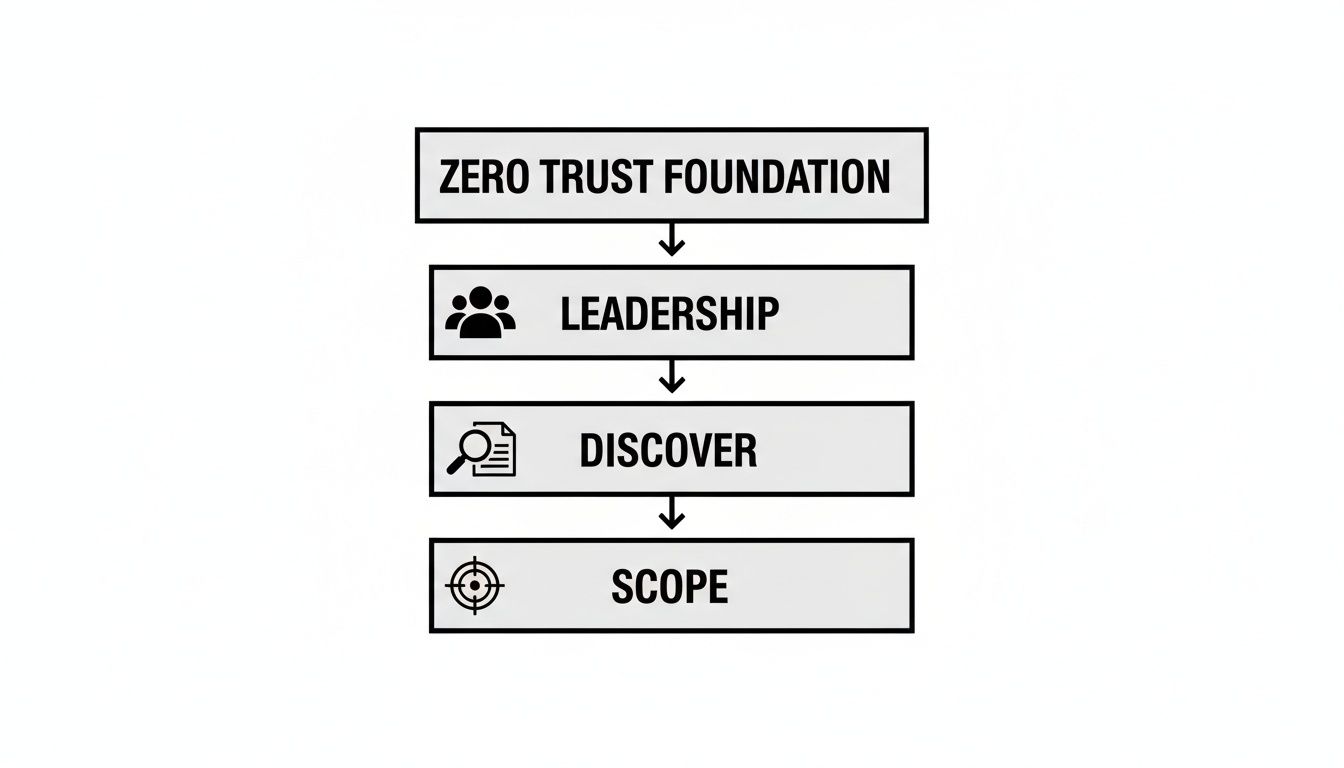
As you can see, the technology part comes after the strategy. Jumping straight to tools without this groundwork is a recipe for failure.
The Core Pillars of Zero Trust
A solid Zero Trust strategy is built on several pillars that all have to work together. If one of these is weak, it puts the entire structure at risk. Attackers are always looking for the path of least resistance. The CISA Zero Trust Maturity Model identifies five pillars, each of which must be addressed for a complete implementation:
Think of these as an integrated system, not a checklist of separate solutions:
- Identity: This is your new perimeter. We need to verify every single user and service account with strong, phishing-resistant Multi-Factor Authentication (MFA). It's not just about passwords anymore. Microsoft reports that MFA blocks 99.9% of account compromise attacks, yet only 37% of organizations have implemented it enterprise-wide (Microsoft Digital Defense Report 2024).
- Devices: Every laptop, server, smartphone, and IoT device is a potential entry point. You must be able to verify its health and compliance status before it gets access to anything. Is it patched? Is security software running? Ponemon Institute research shows that 67% of breaches involve an endpoint that was either unmanaged or non-compliant with security policies.
- Networks: Treat every network--internal and external--as hostile. This is where microsegmentation comes in. By creating small, isolated network zones, you can stop an attacker from moving laterally if they do manage to compromise one area.
- Applications: Access to apps, whether they're legacy systems in your data center or SaaS platforms in the cloud, must be secured. This includes inspecting API traffic and making sure workloads are configured correctly. Salt Security's 2024 API Security Report found that API attacks increased by 400% year-over-year, making application-layer security a critical Zero Trust pillar.
- Data: At the end of the day, it's all about protecting data. You need to classify, label, and encrypt your data everywhere it lives and moves. Access policies should be based on the user's real-time context and the data's sensitivity level.
A huge mistake I see teams make is buying a bunch of disconnected point solutions for each pillar. This "vendor sprawl" just creates complexity and, worse, visibility gaps. Gartner's 2024 research found that organizations with more than 15 security tools actually experienced higher breach rates than those with fewer, better-integrated solutions.
True Zero Trust architecture isn't about buying a specific product. It's about ensuring your existing and future tools can communicate and enforce policy cohesively. An endpoint detection tool should inform identity access decisions, and network traffic analysis should provide context for application security.
Zero Trust Implementation Maturity Levels
Implementing Zero Trust isn't a flip-of-the-switch event; it's a journey. Most organizations move through predictable stages of maturity, from basic controls to a fully adaptive, automated security posture. Understanding these levels can help you benchmark your progress and set realistic goals for your team.
| Maturity Level | Key Characteristics | Primary Focus Areas |
|---|---|---|
| Traditional | Relies on network perimeter security (firewalls, VPNs). Limited internal visibility and trust is implicit. | Perimeter defense, basic access control lists (ACLs). |
| Initial | Starting to implement MFA for critical apps. Basic device inventory and initial network segmentation efforts. | Identity and Access Management (IAM), MFA rollout, asset discovery. |
| Defined | Policies are consistently applied across identity and devices. Microsegmentation is being deployed in key areas. | Endpoint security, conditional access policies, network visibility, initial data classification. |
| Advanced | Rich telemetry from all pillars is used for automated policy decisions. Analytics and threat intelligence are integrated. | Security orchestration and automation (SOAR), API security, workload protection, data loss prevention (DLP). |
| Optimized | Fully automated, context-aware security posture. Continuous monitoring and real-time policy adjustments. | Just-in-time access, AI/ML-driven threat detection, continuous improvement and governance. |
By identifying where you are on this spectrum, you can create a more targeted roadmap. Don't try to jump from Traditional to Optimized overnight. Focus on mastering the basics in the Initial and Defined stages before tackling the more complex automation of the advanced levels. CISA's Zero Trust Maturity Model provides a free, detailed self-assessment tool to help you benchmark your current position across all five pillars.
Mapping Your Tools to Uncover Gaps
Now for a practical exercise. Once you understand the pillars, map your current security stack against them. Make a simple inventory of every tool you use and assign it to its primary pillar. Your Okta or Entra ID goes under Identity. Your CrowdStrike or SentinelOne EDR fits into Devices. Your Palo Alto Networks firewall is part of the Networks pillar.
This process is incredibly eye-opening. You'll immediately see where you have redundant tools and--more importantly--where the critical gaps are. Maybe you have rock-solid identity controls but almost no insight into device health. Or perhaps you have great network firewalls but are completely blind to application-layer threats.
This gap analysis becomes your implementation roadmap. It tells you exactly where to focus your budget and your team's energy. In a complex hosting environment, for example, knowing how Plesk can help manage server environments securely is a key piece of the puzzle for your Application and Data pillars. By methodically closing these gaps, you can build an architecture that's genuinely resilient.
Establishing Identity and Device Trust
Now that the old network perimeter is gone, identity has become your new front line. In a Zero Trust world, every single access request starts with a fundamental question: who is this? But that's only half the battle. You also have to ask, what device are they using, and can I trust it? I've seen it happen time and again--a fully authenticated user on a compromised machine is one of the fastest ways to a major breach.
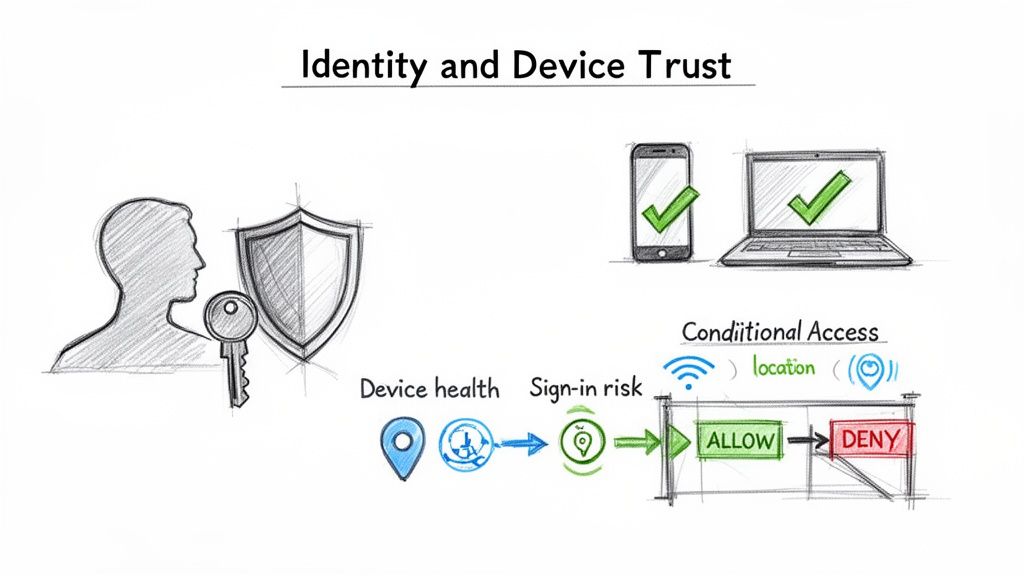
This dual focus on both the person and their device is the absolute cornerstone of any practical Zero Trust plan. It's about moving past static passwords and building a dynamic, context-aware system that constantly validates every connection, every time. Verizon's 2024 DBIR found that stolen credentials were involved in over 50% of breaches, making identity the single most attacked vector in the threat landscape.
Moving Beyond Basic MFA to Frictionless Security
Let's be clear: just flipping the switch on multi-factor authentication (MFA) isn't enough anymore. It's a critical first step, of course, but a clumsy MFA setup just frustrates users and gets in the way of work. The real goal is to make strong authentication practically invisible for your legitimate users while building an impassable wall for attackers.
This is where phishing-resistant MFA comes into the picture. We're talking about methods like FIDO2 security keys (think YubiKey), device biometrics like Windows Hello for Business or Face ID, or certificate-based authentication. These are game-changers because unlike a one-time code sent over SMS, they can't be easily phished or intercepted. Google's internal deployment of FIDO2 security keys resulted in zero successful phishing attacks across all 85,000+ employees since implementation--a compelling proof point for the technology.
The adoption numbers are telling: FIDO Alliance reports that organizations deploying phishing-resistant MFA reduce account takeover attacks by 99.9% compared to password-only authentication, and by 96% compared to SMS-based MFA.
A common misconception is that Zero Trust makes access harder. It doesn't. It makes secure access easier. A well-designed system should challenge users less often but with far greater certainty, using background signals instead of constant password prompts.
Using Conditional Access as Your Gatekeeper
Conditional Access is the brain of the operation, where identity and device trust come together to act as your intelligent gatekeeper. Instead of a blunt "allow" or "deny," it makes smart, granular decisions based on real-time signals. Think of it as a bouncer for your data who checks a lot more than just a simple ID.
Your Conditional Access policies need to weigh a combination of factors before granting access:
- Sign-in Risk: Is this login attempt coming from an anonymous IP? Does it look like part of a password spray attack? Microsoft Entra ID Protection evaluates over 100 signals in real-time for every sign-in event.
- User Location: Is our New York-based engineer suddenly trying to log in from a different continent at 3 AM? Impossible travel detection has prevented millions of credential stuffing attacks according to Microsoft's 2024 security data.
- Device Compliance: Is this a company-managed laptop? Is it encrypted? Is its security software up to date? Non-compliant devices should receive restricted access (e.g., browser-only, no downloads) rather than full network access.
- Application Sensitivity: Sure, let them access the internal wiki. But if they're trying to get into the finance database, we need to trigger a request for phishing-resistant MFA. Tiered sensitivity classifications allow you to balance security with user experience.
This dynamic approach is how you actually put the principle of least privilege into practice. A key part of building this trust is through granular controls, which you can learn more about in this guide to Role Based Access Control (RBAC).
Verifying Every Single Endpoint
You can't have trusted identities without trusted devices. It's that simple. Every single endpoint--from corporate laptops and servers to personal smartphones people use for email (BYOD)--must have its security posture checked before it touches your resources. Absolute Software's 2024 report found that 25% of enterprise endpoints have at least one critical security control that is broken, missing, or out of date at any given time.
Here's how you establish that device trust in practice:
- Device Enrollment: First, every device that accesses company data has to be enrolled in a unified endpoint management (UEM) or mobile device management (MDM) tool. Think Microsoft Intune or Jamf. This step gives you visibility and control.
- Health Attestation: The agent from your UEM/MDM tool then continuously checks the device against your security baseline. It's validating the OS version, patch level, disk encryption, and whether endpoint protection is running. Microsoft Intune processes over 3 billion compliance checks per day across its managed device fleet.
- Policy Enforcement: This health report is fed directly into your Conditional Access policies. If a device falls out of compliance--say, a user turns off their antivirus--its access can be automatically limited or blocked entirely until the problem is fixed.
And what about contractors on their personal computers? For those situations where enrollment isn't an option, you can use virtual desktop infrastructure (VDI) or secure browser solutions to create a managed, compliant session on an otherwise unmanaged machine. It's also smart to look at how secure platforms like Tresorit can add another layer of protection, keeping files encrypted no matter what endpoint is used to access them. You can see how that works here. This layered strategy ensures no device becomes an unchecked backdoor into your environment.
Stopping Lateral Movement with Microsegmentation
Let's be honest: perimeter breaches happen. The real damage, however, starts when an attacker gets inside and starts moving around freely. This lateral movement is what turns a minor intrusion into a front-page data breach. A true Zero Trust model throws out the old idea of a "trusted" internal network, and your most powerful tool for enforcing this is microsegmentation.
Instead of thinking of your network as one big, open-plan office, picture it as a building with countless individually locked rooms. Microsegmentation is how you build those secure, isolated zones around your applications and workloads. If one room is compromised, the attacker is trapped. They can't just wander down the hall and try the next door. This approach shrinks your attack surface in a massive way.
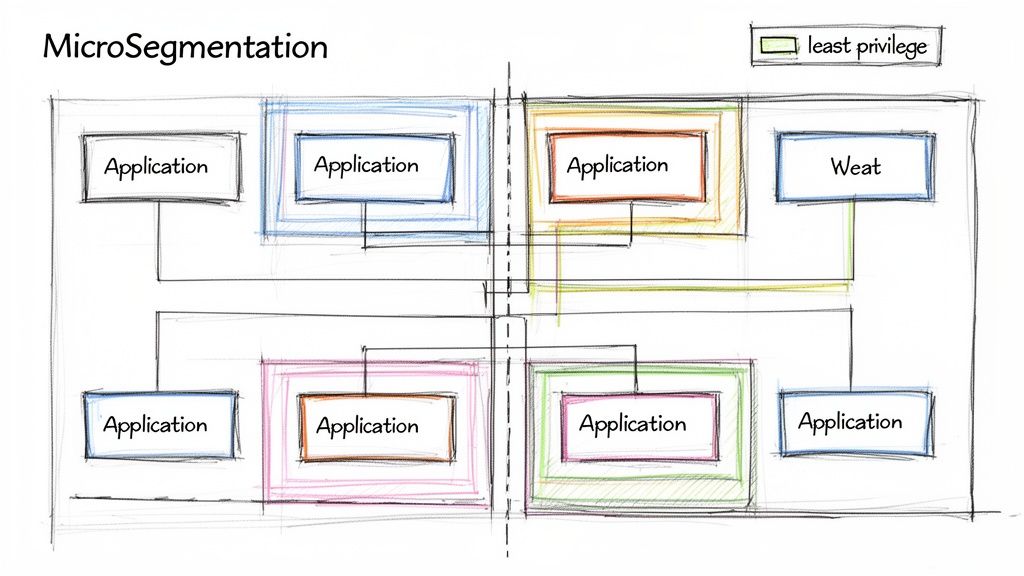
This isn't just theory; it's a core tenet of modern security that's seeing huge adoption. A 2024 report from the Cloud Security Alliance found that 77% of organizations have increased their focus on microsegmentation in the past year. The results speak for themselves, with companies that implement Zero Trust successfully reporting an average $2.01 million reduction in breach costs (IBM). CrowdStrike's 2024 Threat Report found that the average adversary breakout time--how quickly an attacker moves laterally after initial access--dropped to just 62 minutes, making microsegmentation's ability to block lateral movement more critical than ever.
5 Common Mistakes in Zero Trust Implementation
- Thinking Zero Trust is a product you can buy. This is the most pervasive misconception. No single vendor offers a "Zero Trust in a box" solution. Forrester, which coined the term, emphasizes that Zero Trust is a strategy and a framework, not a product category. Organizations that approach it as a vendor purchase rather than a strategic initiative fail 3x more often (Forrester).
- Attempting a "big bang" rollout. Trying to implement Zero Trust across your entire environment at once is a recipe for disaster. It overwhelms IT teams, frustrates users, and almost always stalls. NIST recommends starting with a pilot scope on a single high-value protect surface and expanding iteratively. Organizations using phased rollouts report 71% higher success rates (ESG 2024).
- Ignoring the user experience. If your Zero Trust implementation makes it painful for people to do their jobs, they will find workarounds--and workarounds create security gaps. Measure user satisfaction alongside security metrics. Microsoft's own internal Zero Trust deployment found that user-reported friction dropped by 50% after switching from VPN to ZTNA, proving that better security can also mean a better experience.
- Neglecting non-human identities (service accounts, APIs, machine identities). Most organizations focus MFA and conditional access on human users but forget about service accounts, API keys, and machine-to-machine communications. CyberArk's 2024 Identity Security Threat Landscape Report found that machine identities now outnumber human identities by 45-to-1 in many enterprises. These are prime targets for attackers.
- Failing to instrument adequate monitoring and logging. Zero Trust generates massive amounts of telemetry data--and that's the point. But if you don't have the infrastructure to collect, correlate, and analyze that data, you're flying blind. Gartner recommends that organizations budget 15-20% of their Zero Trust investment specifically for monitoring, analytics, and SIEM/SOAR integration.
Choosing Your Microsegmentation Strategy
When you start looking into microsegmentation, you'll find there are a few ways to get it done. There's no single "best" option--the right choice really comes down to your specific environment, whether it's an on-prem data center, a multi-cloud setup, or a mix of everything.
Agent-Based Segmentation: This is a very common and effective method. You install a lightweight software agent on each server or workload, and that agent enforces security policies right on the host. The big win here is flexibility; it gives you granular control that works the same way everywhere, from your own data center to AWS or Azure. Vendors like Illumio and Akamai Guardicore specialize in this approach. Illumio reports that their agent-based microsegmentation can be deployed and enforcing policies within 24 hours for most environments.
Network-Based Segmentation: This approach relies on the network hardware you already have, like firewalls and switches, to create isolated segments. It can work, but the policies are often tied to network addresses (like IPs), which can become a management headache in dynamic cloud environments where things are constantly changing.
Native Cloud Controls: If you're heavily invested in the cloud, the built-in tools are a great place to start. Think AWS Security Groups or Azure Network Security Groups. They're powerful, integrate perfectly with other cloud services, and are designed for cloud-native workloads. AWS reports that customers using Security Groups in conjunction with VPC endpoints reduce their cloud attack surface by an average of 60%.
From my experience, the most successful strategies usually end up being a hybrid. You might lean on native cloud controls for your public cloud assets while using an agent-based solution in your on-prem data center. This gives you consistent visibility and policy enforcement across your entire estate.
A Practical Roadmap for Implementation
Jumping straight into blocking traffic is a classic mistake and a surefire way to break critical applications. A successful microsegmentation project is methodical. It's all about seeing before you act.
First, you need to map your application dependencies. Before writing a single policy, you have to understand how your applications actually talk to each other. Deploy your chosen segmentation tool in a "monitor-only" or "listen" mode. This lets you gather data and build a detailed map of all the normal traffic flows between workloads. I guarantee you'll uncover some surprising--and probably undocumented--connections. Guardicore research found that the average enterprise discovers 40% more application dependencies than documented during this mapping phase.
Next, it's time to model and test your policies. Using the data from your dependency map, you can start crafting least-privilege rules. The goal is to only allow traffic that is absolutely necessary. For example, your web server should only be allowed to talk to its database on a specific port, and nothing else. Crucially, you must test these policies in a simulated environment first to make sure you don't accidentally disrupt the business.
Finally, you can enforce and continuously monitor. Once you've validated your policies, it's time to flip the switch from monitoring to enforcement. This is where the virtual walls go up. But the job isn't done. Your environment is always evolving, so you have to keep monitoring traffic, adapting policies for new applications, and fine-tuning your rules as you go.
Implementing microsegmentation is a foundational part of building a real Zero Trust architecture. It moves your security controls from the perimeter directly to the workload, ensuring that if a breach does occur, the damage is contained. This is also where tools that simplify secure remote access can play a role in maintaining control. To see how these principles work in a real-world tool, check out our guide on Getscreen.me for more on secure connections.
How to Automate and Monitor Your Zero Trust Environment
Getting your Zero Trust architecture up and running is a huge milestone, but it's not the finish line. Think of it as a living system--it needs constant care and feeding to stay effective. If you just set it and forget it, policies become stale, configurations drift, and you'll find yourself exposed all over again.
This is the operational phase, where the real work of maintaining a strong security posture begins. It's all about gathering the right intelligence from your environment, automating your defenses, and constantly measuring your progress to prove the system is actually working.
Harnessing Complete Telemetry for True Visibility
In a Zero Trust world, you can't act on what you can't see. That's why complete telemetry is non-negotiable. You need to pull in rich, detailed data from every corner of your tech stack to feed your policy engines and threat detection systems. Siloed data is the enemy here. According to Splunk's 2024 State of Security report, organizations with integrated telemetry across all five Zero Trust pillars detect threats 62% faster than those with siloed visibility.
To get that complete picture, you need to be collecting signals from a few critical sources:
- Identity and Access: Keep a close eye on sign-in logs, MFA successes and failures, permission changes, and user risk alerts. This is often the first place you'll spot a compromised account or someone trying to escalate their privileges. Microsoft Entra ID processes over 30 billion authentication requests per day, generating massive telemetry that feeds directly into risk-based access decisions.
- Endpoint Health: Your Endpoint Detection and Response (EDR) tools are a goldmine of information. You need data on device compliance status, which processes are running, any detected malware, and strange network connections coming from a device.
- Network and Application Flows: Monitor all traffic, paying special attention to the east-west traffic flowing between your microsegments. By inspecting API calls and application logs, you can build a baseline of normal behavior and spot anomalies that could signal a breach.
Collecting this data is just the first step. The magic happens when you bring it all together in a Security Information and Event Management (SIEM) platform. When a high-risk identity alert from Entra ID pops up at the same time as a critical EDR alert on that user's machine, your system can automatically connect the dots and raise the alarm. For a deeper look into the tools that aggregate and analyze this kind of data, you might be interested in exploring platforms that specialize in data analytics, such as those found in our guide on ThorData.
Automating Responses with SOAR and AI
There are simply too many alerts for any human team to handle manually. This is where Security Orchestration, Automation, and Response (SOAR) tools become your best friend. SOAR platforms plug into your existing security tools and run automated playbooks when certain conditions are met. Gartner predicts that by 2027, 75% of organizations will use SOAR or equivalent automation capabilities within their security operations, up from less than 30% in 2023.
Let's walk through a real-world scenario:
Stop overpaying for AI tools you barely use. See how Dupple X helps your team adopt AI without the bloat.
Some offers on this page may be paid placements or contain affiliate links.
