
A Practical Guide on How to Learn Coding for Beginners

Key facts4 platforms compared: freeCodeCamp, The Odin Project, Coursera, Codecademy
- 4 platforms compared: freeCodeCamp, The Odin Project, Coursera, Codecademy
- freeCodeCamp (best for: Hands-on, project-based learning from day one): Completely Free (donation-supported)
- The Odin Project (best for: A rigorous, self-paced curriculum focused on web development): Completely Free (donation-supported)
- Coursera (best for: University-level courses with a structured, academic approach): Freemium/Subscription (Coursera Plus is ~$59/month)
- Codecademy (best for: Interactive, in-browser exercises for immediate practice): Freemium/Subscription (Pro plans start at ~$17.49/month)
Jumping into programming can feel like you're learning a new spoken language and a new way of thinking at the same time. There's a ton of jargon, a dizzying number of languages to choose from, and what seems like a hundred different paths you could take. That initial feeling of being overwhelmed? Totally normal. Don't let it stop you.
Key Facts: The State of Coding Education in 2026
- The global programming education market was valued at USD 13.97 billion in 2023 and is projected to surpass USD 61 billion by 2033 (Allied Market Research).
- According to the Bureau of Labor Statistics, software developer employment is projected to grow 25% from 2022 to 2032, far outpacing the average for all occupations.
- The 2023 Stack Overflow Developer Survey found that 80% of developers learned to code using online resources, up from 70% the year prior.
- A 2024 HackerRank report revealed that 65% of hiring managers prioritize demonstrated skills and portfolio projects over formal computer science degrees.
The trick is to start with a solid foundation, not of code, but of purpose. Before you even think about writing that first hello, world, you need to figure out your why. This is the thing you'll hold onto when you inevitably get stuck.
Starting Your Coding Journey With Confidence
Find Your "Why"
Your personal reason for learning to code is the most powerful motivator you have. It's what will get you through the frustrating days when nothing seems to work and keep your eyes on the prize. A vague goal like "I want a tech job" is a start, but getting specific is what really makes a difference.
Think about what actually gets you excited:
- A New Career: Are you looking to make a big career switch? The demand for good developers is still incredibly high, and coding is a very direct route to brand-new opportunities. According to Glassdoor, the average entry-level software developer salary in the US is approximately $78,000 per year, with senior roles exceeding $150,000.
- Building Something Cool: Do you have an idea for an app, a game, or a website that you're dying to create? Some of the most successful products, from Wordle to early Basecamp, were built by people who simply wanted to scratch their own itch.
- Solving a Problem: Maybe you want to automate some boring, repetitive task at your current job or use data to make better decisions. A McKinsey report estimated that 60% of occupations have at least 30% of activities that could be automated with existing technology.
- Just for the Challenge: Or maybe you're just curious and love the idea of picking up a valuable new skill. Computational thinking, the problem-solving mindset that coding teaches, is increasingly valued across every industry.
This simple flowchart breaks down those first crucial steps. It's all about starting with a clear goal in mind.
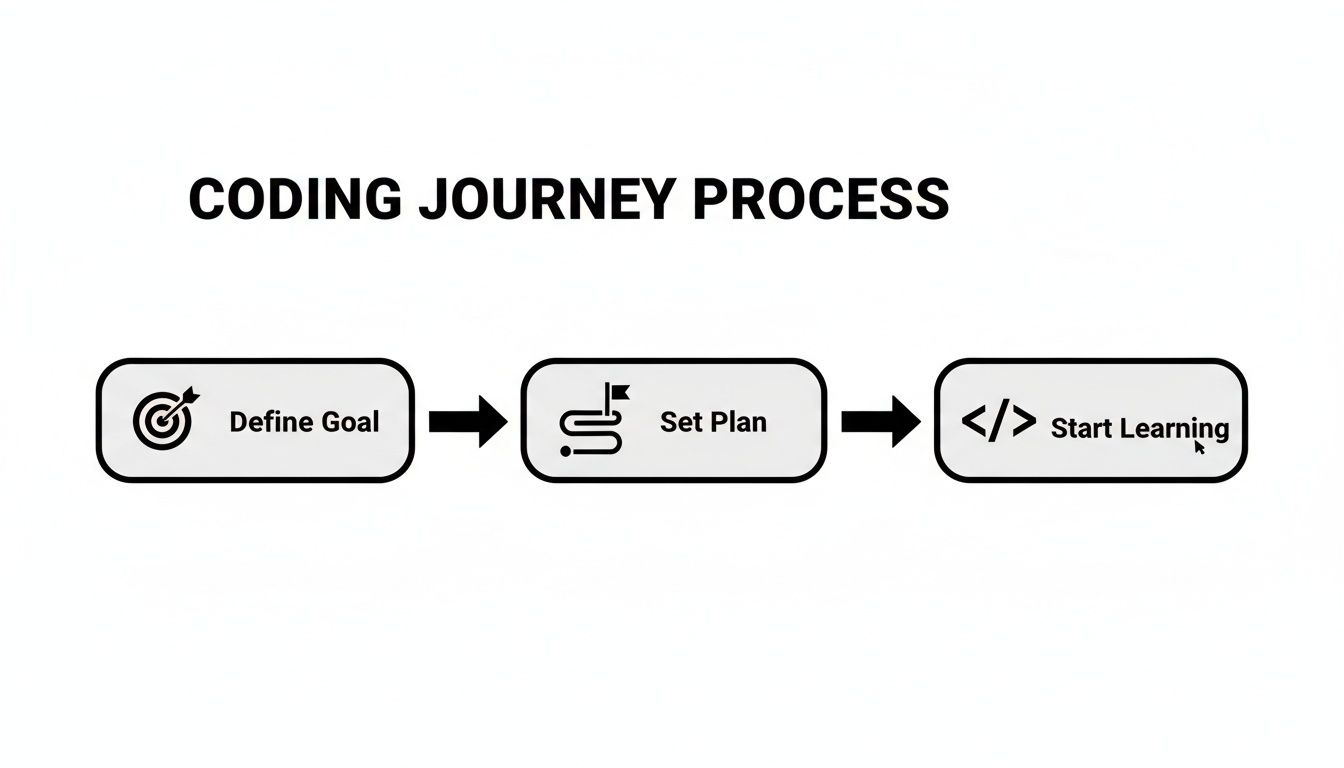
As you can see, the real journey begins before you ever write a line of code. It starts with a clear intention and a bit of planning.
To give you a bird's-eye view of what's ahead, here's a quick summary of the path most people take when learning to code from scratch.
Beginner's Coding Roadmap At A Glance
| Phase | Focus Area | Key Outcome |
|---|---|---|
| 1. Foundation | Goals, Mindset, First Language | A clear reason to learn and the basic tools to start. |
| 2. Core Concepts | Variables, Loops, Functions, Data Structures | The ability to write simple, functional scripts. |
| 3. Practical Skills | Version Control (Git), Debugging | Knowing how to manage code and fix your own mistakes. |
| 4. Project Building | Small, Guided Projects | A portfolio piece that proves you can build something. |
| 5. Specialization | Web Dev, Mobile, Data Science | Deeper knowledge in a specific, marketable area. |
This roadmap isn't set in stone, but it gives you a solid idea of the major milestones you'll hit along the way.
Get Your Mind Right
Learning to code is basically a long series of solving puzzles. You will run into bugs you don't understand. You will struggle with concepts that feel impossible at first. The difference between the people who make it and those who don't is almost always their mindset.
"The best programmers are not the ones who never make mistakes. They're the ones who have made every mistake in the book and learned from each one. Persistence is the only talent that truly matters in software development."
-- John Carmack, legendary programmer and co-founder of id Software
A growth mindset is the belief that you can get better at something through practice and hard work. Nobody is born a "natural" coder. The best programmers are just the most persistent learners. Embrace the challenges, see mistakes as learning opportunities, and remember that "not knowing" is just a temporary state.
The demand for this skill is exploding. The global market for programming education was valued at USD 13.97 billion in 2023 and is projected to grow to over USD 61 billion by 2033. That's a clear signal of just how vital these skills have become.
For more guides and resources to help you along the way, feel free to check out other articles on the Dupple blog.
How To Choose Your First Programming Language

The first real hurdle in learning to code is picking a language. It's a classic case of analysis paralysis. With so many options, each with its own fan club, it's easy to get stuck before you even start.
Here's the secret: stop agonizing over the "best" language and start thinking about what you want to build. Your personal goals are the best compass you have.
Let Your Goal Drive Your Choice
Instead of getting lost in technical debates about which language is faster or more popular, connect your learning to a passion. What gets you excited? Building a slick website? Analyzing data to find hidden patterns? Creating a mobile app?
When you have a concrete goal, learning becomes less of an abstract chore and more of a practical mission. Every new concept has a purpose.
Let's map some common ambitions to the right tools for the job.
- Building Websites & Web Apps: If you dream of creating interactive websites, there's no way around it, you need JavaScript. It's the language that powers the dynamic, engaging web we use every day. According to the 2023 Stack Overflow Survey, JavaScript has been the most commonly used programming language for 11 years running, used by 63.6% of professional developers.
- Data Science & Machine Learning: For anyone drawn to the world of data, AI, and automation, Python is the undisputed champion. Its straightforward syntax and massive collection of specialized libraries make it perfect for crunching numbers and building intelligent systems. Python surpassed Java as the #1 language on the TIOBE Index in 2021 and has held that position ever since.
- Mobile App Development: Want to build an app for the App Store? Swift is Apple's modern, powerful language designed specifically for iOS. For Android development, Kotlin is the industry standard, known for making apps safer and more reliable. Google announced Kotlin as its preferred language for Android development in 2019, and today over 95% of the top 1,000 Android apps use it.
Choosing a language that directly supports your project creates an incredible motivational loop. You learn a new skill, immediately apply it to your goal, and see real progress. That's how you stay engaged.
Programming Language Comparison for Beginners
| Language | Learning Curve | Best Use Cases | Avg. Entry Salary (US) | Job Demand |
|---|---|---|---|---|
| Python | Easy | AI/ML, data science, automation, web backends | $75K-$95K | Very High |
| JavaScript | Moderate | Web apps, front-end, full-stack, mobile (React Native) | $70K-$90K | Very High |
| HTML/CSS | Very Easy | Web page structure and styling | N/A (paired with JS) | Essential skill |
| Swift | Moderate | iOS/macOS apps | $80K-$100K | High |
| Kotlin | Moderate | Android apps, server-side | $78K-$98K | High |
| Java | Steep | Enterprise software, Android (legacy), big data | $75K-$95K | High |
| Rust | Steep | Systems programming, performance-critical apps | $90K-$120K | Growing fast |
The Big Three for Web Development
For a lot of beginners, web development is the most rewarding place to start. The feedback is immediate, you write some code, refresh your browser, and instantly see the results. It's a great feeling.
The three core technologies of the web work together seamlessly.
- HTML (HyperText Markup Language): This is the skeleton of a webpage. It defines the structure and content, like the walls, floors, and rooms of a house.
- CSS (Cascading Style Sheets): This is the interior designer. CSS handles all the visual styling, colors, fonts, spacing, and layout, to make the house look good.
- JavaScript: This is the electricity and plumbing. It makes the house functional and interactive, handling everything from clickable buttons and animations to fetching data from a server.
You'll always begin with HTML and CSS, but JavaScript is where the real "programming" starts. It's an essential, versatile language that runs on every browser, making it a fantastic first pick.
Why Everyone Loves Python
There's a good reason Python consistently tops the charts as one of the most-loved programming languages. It was designed from the ground up to be readable and clean, making its syntax feel much closer to plain English. This dramatically lowers the barrier to entry.
The "Zen of Python," a set of guiding principles for the language, famously states, "Simple is better than complex." This philosophy makes it a phenomenal first language. You can focus on learning fundamental concepts like loops and data types without getting bogged down by confusing syntax.
This focus on clarity isn't just for beginners; it helps professional developers write code that is easier to fix and maintain. If your interests lie in backend development, automating tedious tasks, or data analysis, you can't go wrong starting with Python. For a hands-on look, our guide on how to write a Python script is a great next step.
Ultimately, the best first language is the one that gets you building something you actually care about. Don't waste weeks deliberating. Pick a direction based on what excites you, and jump in. You can always learn a second language later, and trust me, the fundamental concepts you master now will make it so much easier.
Gathering Your Essential Tools and Resources
Alright, you've picked a language. Now it's time to set up your workshop. Learning to code isn't just about absorbing theory; it's about having the right tools to actually build things. Think of it like this: you need a workbench, a system for saving your progress, and a library of good blueprints.
Your Digital Workbench: The Code Editor
Every developer needs a dedicated space to write and manage code. While you could technically use a simple app like Notepad, a proper code editor will make your life infinitely easier. It's software built specifically for programming, with features like syntax highlighting (which colors your code to make it readable), intelligent suggestions, and built-in error checking.
For anyone just starting out, Visual Studio Code (VS Code) is the undisputed king. It's free, incredibly powerful, and has a massive community building extensions for just about anything you can imagine. There's a reason it's the industry standard, the 2023 Stack Overflow survey found that 73.7% of developers use VS Code as their primary editor.
A Safety Net for Your Code: Version Control
Picture this: you've spent hours working on a project, you make one tiny change, and the whole thing breaks. Without a way to go back, you're stuck. That's the nightmare version control was invented to prevent. It's like a time machine for your code, letting you save snapshots of your work so you can always revert to a previous state if something goes wrong.
The two tools you'll hear about constantly are:
- Git: This is the software that lives on your computer and tracks every single change you make. It is used by over 93% of professional developers worldwide (Stack Overflow, 2023).
- GitHub: This is a website where you can store your code projects (called "repositories") online. It's the perfect place to back up your work and, eventually, collaborate with others. GitHub hosts over 420 million repositories and has more than 100 million developers on its platform.
Getting comfortable with the basics of Git and GitHub early is one of the best habits you can form. Professionals rely on it every single day.
Navigating Your Computer: The Command Line
The command line (or "terminal") can look a bit scary at first, it's that black window with blinking text you always see in hacker movies. In reality, it's just a powerful, direct way to talk to your computer. You'll use it for essential tasks like running your code, installing new software packages, and interacting with Git.
You don't need to become a wizard overnight. Just learning a few basic commands will make you a much more efficient and capable developer. It's a fundamental skill that truly separates the hobbyists from the pros.
"The most disqualifying thing I see in junior developer candidates is not a lack of knowledge, it's a lack of curiosity. The ones who thrive are the ones who've built things, broken things, and can walk me through what they learned from the experience."
-- Sarah Drasner, VP of Developer Experience at Netlify
Don't try to master everything at once. Focus on getting your code editor set up, learn the absolute basics of saving a project to GitHub, and just look up command line instructions as you need them. The fastest way to learn these tools is by actually using them.
Finding Your Learning Resources
The right learning platform can make or break your journey. And let's be clear, self-directed online learning is no longer the alternative, it's the norm. The trend is undeniable, with data showing that learning to code from online resources jumped from 70% to 80% between 2022 and 2023, according to the 2023 Stack Overflow Developer Survey.
As you gather your resources, exploring the best online learning platforms is a great way to find high-quality educational content. But with so many options, which one is right for you?
To help you decide, here's a quick comparison of the most popular platforms for beginners.
Top Learning Platforms For Coding Beginners
| Platform | Best For | Pricing Model (as of late 2024) | Key Feature |
|---|---|---|---|
| freeCodeCamp | Hands-on, project-based learning from day one. | Completely Free (donation-supported) | You earn certifications by building real-world projects. |
| The Odin Project | A rigorous, self-paced curriculum focused on web development. | Completely Free (donation-supported) | Forces you to set up a professional development environment. |
| Coursera | University-level courses with a structured, academic approach. | Freemium/Subscription (Coursera Plus is ~$59/month) | Offers certificates from top universities and companies like Google. |
| Codecademy | Interactive, in-browser exercises for immediate practice. | Freemium/Subscription (Pro plans start at ~$17.49/month) | Gamified learning path that makes coding feel less daunting. |
Don't feel like you have to pick just one! A great approach is to mix and match. You could follow The Odin Project's core curriculum, use freeCodeCamp for extra practice projects, and turn to a Coursera course when you want to do a deep dive into a specific computer science topic.
If you want an even more detailed breakdown, you might find our guide on the top tools for modern developers helpful. The goal is to find a combination that clicks with your learning style and, most importantly, keeps you excited to show up and code.
Using AI Tools to Accelerate Your Coding Journey
One of the biggest advantages new coders have in 2026 that previous generations did not is access to powerful AI assistants. Tools like ChatGPT, Claude, and GitHub Copilot are transforming how people learn and write code. Used correctly, they are like having a patient, always-available tutor sitting right next to you. Used incorrectly, they become a crutch that prevents you from actually learning anything.
The key is to use AI as a learning partner, not a code-generation machine. Here is how to do it right, with specific prompts you can copy and use today.
5 Specific AI Prompts for Learning to Code
Prompt 1: Explain a concept like you are talking to a complete beginner
"I'm a complete beginner learning Python. Can you explain what a 'for loop' is using a real-world analogy? Then show me three simple examples, starting with the absolute easiest and gradually increasing in complexity. After each example, explain what every single line does."
Prompt 2: Debug your code and explain the fix
"Here is my JavaScript code that is supposed to [describe what it should do], but instead it [describe the bug]. Can you identify the bug, explain WHY it happens in a way a beginner can understand, and show me the corrected code? Don't just fix it, teach me what went wrong so I can avoid this mistake in the future."
Prompt 3: Generate practice challenges at your level
"I just learned about JavaScript arrays and basic array methods (push, pop, map, filter). Give me 5 mini coding challenges that test these concepts, ordered from easiest to hardest. For each challenge, give me just the problem description, do NOT give me the solution. I want to solve them myself. After I paste my solution, review it and suggest improvements."
Prompt 4: Review your code like a senior developer would
"Act as a senior developer doing a code review. Here is my Python function that [describe what it does]. Review it and tell me: (1) Does it work correctly? (2) What are the potential bugs or edge cases I missed? (3) How could I make it more readable? (4) What would a professional developer do differently? Be specific and constructive."
Prompt 5: Build a project roadmap step by step
"I want to build a simple to-do list web app using HTML, CSS, and JavaScript. I'm a beginner. Break this project into 10-15 small, sequential steps where each step builds on the last. For each step, tell me WHAT to do but not HOW. I want to figure out the code myself. If I get stuck on a step, I will ask you for hints."
The golden rule with AI coding assistants: never paste code you do not understand. If the AI gives you a solution, read every line. If there is something you do not understand, ask it to explain. The moment you start blindly copying AI-generated code is the moment you stop learning.
A 2024 GitHub survey found that developers using Copilot completed tasks 55% faster, but the key insight was that experienced developers benefited most, because they understood enough to verify and adapt the suggestions. As a beginner, your goal is to build that understanding first.
Understanding the Core Concepts of Programming
Here's a common trap for beginners: focusing only on learning a language's syntax. It's like memorizing a dictionary but not knowing how to form a sentence. To truly learn to code, you have to go deeper and grasp the fundamental concepts, the universal rules of logic that are the same in nearly every language.
Think of these concepts as the grammar of programming. Once you understand them, picking up a new language is ten times easier. You're just learning new words for ideas you already know inside and out.
The Essential Building Blocks
At its core, all programming is just about giving a computer very specific, step-by-step instructions. Four concepts form the foundation of almost everything you'll ever build.
- Variables: Think of these as labeled boxes for storing information. You might have a box labeled
userNamethat holds "Alex" or another calleduserAgeholding the number 30. They let your program remember and work with data. - Conditionals (If/Else Statements): These are the decision-makers. They let your program do different things based on whether a condition is true or false. For example, "If the user is logged in, show their dashboard; otherwise, show the login page."
- Loops: Loops are all about efficiency. They let you repeat an action over and over without rewriting the code. Imagine sending an email to 100 subscribers, you write the "send email" instruction once and tell a loop to run it 100 times.
- Functions: A function is a reusable chunk of code that does a specific job. Instead of writing the same steps to figure out a shopping cart's total price repeatedly, you wrap them in a function like
calculateTotalPriceand just "call" it when you need it.
Getting a solid handle on these four elements is your first major milestone. They are the absolute bedrock of programming logic, and you'll see them in every single project.
Beyond the Basics: Algorithms and Data Structures
Once you're comfortable with those basics, you'll start hearing two slightly bigger terms: algorithms and data structures. Don't let the fancy names scare you; the ideas are pretty intuitive.
An algorithm is just a recipe, a set of steps to get something done. You follow algorithms every day, like a recipe for baking a cake. In coding, a sorting algorithm is the recipe an e-commerce site uses for its "Sort by Price: Low to High" feature.
A data structure is just a way of organizing information to make it useful. A simple shopping list is a data structure (in programming, we often call this an array). A more complex one, like a graph, is what a social network uses to map out how you're connected to your friends, and how they're connected to their friends.
"Everyone in this country should learn to program a computer, because it teaches you how to think."
-- Steve Jobs, Co-founder of Apple
Understanding these core ideas is what separates a coder from a developer. A coder can follow instructions, but a developer understands why those instructions work and can invent new solutions to new problems. This is the skill that truly matters.
As you get into these concepts, you'll find it's critical to develop strong problem-solving skills, because that's what debugging and writing good code is all about.
The Real Goal: Problem Solving
At the end of the day, learning to code is really about learning how to think. It's about breaking down huge, messy problems into small, logical pieces that a computer can actually handle.
Every bug you fix and every feature you build is a workout for this mental muscle. Don't just copy and paste code you find on the internet. Take the time to understand why it works. Tweak it, break it, and see what happens. This curious, hands-on approach is how you build real, lasting knowledge and become a programmer who can solve any problem thrown your way.
Building Your First Projects From Scratch
Watching tutorials and doing coding exercises is like running drills in basketball. It's crucial for learning the fundamentals, but the real test, the actual game, starts when you step onto the court. For coders, that means leaving the comfort of guided lessons to build something entirely on your own. This is the moment when knowledge hardens into real, durable skill.
Staring at a blank screen in your code editor for the first time is intimidating. No more step-by-step instructions, no hints. It's just you and the cursor. The secret is to change your goal. You're not trying to build the next Facebook. You're just trying to solve one tiny problem, then the next, and then the next.
From Idea To Actionable Plan
The best way to conquer "blank screen paralysis" is to smash your big idea into ridiculously small, manageable tasks. Let's say you want to build a simple to-do list app. Don't just write "build app" on your list. That's a recipe for overwhelm.
Instead, break it down into the smallest possible functions. This isn't just about making it easier; it's about forcing yourself to think like a developer. You're not just throwing code at a wall, you're planning, architecting, and creating a clear roadmap.
Your first task list might look something like this:
- Create an HTML file with a title and a single input box.
- Add a button right next to that input box.
- Write one CSS rule to make the button look less boring.
- Use JavaScript to see if you can detect a click on that button.
- When clicked, figure out how to grab the text from the input box.
- Make that text appear somewhere else on the page.
See? Each step is a tiny, achievable win. This approach builds momentum and turns a daunting project into a fun series of puzzles. For a deeper look at structuring modern web projects, our overview of different web development tools can offer some valuable perspective.
Starter Projects To Build Your Confidence
The best first projects are simple enough to finish but just tricky enough to stretch your skills. The goal is to create something that actually works, something you can show someone. Here are a few classics that have helped countless developers get their start.
Project Ideas and Key Features
| Project Idea | Core Functionality to Build | Concepts You'll Practice |
|---|---|---|
| Simple To-Do List | Add items, remove items, and mark them as complete. | DOM manipulation, event handling, working with arrays. |
| Basic Weather App | Enter a city name to display its current temperature and conditions. | Making API requests (fetching data), handling JSON, updating the UI. |
| Personal Blog Layout | Create a static, multi-page site with a homepage, about page, and contact form. | HTML structure, CSS layout (Flexbox/Grid), and basic navigation. |
| Calculator App | Perform basic math operations with a visual interface. | Event listeners, functions, conditional logic, state management. |
| Pomodoro Timer | A 25-minute focus timer with start, pause, and reset controls. | setInterval/setTimeout, DOM updates, audio playback. |
Don't get bogged down in making them pretty. A functional but ugly project is infinitely more valuable for your learning than a beautiful design that's only half-built. Seriously. Get it working first.
Embrace The Inevitable Bugs
Your code is going to break. Things will not work the way you expect. This isn't a sign that you're a bad coder, it's the most critical part of the entire learning process. Debugging is where you go from just knowing what code to write to understanding why it works.
When you hit a wall, fight the urge to immediately Google for a copy-paste solution. Instead, practice the art of investigation. Read the error message, really read it. Use console.log() to peek at your variables at different points in your code. Try explaining the problem out loud to yourself (or a rubber duck). This process builds the problem-solving muscle that separates hobbyists from professionals.
And please, use Git and GitHub to track your progress. Commit your code after every tiny feature you successfully add. This creates a safety net, letting you rewind to a working version if you accidentally break everything. It's a professional habit that will save you from a world of pain. Building your own projects, bugs and all, is the single most effective way to go from someone who knows syntax to a developer who can solve real problems.
5 Common Mistakes Beginners Make (And How to Avoid Them)
Mistake 1: Trying to learn multiple languages at once.
This is the coding equivalent of trying to learn French, Mandarin, and Arabic simultaneously. You will confuse syntax, mix up conventions, and make painfully slow progress in all of them. Fix: Pick ONE language. Stick with it for at least 3-4 months. Once you are comfortable building things in it, adding a second language becomes dramatically easier because you already understand the underlying concepts.
Mistake 2: Spending too long in "tutorial hell."
Following along with tutorials feels productive, but it is often an illusion of learning. You are essentially copying what someone else is doing. The 2024 freeCodeCamp survey found that 73% of self-taught developers reported getting stuck in tutorial hell for 3 months or longer. Fix: For every tutorial you complete, immediately build something similar but different, entirely on your own, without looking at the tutorial. If the tutorial taught you to build a to-do list, build a grocery list or a bookmark manager.
Mistake 3: Not reading error messages.
When your code throws an error, most beginners panic or immediately copy the error into Google. The error message is actually your best friend, it tells you exactly what went wrong and usually points you to the exact line of code. Fix: Train yourself to read the error message slowly, line by line. Most error messages contain the file name, the line number, and a description of the problem. Learning to read them will save you hours of frustration.
Mistake 4: Skipping version control (Git).
Many beginners think Git is "too advanced" or "something I will learn later." Then they accidentally delete or overwrite hours of work with no way to recover. Fix: Learn just three Git commands on day one: git add, git commit, and git push. That is enough to save your work. You can learn branching and merging later. The peace of mind alone is worth the 30 minutes it takes to set up.
Mistake 5: Comparing your progress to others.
Social media is full of people claiming they went from zero to six-figure developer in 3 months. These stories are the exception, not the rule, and they leave out the 12-hour days, the prior experience, or the burnout that followed. Fix: Compare yourself only to where you were last week. Are you better than you were 7 days ago? That is the only metric that matters. Keep a learning journal and review it monthly, you will be surprised at how far you have come.
Some offers on this page may be paid placements or contain affiliate links.
